Best WordPress Plugins for SEO: 11 Free Ones Tested (2026)

Updated
Part of the guide: WordPress SEO guides and plugin comparisons
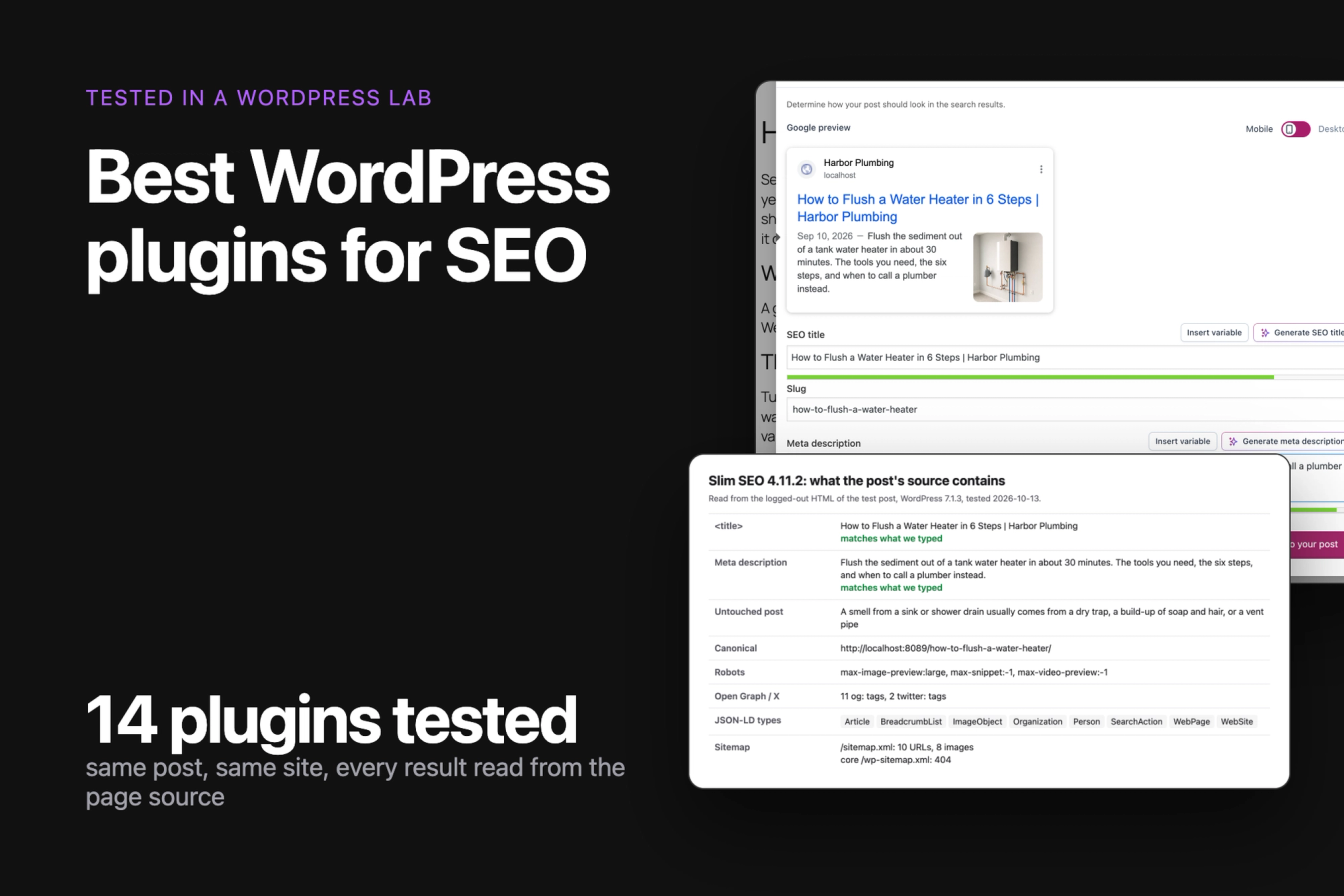
The best WordPress plugins for SEO set your titles and meta descriptions, print schema markup, build an XML sitemap and keep old links working. We installed 14 free SEO plugins in a WordPress lab, gave each one the same site and the same post, and read what each printed into the page source for Google.
Best overall by our scorecard: Slim SEO, which passed all 9 measured checks, with no setup wizard, no new database tables and 0.6 KB of autoloaded settings. Runner-up: SureRank (8 of 9). Most installed, with exact output and Article plus breadcrumb schema: Yoast SEO (6 of 9). For redirects and a 404 log: Redirection. For many landing pages from one template and a spreadsheet: LPagery, next to any of them.
Last tested 13 October 2026 on WordPress 7.1.3. We make LPagery, one of the specialist plugins on this list. We are not affiliated with any other plugin here, and nobody paid to be included.
Plugin | Best for | Checks passed | Steps to set title and description | Schema types on a post (free) | Sitemap URLs | Active installs |
|---|---|---|---|---|---|---|
Slim SEO | Best overall by our checks | 9 of 9 | 5 | 8 | 10 | 70k+ |
SureRank | Runner-up, small footprint | 8 of 9 | 6 | 8 | 10 | 300k+ |
All in One SEO | Guided checklists | 7 of 9 | 6 | 7 | 10 | 2M+ |
Yoast SEO | Most installed, exact output | 6 of 9 | 8 | 7 | 11 | 10M+ |
SiteSEO | A tabbed editor panel | 6 of 9 | 6 | 2 | 11 | 500k+ |
The SEO Framework | Automatic defaults | 6 of 9 | 5 | 6 | 8 | 200k+ |
Rank Math | Automatic descriptions and editor score | 5 of 9 | 9 | 6 | 10 | 4M+ |
SEOPress | Least extra HTML | 5 of 9 | 6 | 0 | 11 | 300k+ |
Redirection | Redirects and a 404 log | n/a | n/a | n/a | n/a | 2M+ |
Schema & Structured Data for WP & AMP | Schema types the others lack | n/a | n/a | +1 (HowTo) | n/a | 100k+ |
LPagery | Many landing pages from one sheet | n/a | n/a | n/a | +20 pages | 3k+ |
Schema types count the distinct JSON-LD types in the post's source, helper types left out. All eight all-in-one plugins loaded no CSS or JavaScript file for logged-out visitors on our test post.
What WordPress already does for SEO without a plugin
Before any plugin, we read the same post on a bare WordPress 7.1.3. Core already printed a <title> ("How to Flush a Water Heater – Harbor Plumbing"), a canonical link, a robots tag with max-image-preview:large, and a sitemap at /wp-sitemap.xml with 11 URLs. When we renamed a page's slug, the old URL answered with a 301 redirect to the new one, and WordPress now ships a Breadcrumbs block of its own.
What core does not print: a meta description, Open Graph tags for link previews, and any JSON-LD schema. Those three, plus control over each title, are what an SEO plugin adds. Search engines can still write a snippet without a meta description, so the plugin is a convenience for snippets and a necessity for schema and social previews.
How we tested
Jonas Lindemann from the LPagery team ran every test in our WordPress lab on 13 October 2026. We installed 14 free plugins from WordPress.org at their current versions and listed 11.
The lab runs WordPress 7.1.3 with the Twenty Twenty-Five theme on Apache in Docker. The test site is a plumbing company with a service page, three blog posts with featured images in one category, and a link to a page that does not exist. Each plugin ran alone on a fresh copy of that site.
Every all-in-one SEO plugin got the same task, done through its own screens the way a reader would do it:
- Activate it on the Plugins screen and get past whatever opens: a welcome screen, a setup wizard or an account prompt. We skipped the wizards, so every plugin was tested on its defaults.
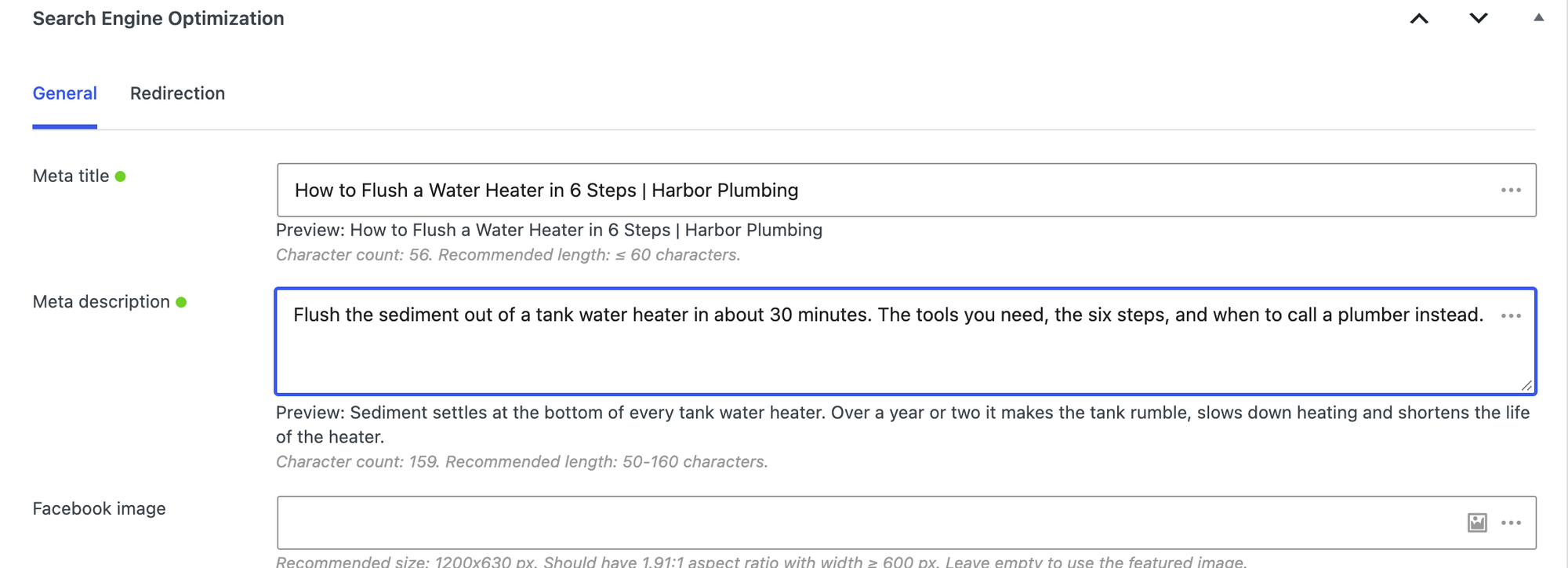
- Open the post "How to Flush a Water Heater" in the block editor and give it the SEO title "How to Flush a Water Heater in 6 Steps | Harbor Plumbing" and a 137-character meta description, then save.
- Rename the service page's slug.
Then a script read the logged-out page source and recorded:
- whether the
<title>and meta description match what we typed, and what a post nobody edited gets as its description - canonical, robots, Open Graph and X (Twitter) tags
- every JSON-LD
@typeon the post and on the home page - the sitemap the plugin announces in robots.txt, how many URLs and image entries it lists, and what happens to the core sitemap
- the HTML and files the plugin adds to the page, and the median server time of 20 requests
- the database tables the plugin creates and the settings it adds to the options WordPress loads on every request
We counted clicks and screens from activation to a saved title and description. The lab is local, so server times compare plugins with each other and say little about your host. The specialist plugins each got their own job, described in their sections.
The all-in-one SEO plugins
Use one of these per site. They overlap almost entirely, so the differences come down to what they print by default, what the free version leaves out and how heavy they are.
Scorecard: how we ranked them
Each plugin gets one point per check it passed in the lab, out of 9. The list below follows this score; plugins with the same score are ordered by active installs. Server time is left out of the score because other lab jobs shared the machine during the runs, and it is reported in each section instead.
Check | Slim SEO | SureRank | All in One SEO | Yoast SEO | SiteSEO | The SEO Framework | Rank Math | SEOPress |
|---|---|---|---|---|---|---|---|---|
Title and description exactly as typed | yes | yes | yes | yes | yes | no | yes | yes |
Writes a description for posts you have not edited | yes | yes | yes | no | yes | yes | yes | yes |
Article or BlogPosting schema on the post | yes | yes | yes | yes | no | no | yes | no |
BreadcrumbList schema on the post | yes | yes | yes | yes | no | yes | no | no |
Image entries in the sitemap | yes | yes | no | yes | yes | no | yes | yes |
Breadcrumb block or shortcode of its own | yes | no | yes | yes | no | yes | yes | no |
No account or sign-up screen on activation | yes | yes | yes | yes | yes | yes | no | yes |
6 steps or fewer to a saved title and description | yes | yes | yes | no | yes | yes | no | yes |
No new database tables | yes | yes | no | no | yes | yes | no | no |
Checks passed | 9 | 8 | 7 | 6 | 6 | 6 | 5 | 5 |
From us: LPagery
If you need many landing pages, one per city or service, LPagery creates them from one template page and a spreadsheet, and your SEO plugin fills each page's title and description. In our test it published 20 pages from a CSV with 20 unique titles and meta descriptions in Yoast SEO. We make LPagery, so it is not ranked against the SEO plugins below; it is a different kind of tool, tested in its own section (#11). See LPagery's bulk page generator.
1. Slim SEO
Slim SEO is our best overall pick: it passed all 9 checks in the scorecard and is the lightest full SEO plugin in the test, for sites that want the essentials on by default and nothing to configure.
Activation opened the plugin's settings page, and there was nothing we had to answer. Under the post, a Search Engine Optimization box has Meta title and Meta description fields with a character count. That made 5 steps, the fewest in the test, tied with The SEO Framework.
The output matched what we typed, and the untouched post got a description from its first paragraph. The post's JSON-LD included Article, the author, the image and a BreadcrumbList (Article, BreadcrumbList, ImageObject, Organization, Person, SearchAction, WebPage, WebSite), and the sitemap at /sitemap.xml with 10 URLs and 8 images. It created no database tables and added 0.6 KB of autoloaded settings, the smallest footprint we measured.
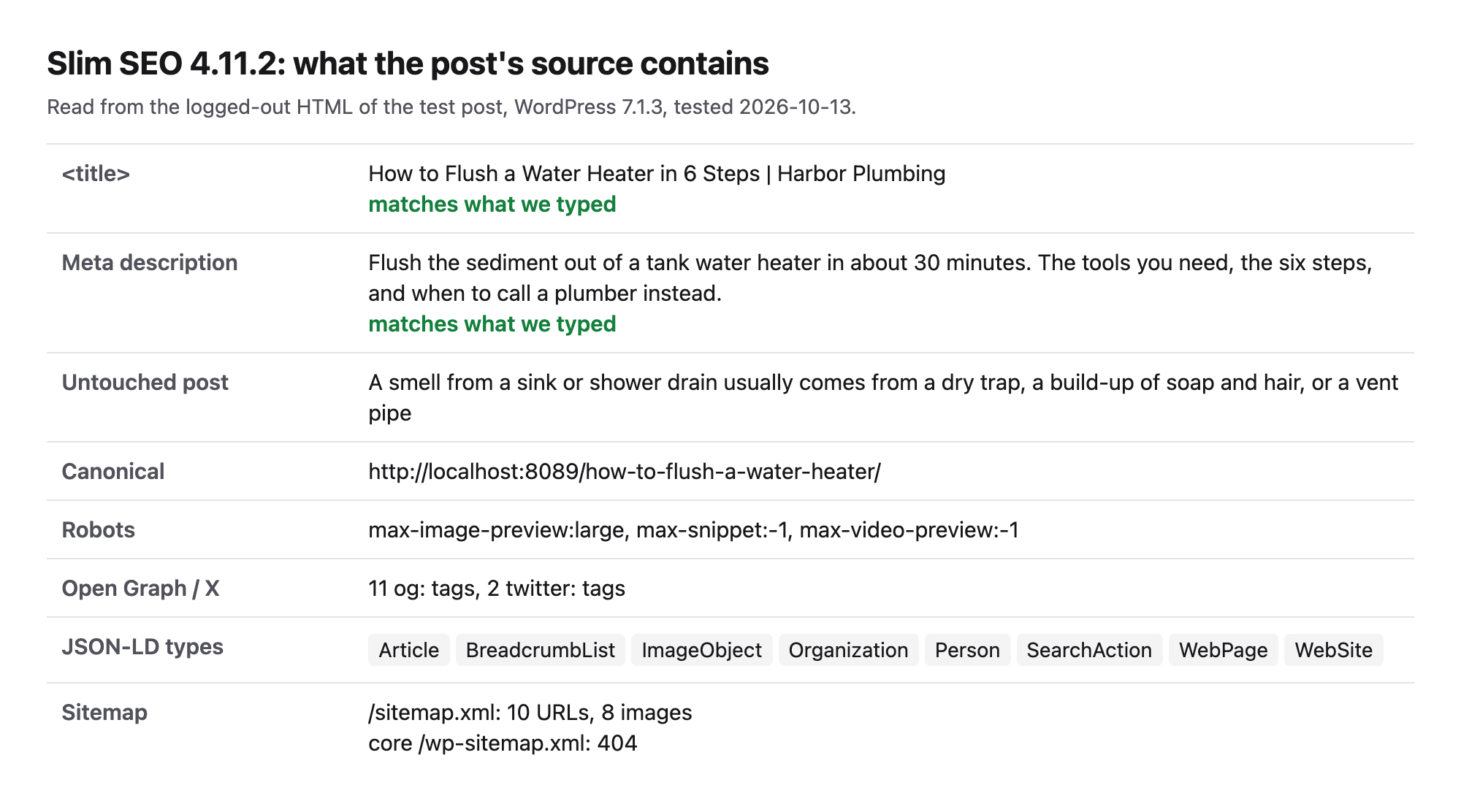
- Steps from activation to a saved title and description: 5.
- Title and description on the page: both exactly as typed. A post nobody edited got a description taken from its first paragraph.
- JSON-LD on the post: Article, BreadcrumbList, ImageObject, Organization, Person, SearchAction, WebPage, WebSite.
- Sitemap:
/sitemap.xmlwith 10 URLs and 8 images. - Added 4.8 KB of HTML to the post and no CSS or JavaScript files. Median server time 30.0 ms.
- Database: 0 new tables, 0.6 KB of autoloaded settings.
- Breadcrumbs: a breadcrumb block and the
[slim_seo_breadcrumbs]shortcode.
Pros
- 5 steps and no wizard or account screen on the way.
- Article and BreadcrumbList schema, automatic descriptions and a sitemap with images, all on by default.
- No new tables and the smallest settings footprint in the test.
Cons
- Few settings to change the defaults, by design.
- Smaller install base (70k+ active installs), so fewer tutorials and answers online.
- The schema builder, link reports and writing assistant are Pro.
Slim SEO Pro costs $59 a year for one site, read on wpslimseo.com on 13 October 2026. It adds a visual schema builder, link reports, bulk link updates and a writing assistant.
Slim SEO on WordPress.org and Slim SEO's own site.
2. SureRank
SureRank is a newer SEO plugin with a clean editor panel and a small footprint, for readers who want a sidebar panel and few prompts.
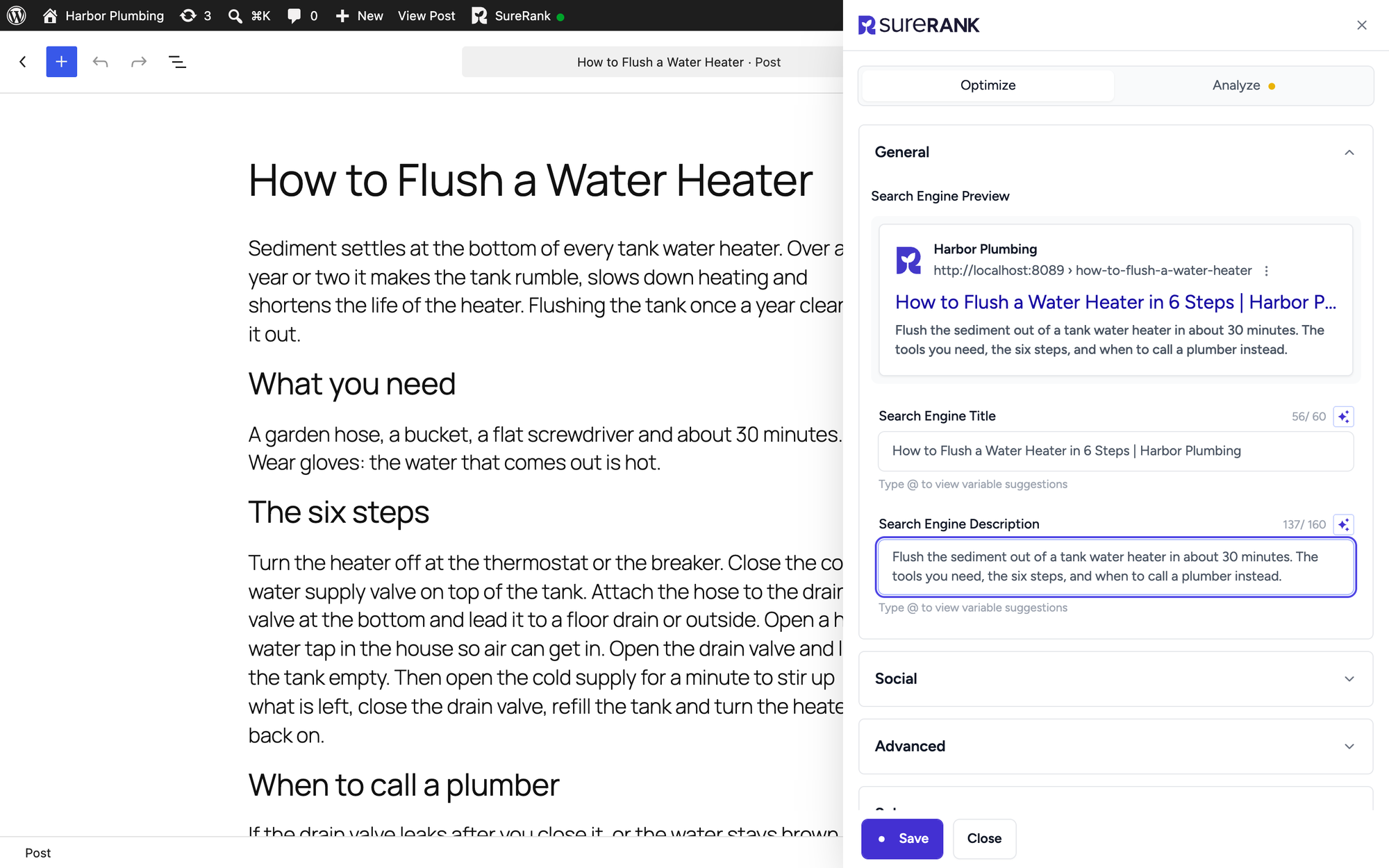
Activation opened a guided setup with Let's Get Started and Exit Guided Setup; we exited. In the editor, a toolbar button opens the SureRank panel with Search Engine Title and Search Engine Description fields and its own Save button. That made 6 steps.
Title and description matched, the untouched post got an automatic description, and the post's JSON-LD included Article and a BreadcrumbList (Article, BreadcrumbList, Organization, Person, SearchAction, WebPage, WebPageElement, WebSite). The sitemap at /sitemap_index.xml with 10 URLs and 7 images replaced the core one. SureRank created no tables and added 1.7 KB of autoloaded settings.
- Steps from activation to a saved title and description: 6.
- Title and description on the page: both exactly as typed. A post nobody edited got a description taken from its first paragraph.
- JSON-LD on the post: Article, BreadcrumbList, Organization, Person, SearchAction, WebPage, WebPageElement, WebSite.
- Sitemap:
/sitemap_index.xmlwith 10 URLs and 7 images. - Added 5.0 KB of HTML to the post and no CSS or JavaScript files. Median server time 36.2 ms.
- Database: 0 new tables, 1.7 KB of autoloaded settings.
- Breadcrumbs: no block or shortcode of its own.
Pros
- Article schema, automatic descriptions and an image sitemap in the free version.
- No new database tables, small settings footprint.
- The panel shows a live search preview and character counts.
Cons
- No breadcrumb block or shortcode of its own in the free version.
- New on WordPress.org: 48 ratings so far, against thousands for the older plugins.
- The guided setup opens on activation.
SureRank Pro costs $99 a year for 10 sites at an introductory price, read on surerank.com on 13 October 2026; renewals are at full price. It adds a site audit, Search Console insights, a redirection manager and a schema builder.
SureRank on WordPress.org and SureRank's own site.
3. All in One SEO
All in One SEO, the plugin many still search for as All in One SEO Pack, suits readers who like checklists and scores, if they accept the heaviest footprint in the test.
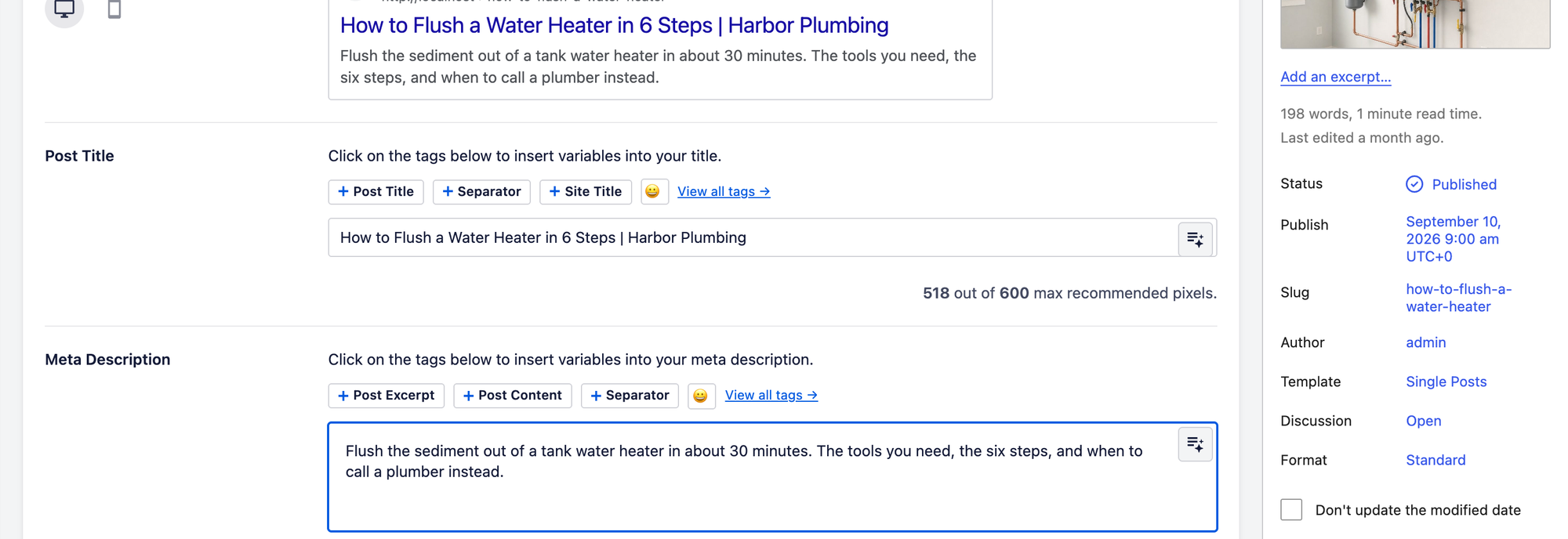
Activation opened the AIOSEO Setup Wizard; we went back to the dashboard. Under the post, the AIOSEO Settings box has Post Title and Meta Description editors with buttons for variables, and the toolbar shows a TruSEO score. That made 6 steps.
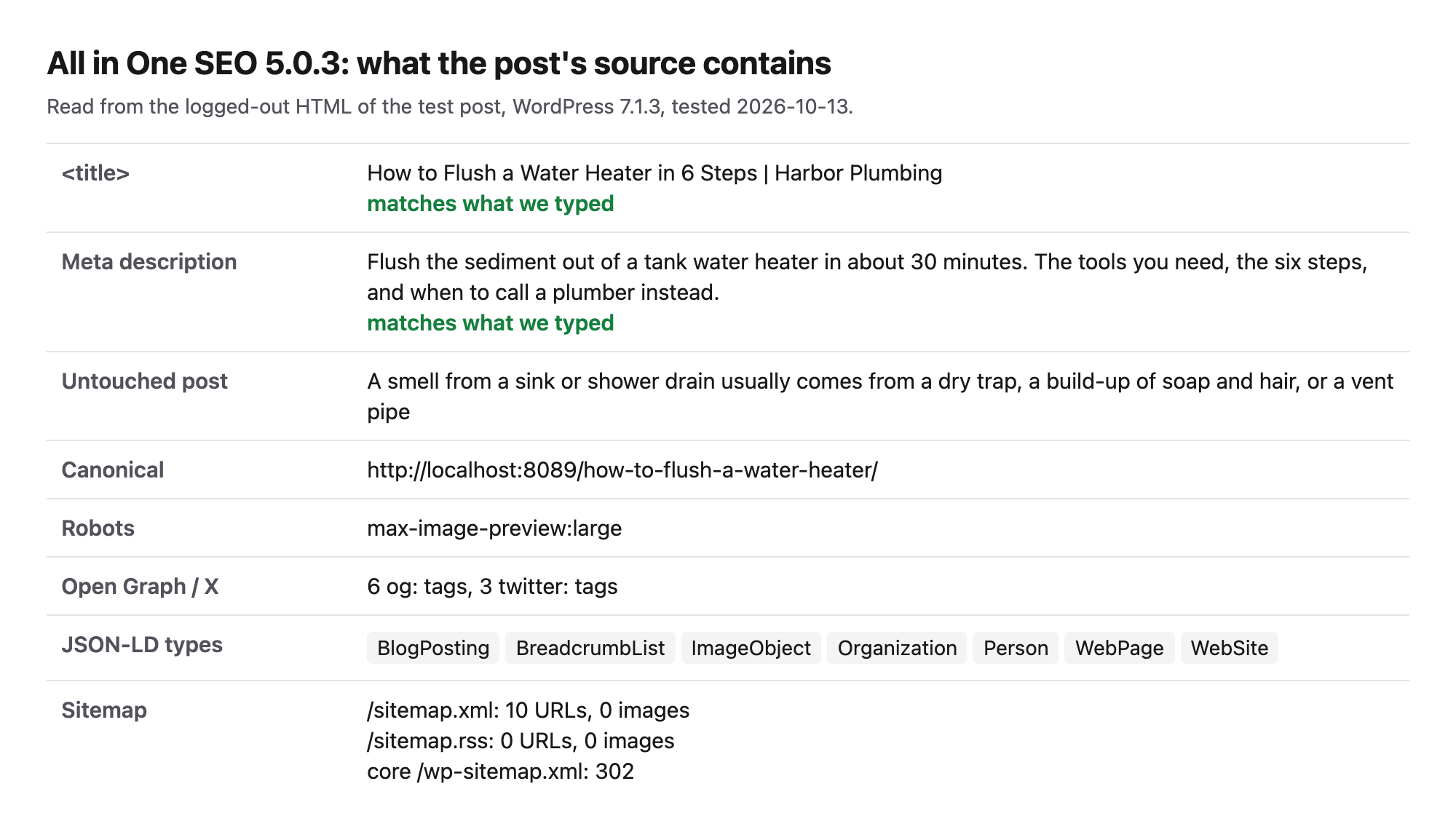
Title and description matched, the untouched post got an automatic description, and the post's JSON-LD marked it as a BlogPosting with breadcrumbs (BlogPosting, BreadcrumbList, ImageObject, Organization, Person, WebPage, WebSite). The sitemap at /sitemap.xml with 10 URLs, no image entries replaced the core sitemap and AIOSEO added an RSS sitemap too. AIOSEO created 13 database tables and its median server time was 85.0 ms, more than twice the 29.7 to 38.4 ms of the others. Other lab jobs shared the machine during the runs, so gaps of a few milliseconds are noise; this one is larger than that.
- Steps from activation to a saved title and description: 6.
- Title and description on the page: both exactly as typed. A post nobody edited got a description taken from its first paragraph.
- JSON-LD on the post: BlogPosting, BreadcrumbList, ImageObject, Organization, Person, WebPage, WebSite.
- Sitemap:
/sitemap.xmlwith 10 URLs, no image entries. - Added 5.4 KB of HTML to the post and no CSS or JavaScript files. Median server time 85.0 ms.
- Database: 13 new tables, 15.3 KB of autoloaded settings.
- Breadcrumbs: a breadcrumb block and the
[aioseo_breadcrumbs]shortcode.
Pros
- BlogPosting and BreadcrumbList schema, automatic descriptions and a breadcrumb block in free.
- TruSEO score and checklist in the editor.
- Variables for titles are one click away.
Cons
- 13 new database tables and the slowest server time in our test.
- A setup wizard opens on activation.
- Redirect monitoring and automatic redirects are on the paid plans, per aioseo.com.
All in One SEO Basic costs $49.50 for the first year for one site and renews at $99, read on aioseo.com on 13 October 2026. Paid plans add redirect monitoring, automatic redirects, more TruSEO keywords and schema types.
All in One SEO on WordPress.org and All in One SEO's own site.
4. Yoast SEO
Yoast SEO is the most installed SEO plugin, and in our test it printed exactly what we typed, a connected Article, author, image and breadcrumb schema graph and a sitemap with image entries, with no account needed.
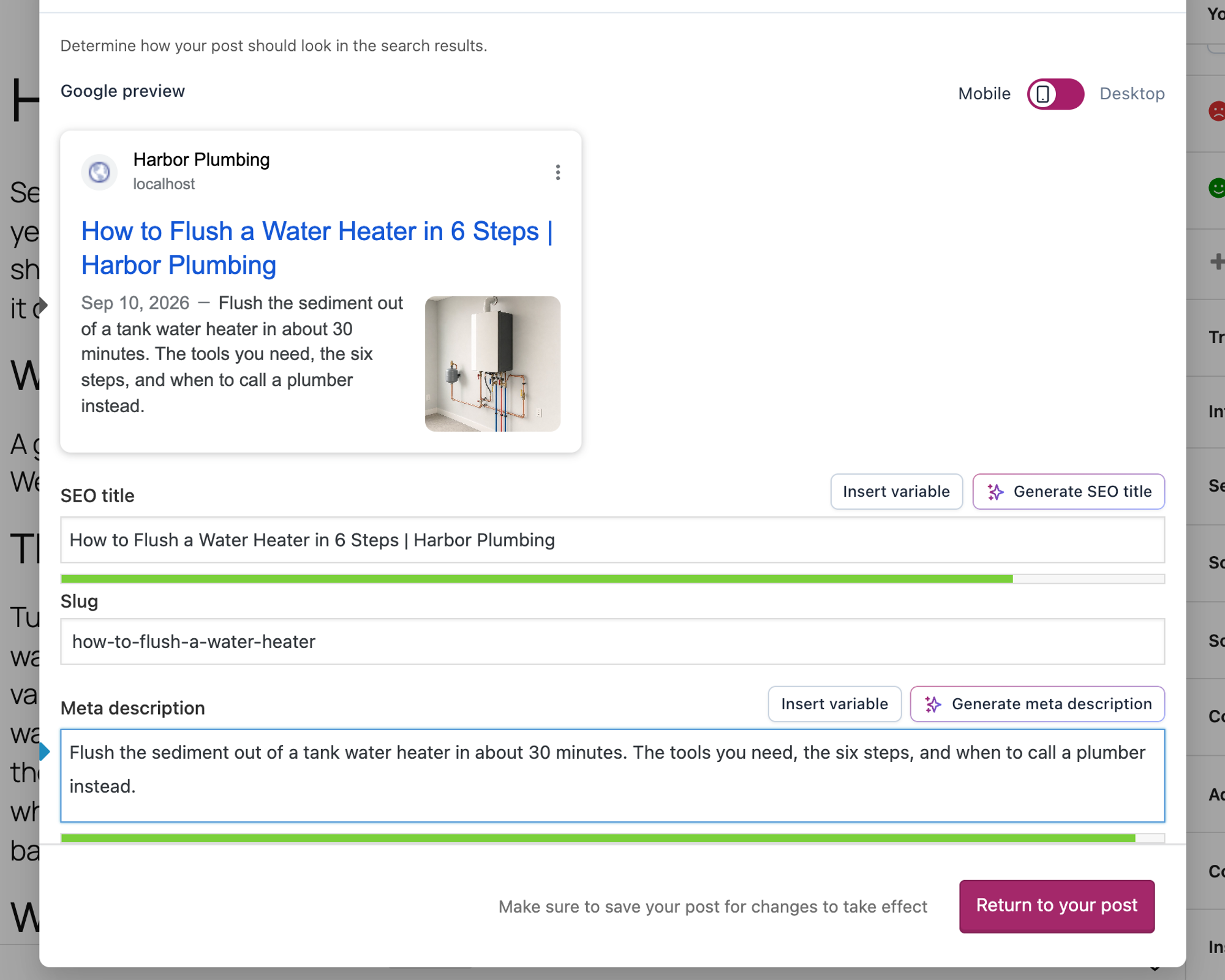
Activation opened a "You've successfully installed Yoast SEO!" screen with Start configuration and a Skip link. In the editor, the title and description live behind the Yoast icon in the toolbar and a Search appearance button, which opens a Google preview with the two fields. That made 8 steps, 3 more than Slim SEO and The SEO Framework, which use a plain box under the post.
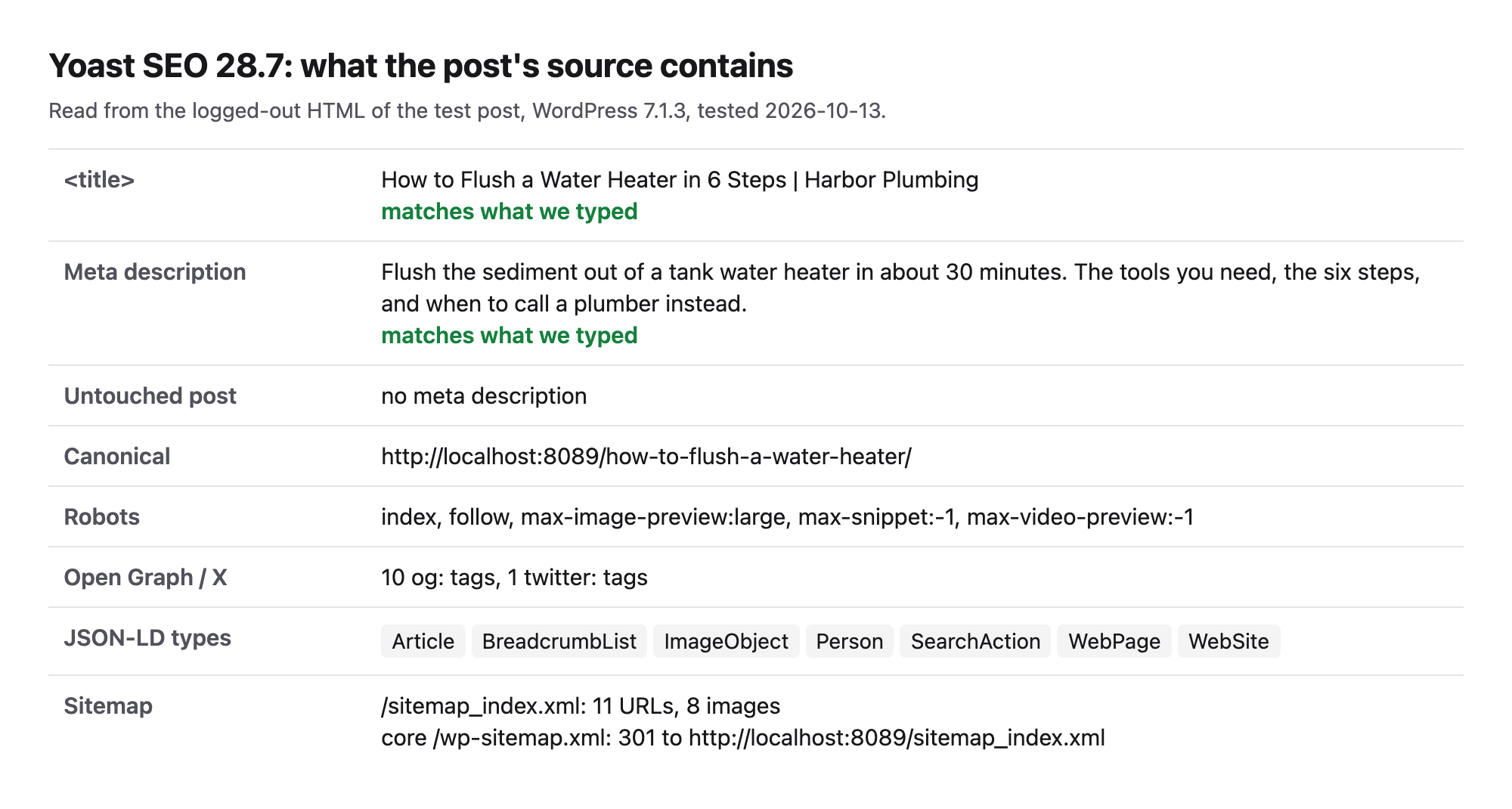
The post's JSON-LD described the article, its author, its image, the page and the site in one connected graph (Article, BreadcrumbList, ImageObject, Person, SearchAction, WebPage, WebSite). The sitemap index at /sitemap_index.xml with 11 URLs and 8 images replaced the core sitemap with a redirect. One gap: the post we never edited got no meta description at all, so Google writes its own snippet for it.
- Steps from activation to a saved title and description: 8.
- Title and description on the page: both exactly as typed. A post nobody edited got no meta description.
- JSON-LD on the post: Article, BreadcrumbList, ImageObject, Person, SearchAction, WebPage, WebSite.
- Sitemap:
/sitemap_index.xmlwith 11 URLs and 8 images. - Added 7.7 KB of HTML to the post and no CSS or JavaScript files. Median server time 31.1 ms.
- Database: 6 new tables, 14.6 KB of autoloaded settings.
- Breadcrumbs: a breadcrumb block and the
[wpseo_breadcrumb]shortcode.
Pros
- Exact title and description, and Article plus BreadcrumbList schema.
- Sitemap with image entries; core sitemap redirected to it.
- Breadcrumb block and shortcode in the free version.
Cons
- No automatic meta description for posts you have not edited.
- Created 6 database tables and 14.6 KB of autoloaded settings, among the heaviest in the test.
- The title fields sit two clicks deep, behind the toolbar icon.
Yoast SEO Premium costs €118.80 a year for one site (ex VAT), read on yoast.com on 13 October 2026. Its page lists "Keep every old URL working", up to five keyphrases per post, "Fill metadata gaps in bulk" and "Find the pages nothing links to", and Premium now includes Yoast's Local, Video and News SEO add-ons.
Yoast SEO on WordPress.org and Yoast SEO's own site.
5. SiteSEO
SiteSEO is a newer free SEO plugin with a tabbed panel in the editor, for readers who want automatic descriptions and few database changes.
Activation stayed on the Plugins screen. In the editor, a round button in the bottom corner opens the SiteSEO panel; its Title tab has the Title and Meta Description fields and a Save Changes button. That made 6 steps.
Title and description matched, and the untouched post got an automatic description. The post's JSON-LD had only ImageObject, Organization, with no Article or WebPage type. The core sitemap redirected to /sitemaps.xml with 11 URLs and 8 images, but robots.txt listed no sitemap, so submit it in Search Console yourself.
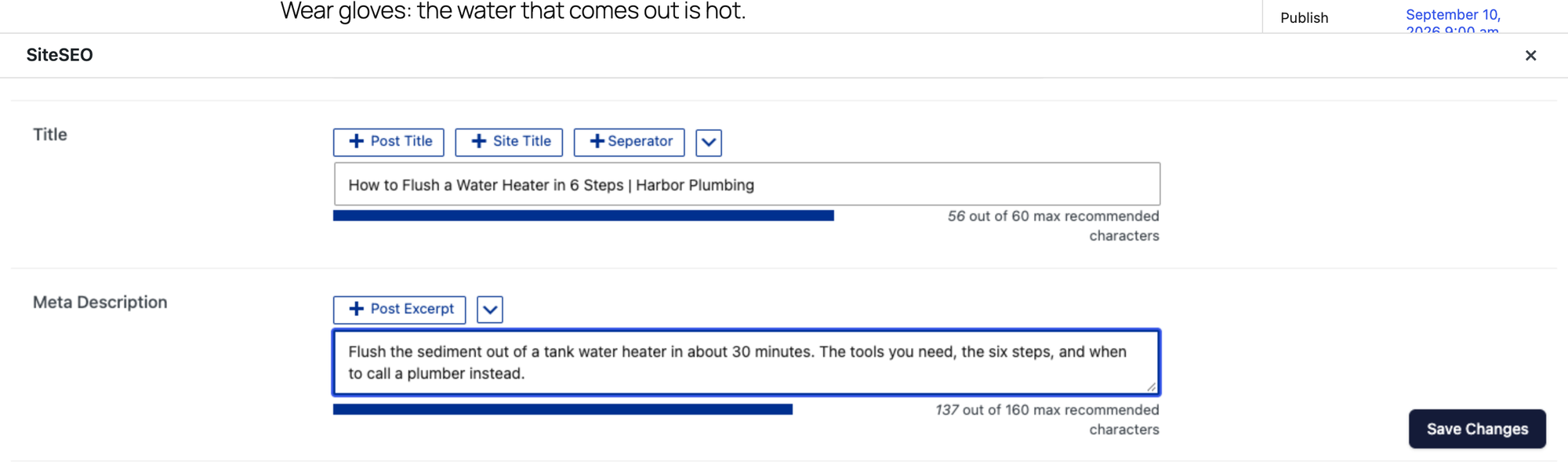
- Steps from activation to a saved title and description: 6.
- Title and description on the page: both exactly as typed. A post nobody edited got a description taken from its first paragraph.
- JSON-LD on the post: ImageObject, Organization.
- Sitemap:
/sitemaps.xmlwith 11 URLs and 8 images. - Added 1.8 KB of HTML to the post and no CSS or JavaScript files. Median server time 38.4 ms.
- Database: 0 new tables, 3.4 KB of autoloaded settings.
- Breadcrumbs: no block or shortcode of its own.
Pros
- Exact output and automatic descriptions.
- No new tables and 3.4 KB of autoloaded settings.
- No setup wizard on activation; content analysis, social, advanced and redirect tabs in one panel.
Cons
- No Article schema on posts in the free version.
- The panel opens from a floating button, not from the editor toolbar.
- 9 ratings on WordPress.org so far.
SiteSEO Pro costs $49 a year for one site, read on siteseo.io on 13 October 2026. Its plans list redirections and 404 monitoring, Google News and video sitemaps, and local business.
SiteSEO on WordPress.org and SiteSEO's own site.
6. The SEO Framework
The SEO Framework fits readers who want automatic titles and descriptions with no setup, and who check what it adds to their own titles.
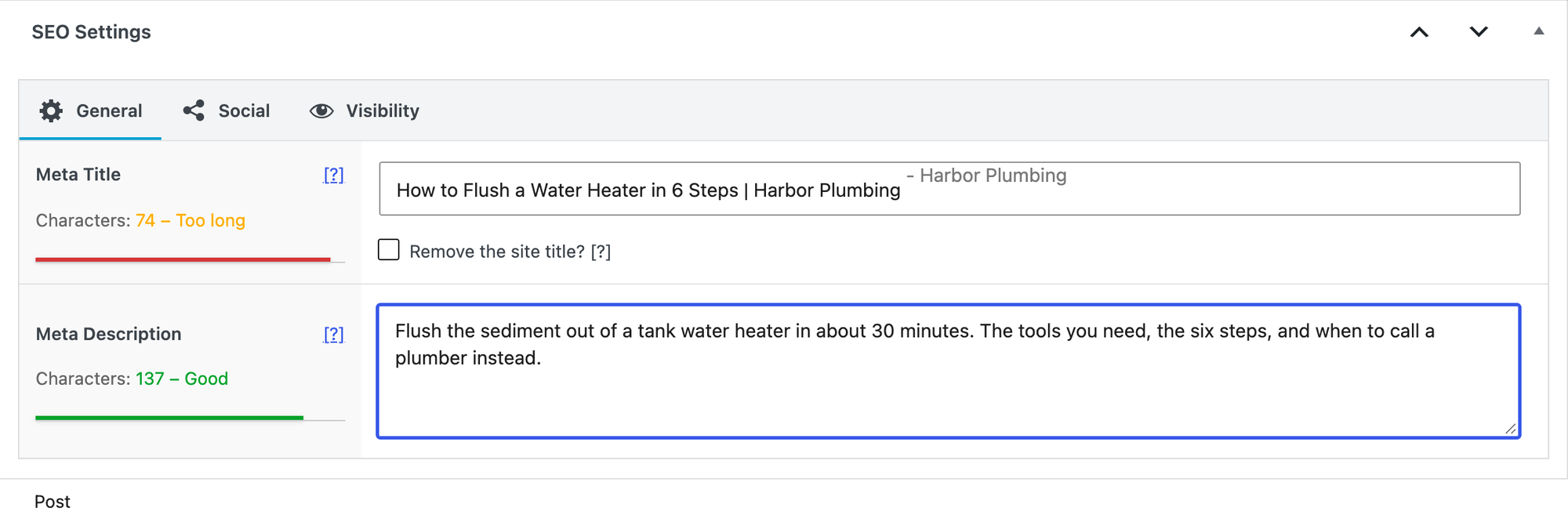
Activation stayed on the Plugins screen, with no wizard or account. Under the post, the SEO Settings box has Meta Title and Meta Description fields. That made 5 steps, tied for the fewest.
The title on the page was "How to Flush a Water Heater in 6 Steps | Harbor Plumbing - Harbor Plumbing": The SEO Framework appended the site name to our custom title, because Remove the site title? is unticked by default. The field shows the added text in grey, so you can see it before saving. The description matched, and the post's JSON-LD had WebPage and breadcrumbs but no Article type (BreadcrumbList, Organization, Person, SearchAction, WebPage, WebSite). The sitemap at /sitemap.xml with 8 URLs, no image entries.
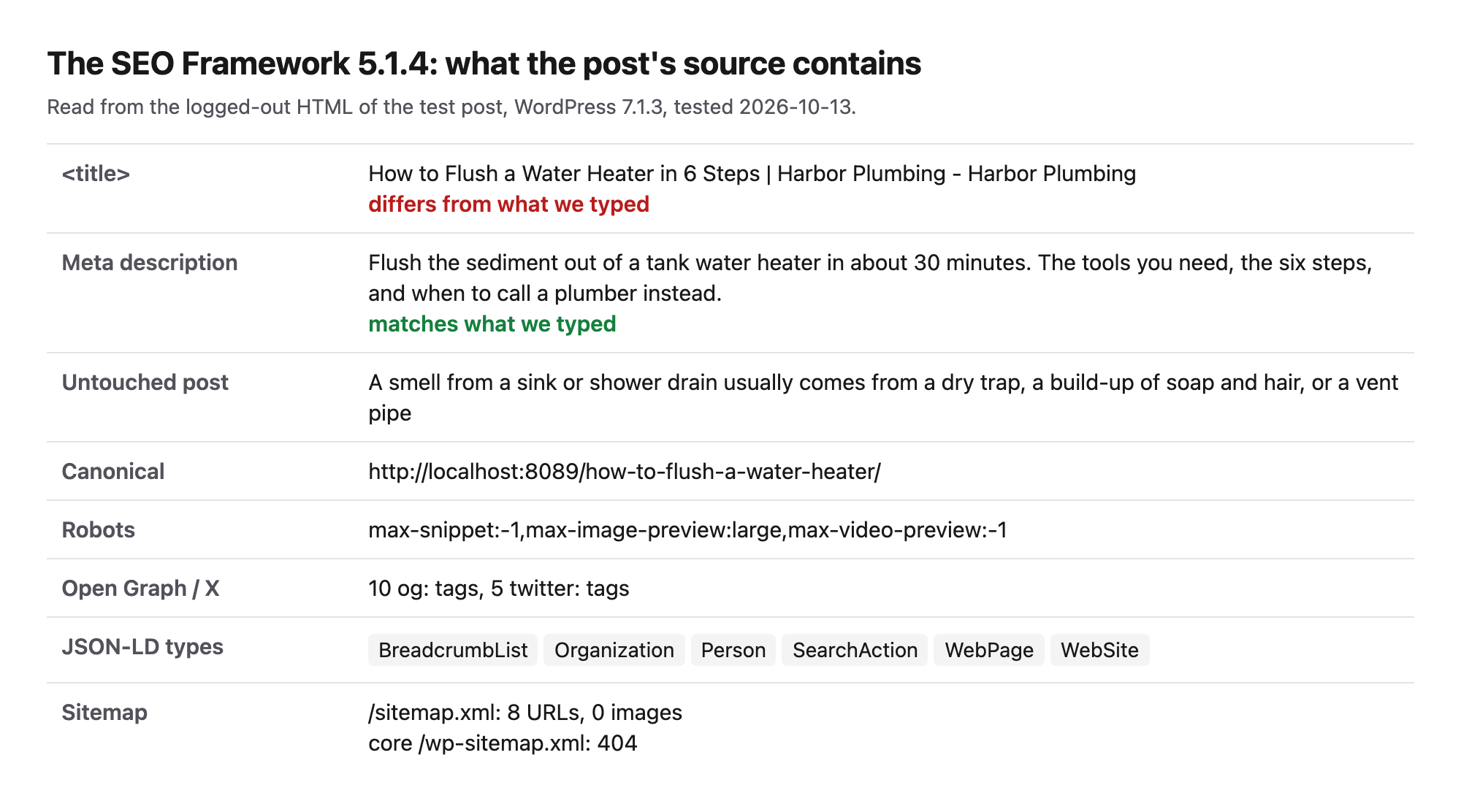
- Steps from activation to a saved title and description: 5.
- Title and description on the page: see above. A post nobody edited got a description taken from its first paragraph.
- JSON-LD on the post: BreadcrumbList, Organization, Person, SearchAction, WebPage, WebSite.
- Sitemap:
/sitemap.xmlwith 8 URLs, no image entries. - Added 3.5 KB of HTML to the post and no CSS or JavaScript files. Median server time 29.7 ms.
- Database: 0 new tables, 6.1 KB of autoloaded settings.
- Breadcrumbs: the
[tsf_breadcrumb]shortcode.
Pros
- 5 steps, no wizard and no account.
- Automatic descriptions and breadcrumbs.
- No new tables.
Cons
- Appends the site name to custom titles unless you tick Remove the site title?.
- No Article schema on posts and no image entries in the sitemap.
- Last updated 2025-12-10 and tested up to WordPress 6.9.10 on WordPress.org, read on 13 October 2026.
The SEO Framework's paid plans start at $7 a month billed yearly for two sites, read on theseoframework.com on 13 October 2026. They include premium extensions such as Focus, Articles (with a Google News sitemap) and Local.
The SEO Framework on WordPress.org and The SEO Framework's own site.
7. Rank Math
Rank Math fits readers who want automatic descriptions, a split sitemap and an editor score, and who accept an account screen and more steps on the way in.
Activation opened a registration screen with Connect Your Account and Skip Step. Until one of them is clicked, Rank Math's other screens stay closed. Skip Step led into a six-part setup wizard, which we left with Return to dashboard. In the editor, the Rank Math sidebar has an Edit Snippet button with a title, permalink and description form. That made 9 steps, the most of the group.
Rank Math printed the title and description as typed and wrote a description from the first paragraph for the post we never edited. The post's JSON-LD marked it as a BlogPosting with its author and image (BlogPosting, ImageObject, Organization, Person, WebPage, WebSite), without a BreadcrumbList. The sitemap index listed 10 URLs and 5 images, split into post, page and category sitemaps.
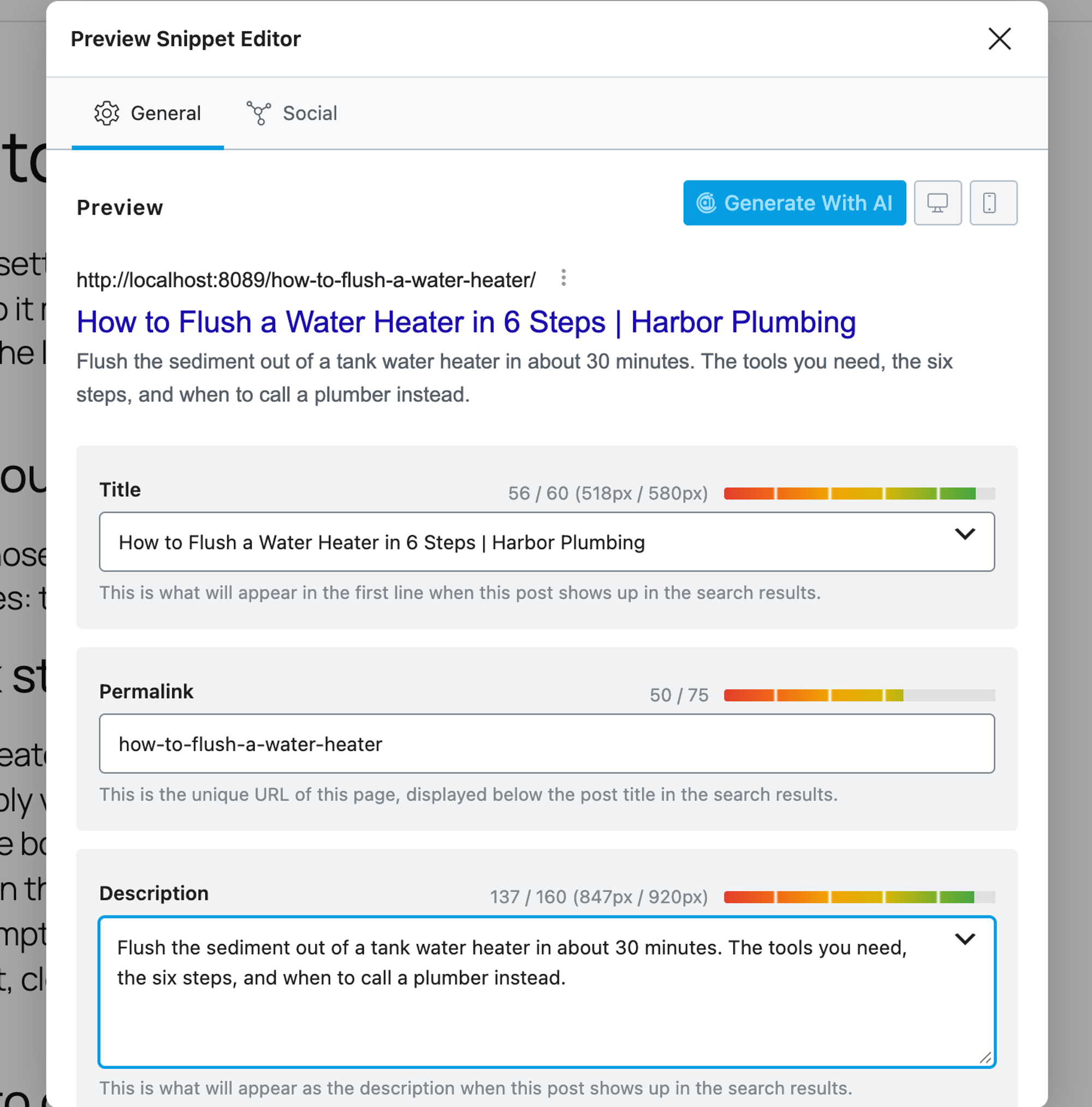
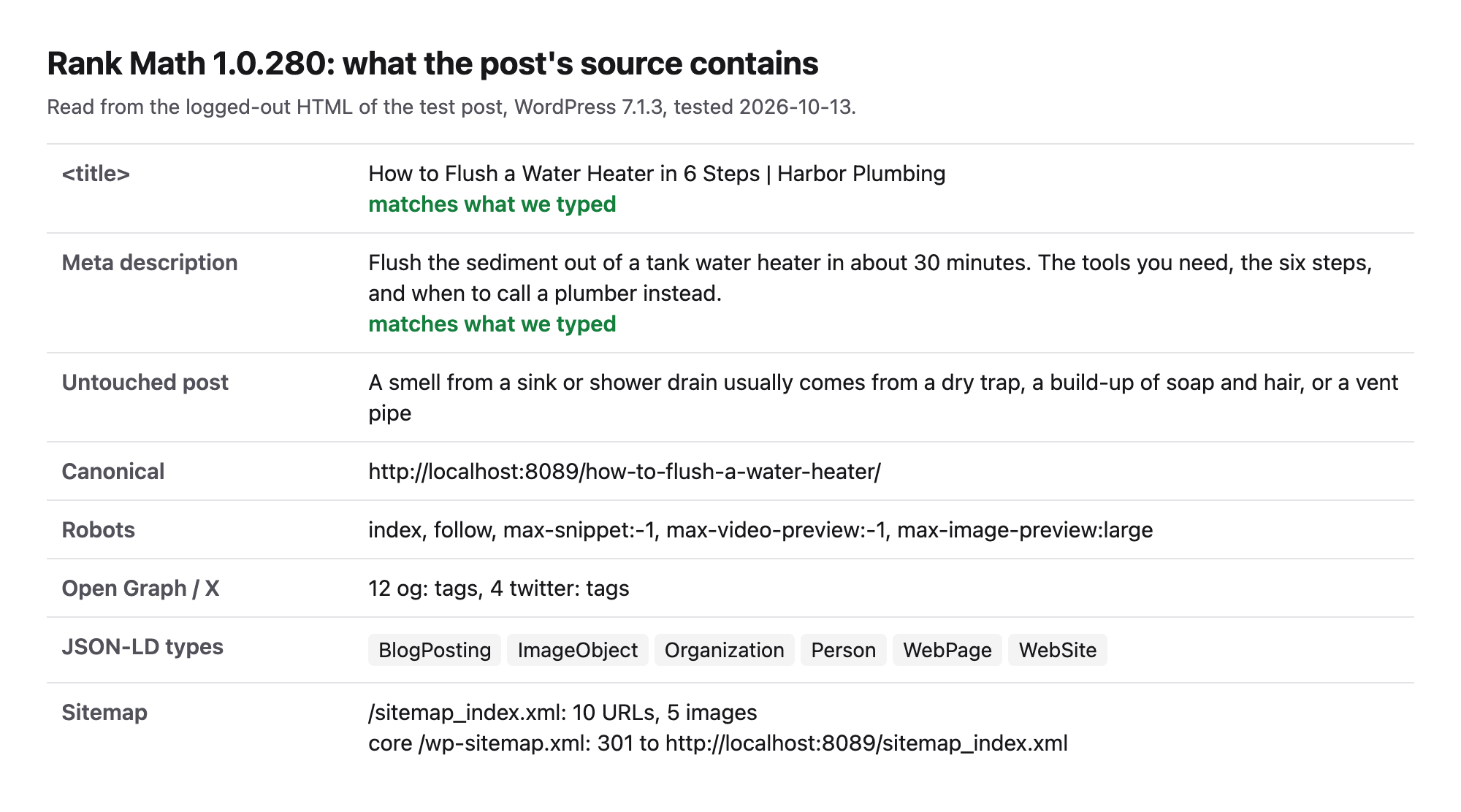
- Steps from activation to a saved title and description: 9.
- Title and description on the page: both exactly as typed. A post nobody edited got a description taken from its first paragraph.
- JSON-LD on the post: BlogPosting, ImageObject, Organization, Person, WebPage, WebSite.
- Sitemap:
/sitemap_index.xmlwith 10 URLs and 5 images. - Added 4.7 KB of HTML to the post and no CSS or JavaScript files. Median server time 35.3 ms.
- Database: 6 new tables, 12.4 KB of autoloaded settings.
- Breadcrumbs: the
[rank_math_breadcrumb]shortcode.
Pros
- Automatic descriptions, BlogPosting schema and a split sitemap with images, all free.
- The snippet editor shows title and description length as you type.
- Content AI and an SEO score sit in the same sidebar.
Cons
- An account screen opens on activation and blocks the other screens until you skip it.
- 9 steps to set a title and description, and a 6-table, 12.4 KB settings footprint.
- Upgrade prompts in the sidebar ("Upgrade today to the PRO version").
Rank Math PRO costs €7.99 a month billed yearly for unlimited personal sites, read on rankmath.com on 13 October 2026 (renews at €8.99). It adds keyword rank tracking, a schema generator, a broken link checker and AI link suggestions.
Rank Math on WordPress.org and Rank Math's own site.
8. SEOPress
SEOPress is the pick for readers who want exact output with the least added HTML and are fine adding schema another way.
Activation opened a five-step setup wizard with a Skip for now link. In the editor, the SEO button in the toolbar opens a panel at the bottom with Title and Meta description fields, a Google preview and a Save button. That made 6 steps.
The title and description matched, and the untouched post got an automatic description. The sitemap at /sitemaps.xml with 11 URLs and 8 images replaced the core one. The surprise: the free version printed no JSON-LD on the post at all, and only a WebSite type on the home page. It added the least HTML of the group (1.7 KB) and one database table.
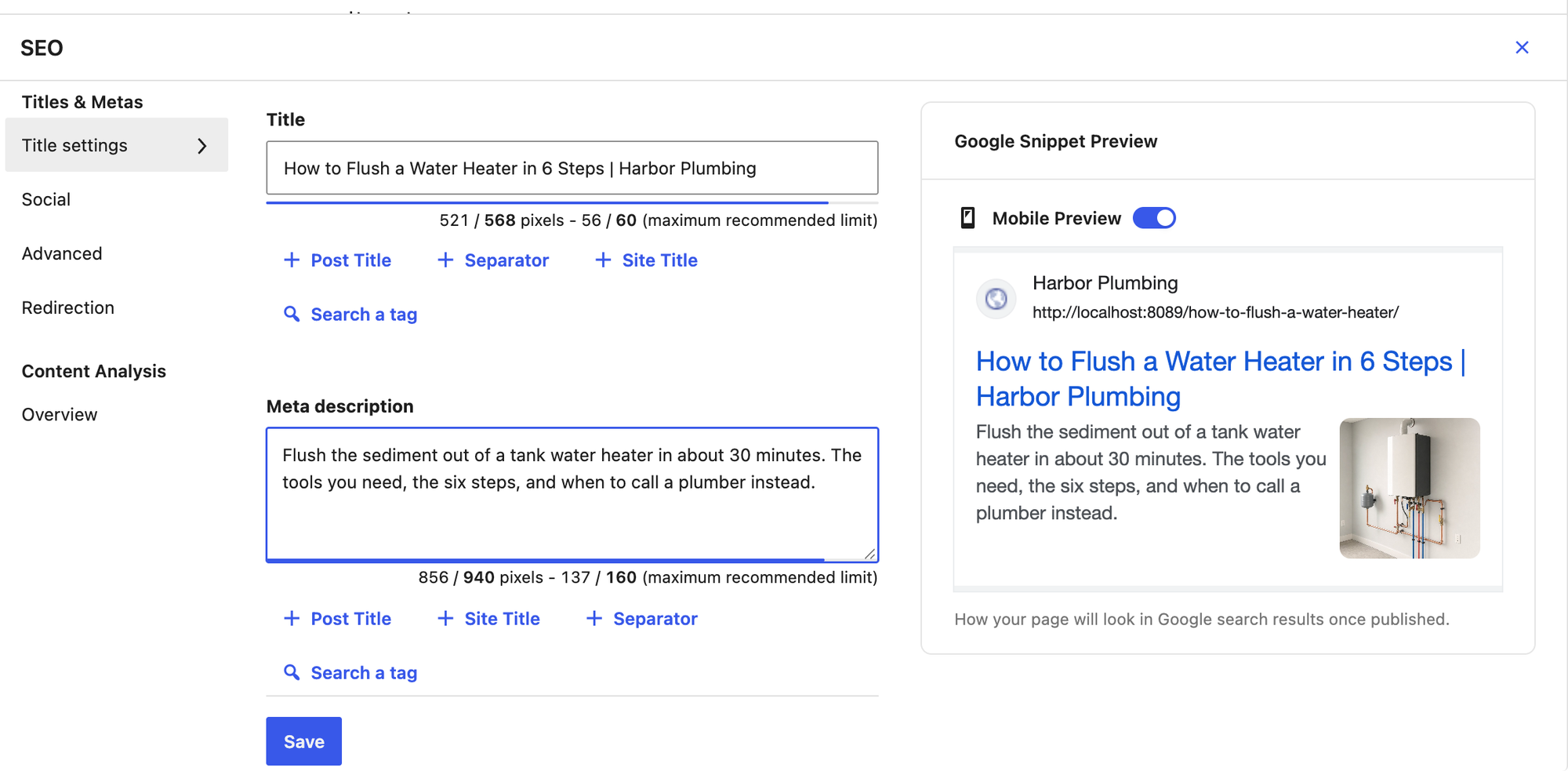
- Steps from activation to a saved title and description: 6.
- Title and description on the page: both exactly as typed. A post nobody edited got a description taken from its first paragraph.
- JSON-LD on the post: none.
- Sitemap:
/sitemaps.xmlwith 11 URLs and 8 images. - Added 1.7 KB of HTML to the post and no CSS or JavaScript files. Median server time 33.7 ms.
- Database: 1 new table, 4.9 KB of autoloaded settings.
- Breadcrumbs: no block or shortcode of its own.
Pros
- Exact output, automatic descriptions and an image sitemap.
- Least extra HTML in the test (1.7 KB) and 4.9 KB of autoloaded settings.
- The panel shows pixel and character limits for both fields.
Cons
- No article schema on posts in the free version.
- Redirects and 404 monitoring are Pro, per the SEOPress pricing page.
- The wizard opens on activation.
SEOPress PRO costs $49 a year for one site and $149 for unlimited sites, read on seopress.org on 13 October 2026, and renews at the same price. It adds a site audit, local SEO, a redirect manager with 404 monitoring, Google News and video sitemaps, and AI integration.
SEOPress on WordPress.org and SEOPress's own site.
Specialist SEO plugins for jobs the all-in-ones skip
These run next to one all-in-one plugin. Each was tested on its own job on the same site. For caching, which affects page speed, see our tested list of free caching plugins. For local SEO, such as LocalBusiness schema and opening hours, see the best local SEO plugins for WordPress.
9. Redirection
Redirection is the free plugin for 301 redirects and a 404 log, next to whichever SEO plugin you use.
Redirection opens no screen on activation. Under Tools > Redirection, a short setup asks two questions, and both answers were unticked by default: Monitor permalink changes in WordPress posts and pages and Keep a log of all redirects and 404 errors. We ticked both. After we renamed the service page, Redirection listed its own 301 from the old URL to the new one, and a request to a missing page showed up under 404s.
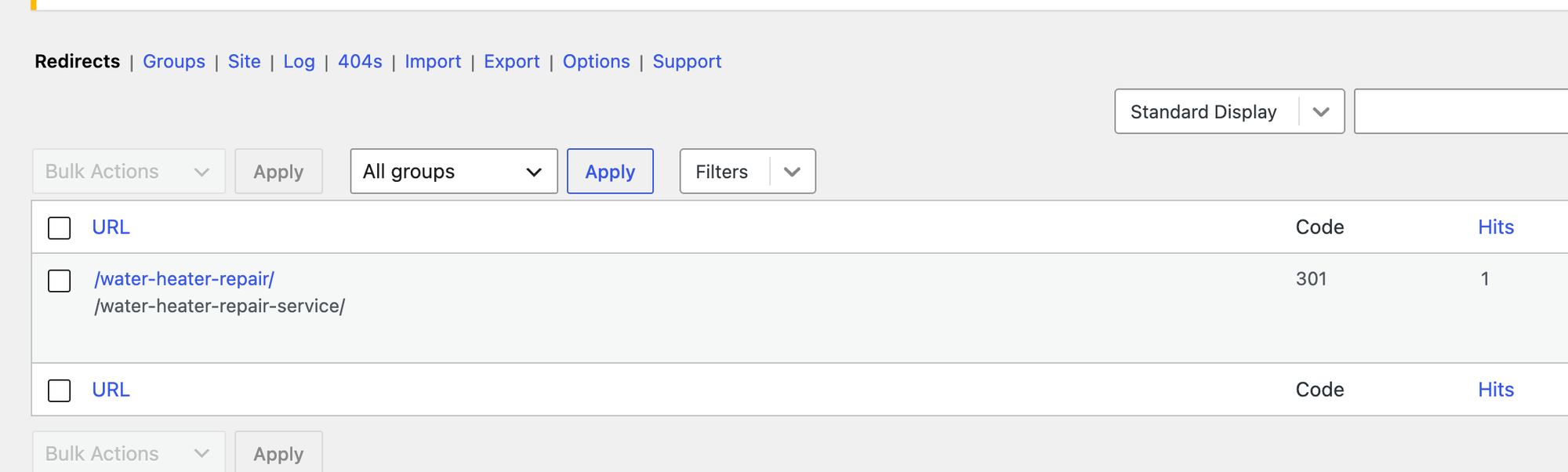
- Setup: 9 steps from activation to Ready to begin!
- Redirect created on its own when the page slug changed: yes, once Monitor permalink changes was ticked.
- 404 log: the missing URL we requested was listed.
- Added no files and no HTML to the page (72.1 KB, the same as without it). Median server time 34.8 ms.
Pros
- Free with no paid version.
- Logs 404s so you can see which old links people still use.
- Redirects for renamed posts and pages are created for you.
Cons
- Both useful options are off until you tick them in the setup.
- WordPress itself already redirected our renamed page, so on a small site the log is the main gain.
Redirection has no paid version: "There's no premium version", read on redirection.me on 13 October 2026.
Redirection on WordPress.org and the Redirection site.
10. Schema & Structured Data for WP & AMP
Schema & Structured Data for WP & AMP is the free plugin for schema types your SEO plugin does not print, with rules for where each one appears.
After activation, the plugin printed only an Organization type on the home page. Under Structured Data > Add Schema Type, a newsletter pop-up came first with the admin email filled in; we clicked No Thanks. The Schema Type list offered 96 types. We chose HowTo with the default placement, posts, and clicked Publish. The post's source then carried a HowTo graph (HowTo, ImageObject) with the post's name, image and description.
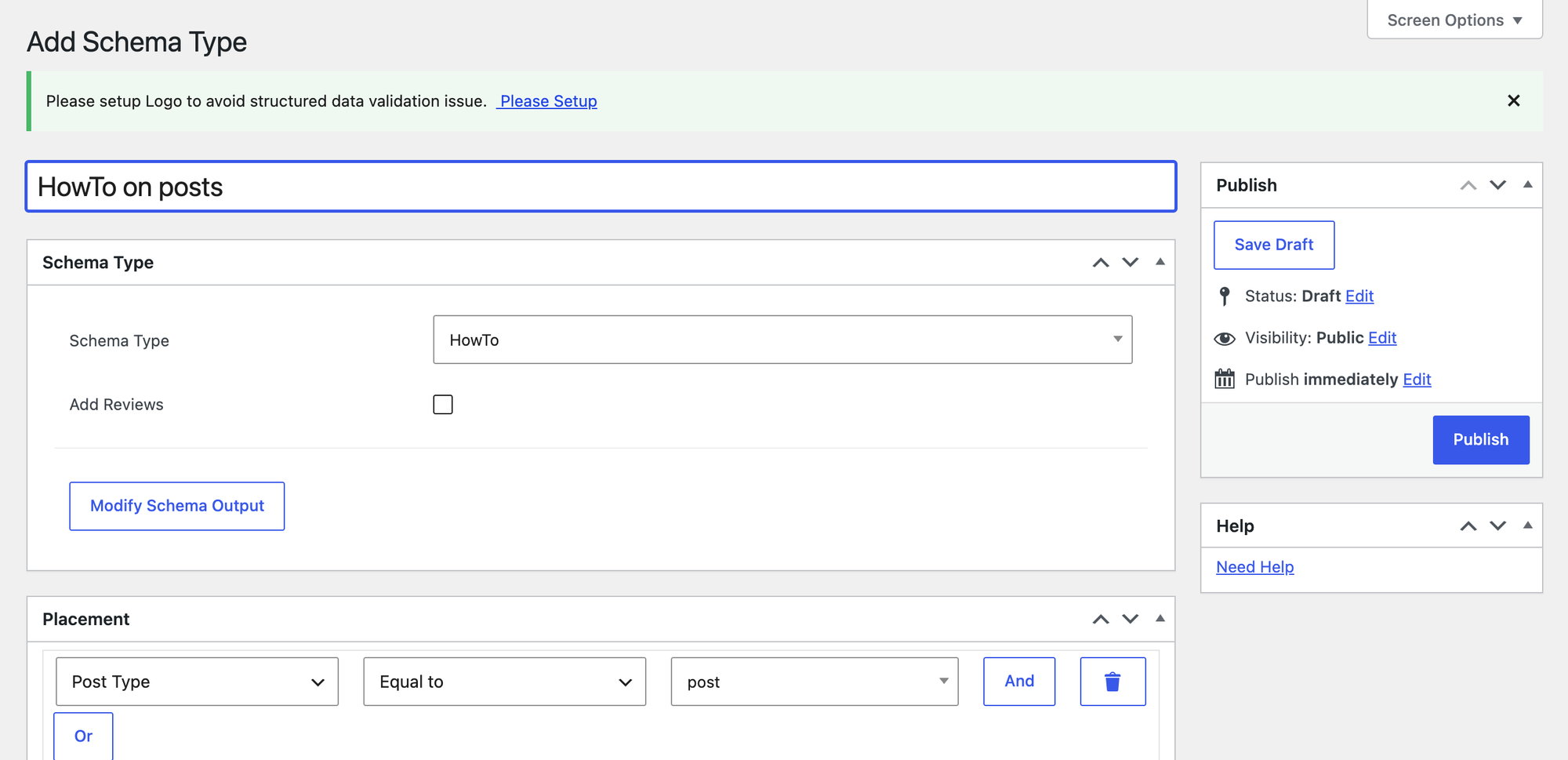
- Steps from activation to schema on the page: 6.
- Schema types to choose from: 96.
- The HowTo description ran the post's paragraphs together without spaces ("clears it out.What you need"), so check the output before relying on it.
- Google stopped showing HowTo rich results in 2023, so for search results pick a type Google still uses, such as Product, Recipe or Event.
Pros
- 96 schema types in the free version.
- Placement rules (we used Post Type equal to post) that combine with And and Or.
Cons
- A newsletter pop-up and a logo notice on the first screen.
- Fields are filled from the post automatically and need checking.
For the LocalBusiness type and what it should contain, see our local business schema guide.
Schema & Structured Data for WP & AMP Pro starts at $99 a year for one site, read on structured-data-for-wp.com on 13 October 2026. It adds review schema, paywall support and more.
Schema & Structured Data for WP & AMP on WordPress.org and the plugin's site.
11. LPagery
LPagery is the specialist for programmatic SEO: it creates many landing pages, one per city or service, from one template page and a spreadsheet. It does not set titles or schema itself, so it runs next to an all-in-one SEO plugin and fills that plugin's fields on every page. What each of those pages needs is covered in how to create local landing pages.
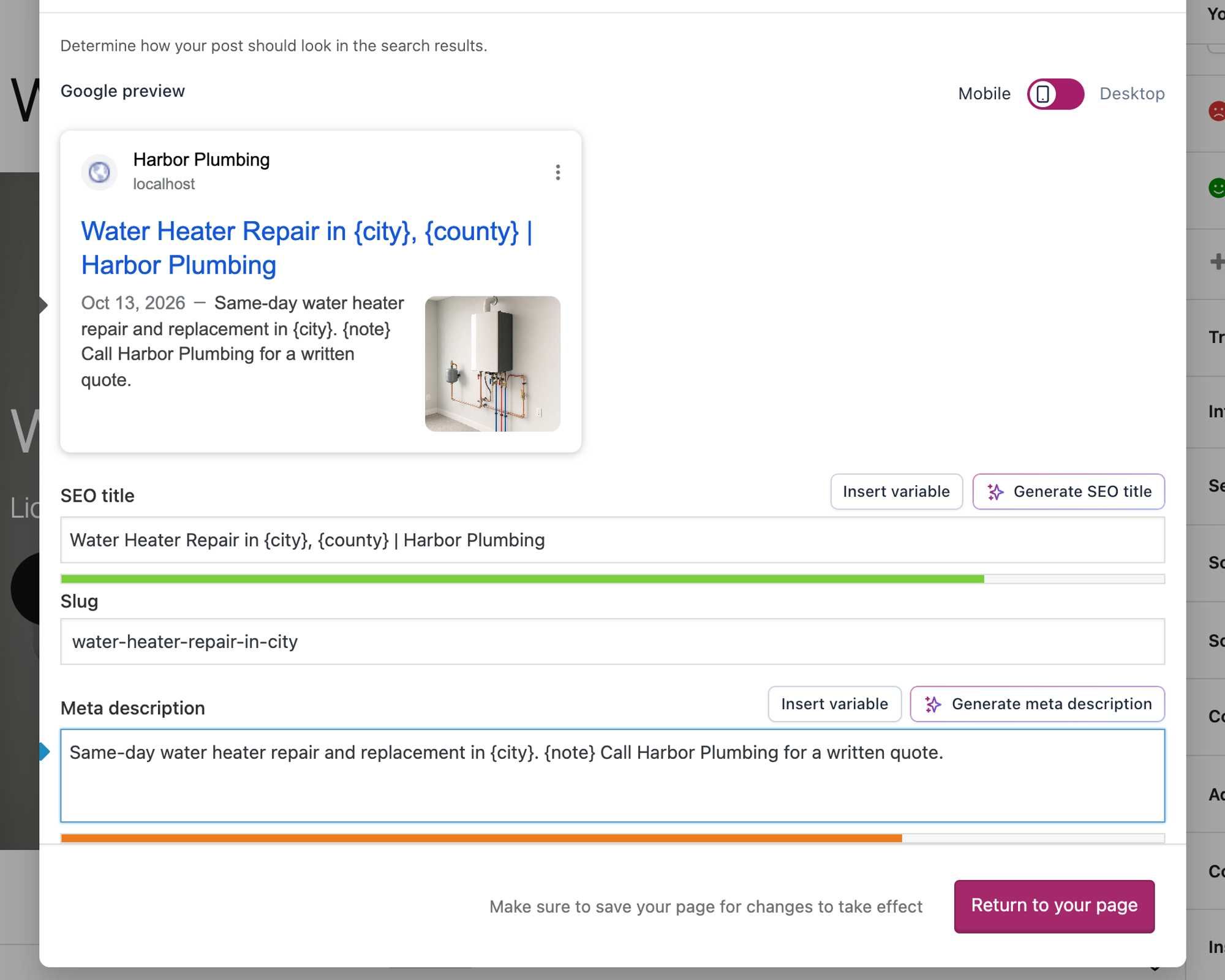
We tested the free version from WordPress.org (3.1.0) with Yoast SEO on the same site. The template page "Water Heater Repair in {city}" got a Yoast SEO title and meta description with placeholders, and a CSV with 20 cities had three columns: city, county and a one-sentence note per city. Three columns is the free version's limit. How to bulk create pages in WordPress covers other ways to do the same job.
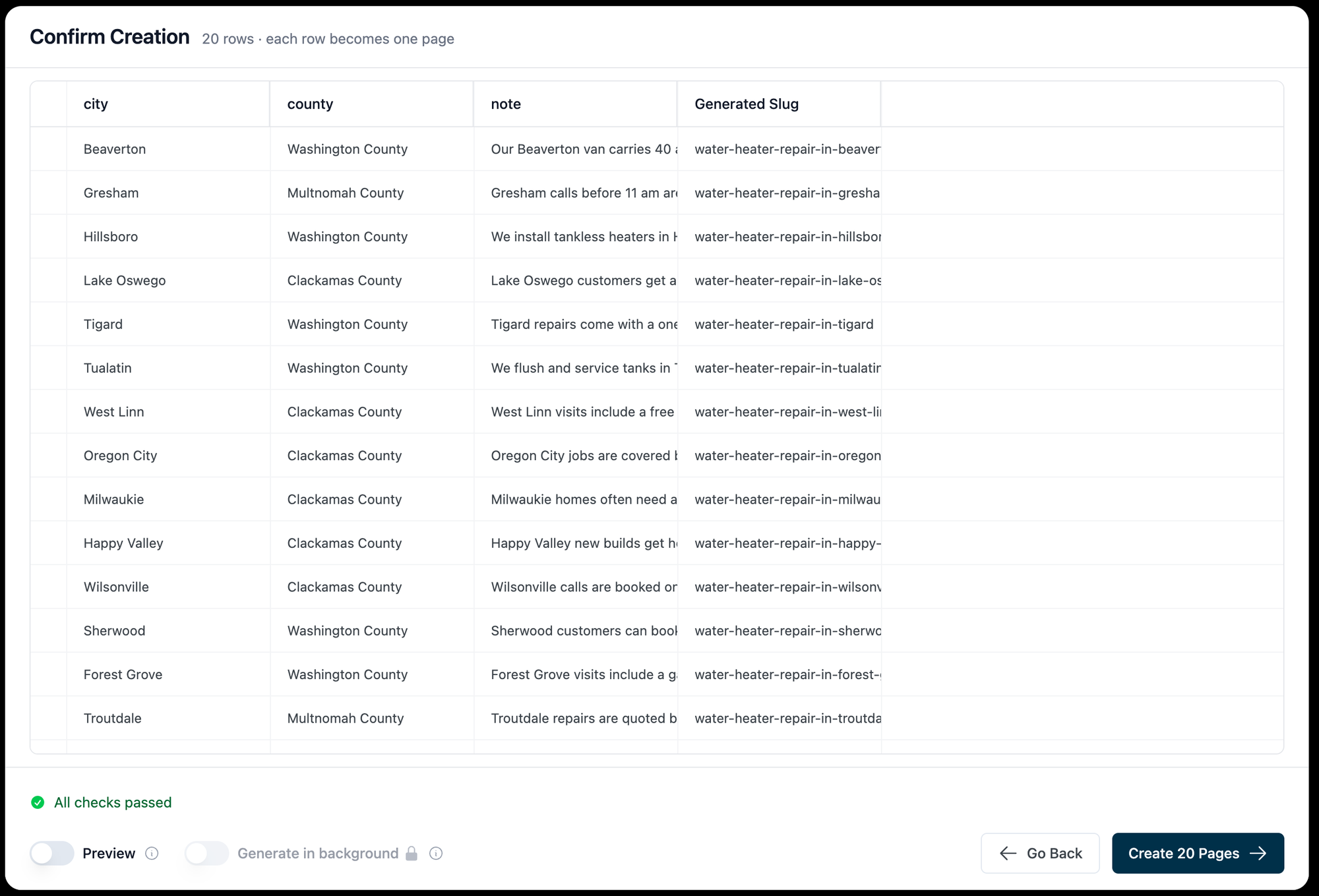
In LPagery > Create Pages we chose the template, uploaded the CSV and clicked Review & Create Pages. The review listed every row with its generated slug, and Create 20 Pages published them. Counting from opening Create Pages (after activating LPagery and skipping its opt-in screen), it took 6 steps and 27.0 seconds to publish 20 pages from a CSV.
Then we read every generated page as a visitor. All 20 answered with 200, with 20 different titles, 20 different meta descriptions and 20 canonicals pointing at themselves, filled from the row: "Water Heater Repair in Beaverton, Washington County | Harbor Plumbing". No placeholder was left on any page, and Yoast's page sitemap listed them.
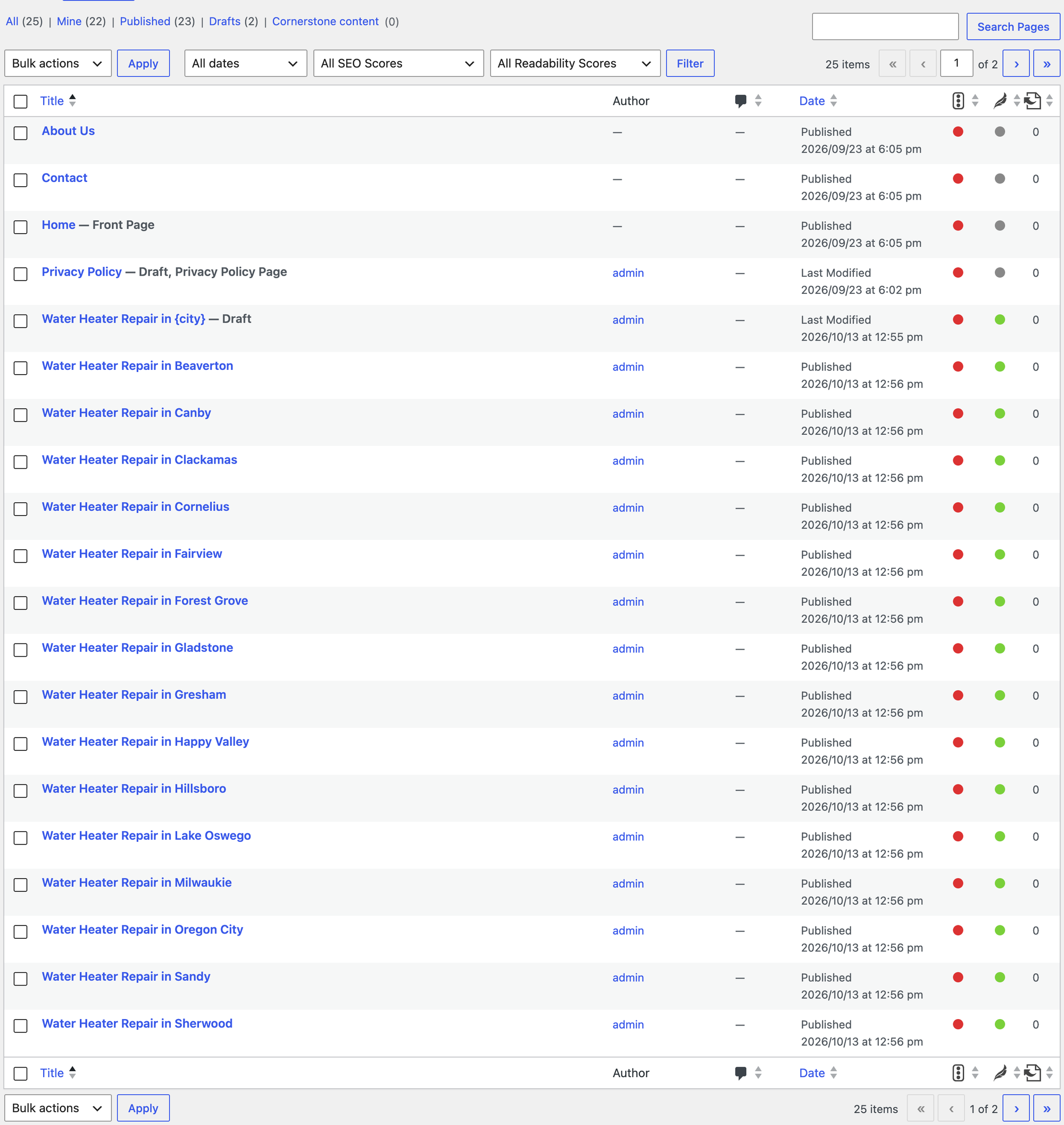
- 6 steps for 20 pages from a CSV, counted from opening Create Pages, in 27.0 seconds.
- Unique titles: 20 of 20. Unique meta descriptions: 20 of 20.
- Word overlap between two generated pages: 88%. Three columns change little text, so each page needs its own facts to be worth indexing; our landing page SEO checklist lists what to add.
- Added no CSS or JavaScript files to the generated pages. In Classic mode, the free default, LPagery creates each page as a regular page with its own content.
Placeholders work in any SEO plugin's fields because LPagery copies the template's custom fields to each page and fills them per row. All in One SEO keeps its settings in its own table, and LPagery's code has a separate step that copies and fills that row too. That AIOSEO step is read from the code; we tested Yoast.
Pros
- Unique titles and descriptions on every generated page, in whatever SEO plugin you use.
- 20 pages in under a minute from a CSV.
- Free version on WordPress.org, no account needed.
Cons
- The free version allows three placeholder columns, which left the pages 88% alike in our test.
- URL slug, page status, parent page, categories, tags and the Radius and Google Sheet inputs show a Pro badge on the Create Pages screen.
- It is not an SEO plugin: titles, schema and sitemaps still come from your all-in-one plugin.
LPagery's paid plans start at $14.25 a month billed yearly for one site, read on the LPagery pricing page on 13 October 2026. Depending on the plan, they add unlimited placeholders, Google Sheets sync, all page settings, spintax, image processing, interlinking and bulk updates of created pages. Syncing a Google Sheet with WordPress shows what the sync is for. Live Mode, which renders pages from the template when they are opened, is an Extended plan feature.
LPagery on WordPress.org and LPagery's bulk page generator. We compared it with other bulk page plugins in our tested list of mass page generators. Our plumber location pages tutorial walks through the same flow step by step, free and Pro.
Test results side by side
Plugin | Version | Steps | Title and description as typed | Auto description | JSON-LD types on post | Sitemap URLs / images | HTML added | New tables | Autoload added | Server median |
|---|---|---|---|---|---|---|---|---|---|---|
Slim SEO | 4.11.2 | 5 | yes | yes | 8 | 10 / 8 | 4.8 KB | 0 | 0.6 KB | 30.0 ms |
SureRank | 1.10.2 | 6 | yes | yes | 8 | 10 / 7 | 5.0 KB | 0 | 1.7 KB | 36.2 ms |
All in One SEO | 5.0.3 | 6 | yes | yes | 7 | 10 / 0 | 5.4 KB | 13 | 15.3 KB | 85.0 ms |
Yoast SEO | 28.7 | 8 | yes | no | 7 | 11 / 8 | 7.7 KB | 6 | 14.6 KB | 31.1 ms |
SiteSEO | 1.4.2 | 6 | yes | yes | 2 | 11 / 8 | 1.8 KB | 0 | 3.4 KB | 38.4 ms |
The SEO Framework | 5.1.4 | 5 | description only | yes | 6 | 8 / 0 | 3.5 KB | 0 | 6.1 KB | 29.7 ms |
Rank Math | 1.0.280 | 9 | yes | yes | 6 | 10 / 5 | 4.7 KB | 6 | 12.4 KB | 35.3 ms |
SEOPress | 10.3 | 6 | yes | yes | 0 | 11 / 8 | 1.7 KB | 1 | 4.9 KB | 33.7 ms |
WordPress alone | 7.1.3 | n/a | n/a | no | 0 | 11 / 0 | 0 KB | 0 | 0 KB | 29.6 ms |
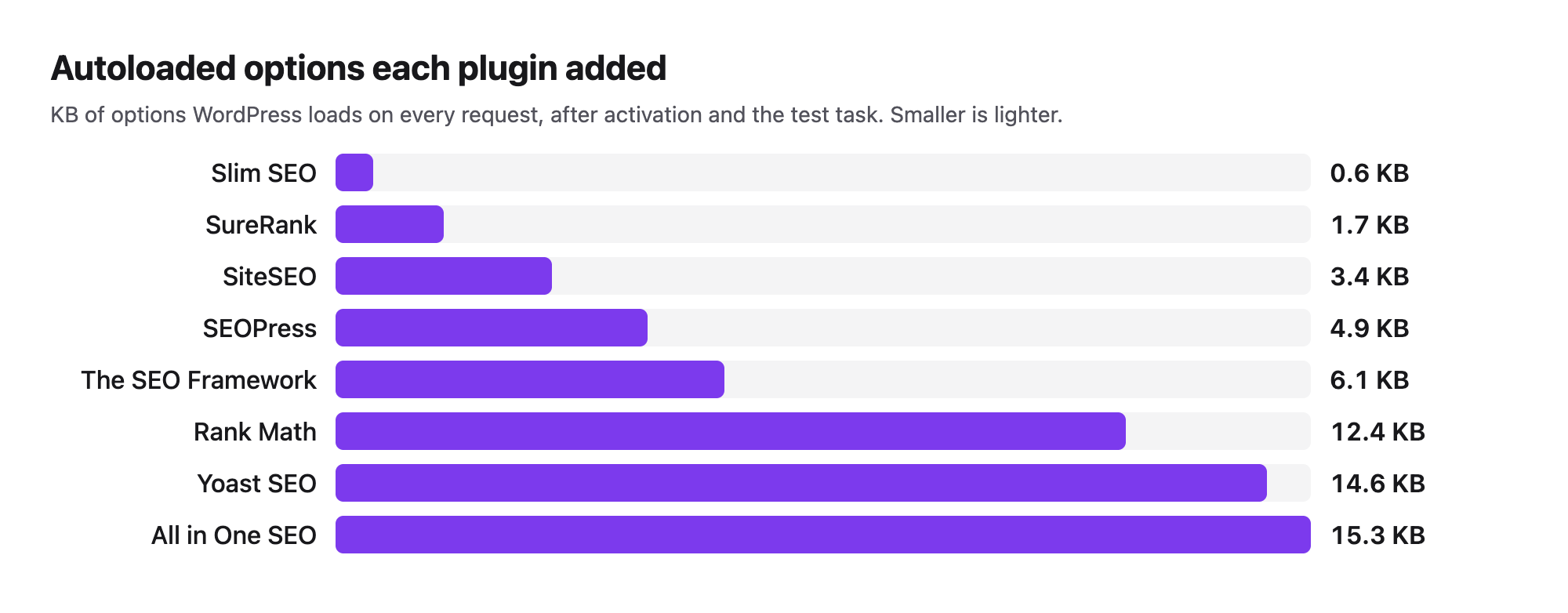
Steps count clicks and screens from activation to a saved title and description. Server times are the median of 20 logged-out requests in a local lab; other lab jobs shared the machine during the runs, so differences of a few milliseconds are noise. All in One SEO's gap is larger than that.
Can you run two SEO plugins at once?
We activated pairs on the same site and counted the tags in the post's head. Yoast SEO with All in One SEO printed 2 canonical links, 2 og:title tags and 2 JSON-LD blocks. Slim SEO with The SEO Framework printed 2 meta descriptions, 2 canonicals and 2 robots tags. Yoast SEO with Rank Math printed one title, one canonical, one og:title and one JSON-LD block, and no meta description at all, because we set none in this test and neither plugin wrote one. Use one all-in-one plugin, and import the old one's data with the new plugin's import tool when you switch.
Which WordPress SEO plugin should you choose?
- Choose Slim SEO if you want good defaults, the fewest steps and the lightest database footprint.
- Choose Yoast SEO if you want exact output, Article and breadcrumb schema and the most used plugin, and you write your own meta descriptions.
- Choose Rank Math if you want automatic descriptions and an editor score, and do not mind an account screen at the start.
- Choose SureRank if you like a modern editor panel and want Article schema with few prompts.
- Choose SEOPress if you want the least extra HTML and add schema with another plugin or Pro.
- Choose All in One SEO if you like scores and checklists, and your server has headroom.
- Choose The SEO Framework if you want automatic output and will tick Remove the site title? on custom titles.
- Choose SiteSEO if you want automatic descriptions and no new tables, and add schema another way.
- Add Redirection for a 404 log and automatic redirects, and Schema & Structured Data for WP & AMP for schema types your SEO plugin lacks.
- Running sites for clients? Our list of WordPress plugins for agencies covers the rest of the stack.
- Add LPagery when you need many landing pages, one per city or service, with their own titles and descriptions. What programmatic SEO is explains when that makes sense.
Plugins we tested but left out
- Squirrly SEO: activation opened its dashboard on a Sign Up form asking for an email address, with SEO Beginner and SEO Expert choices. We do not sign up with real emails in the lab, so it got no further.
- Broken Link Checker (WPMU DEV): the cloud engine needs a free WPMU DEV account, and the local engine had not listed the broken link on our test post after a dozen scheduled-task runs in the lab.
- XML Sitemap Generator for Google: it added
/sitemap.xmlwith 8 URLs, but every all-in-one plugin above already builds a sitemap, and with it active robots.txt listed three sitemaps at once.
FAQ
Do I need an SEO plugin for WordPress?
WordPress 7.1.3 already prints a title, a canonical link, a robots tag and a sitemap, and it redirects a renamed page. It prints no meta description, no Open Graph tags and no schema. If you want control over snippets, link previews and structured data, install one of the plugins above. Our beginner's guide to SEO in WordPress covers what to do after that.
What is the best free SEO plugin for WordPress?
By our scorecard, Slim SEO passed all 9 checks, SureRank 8 and Yoast SEO 6. Yoast is the most installed and printed exact output with Article and breadcrumb schema. All 8 all-in-one plugins set titles and descriptions correctly, except that The SEO Framework appends the site name unless you tell it not to.
Will an SEO plugin slow down my site?
None of the 8 loaded a CSS or JavaScript file for visitors on our test post, and each added between 1.7 and 7.7 KB of HTML. The bigger differences were on the server: All in One SEO's median was 85.0 ms against 30.0 ms for Slim SEO, and the plugins added 0 to 13 database tables. A caching plugin hides most of the server time for visitors.
Is Yoast SEO or Rank Math better?
Both printed exactly what we typed. Yoast SEO added a BreadcrumbList to its schema and needed 8 steps with no account screen; Rank Math wrote automatic descriptions, needed 9 steps and opened on an account screen. Choose Yoast for breadcrumbs in the schema and fewer prompts, Rank Math if you want descriptions written for you.
Which free plugin analyses a page's SEO?
Yoast SEO, Rank Math, All in One SEO, SEOPress, SureRank and SiteSEO all show an on-page analysis in the editor. The scores change with the focus keyword you enter, so read the checklists rather than the number.
Do SEO plugins help with AI search?
AI answers such as Google's AI Overviews are built on the same index, so the title, description and schema these plugins print feed them too. We did not test AI-specific extras such as llms.txt files. Our guides on how to rank in AI Overviews and how to appear in ChatGPT answers cover what else helps.
Can an SEO plugin create landing pages for every city I serve?
No. SEO plugins manage the pages you already have. A bulk page generator such as LPagery creates the pages from a template and a spreadsheet, and the SEO plugin then fills each page's title and description. How to do programmatic SEO in WordPress covers the planning, and you can add a meta description in WordPress by hand for single pages.
I've worked in SEO for more than ten years and helped over 100 businesses rank higher, mostly local businesses, e-commerce stores and SaaS companies. As co-founder of LPagery I work on local SEO, programmatic SEO and AI search visibility, and I test the strategies in these articles on our own sites and with our customers.
I've worked in SEO for more than ten years and helped over 100 businesses rank higher, mostly local businesses, e-commerce stores and SaaS companies. As co-founder of LPagery I work on local SEO, programmatic SEO and AI search visibility, and I test the strategies in these articles on our own sites and with our customers.