Best WordPress Mass Page Generators: 7 Free Plugins Tested (2026)

Updated
Part of the guide: Programmatic SEO and local landing pages in WordPress

A mass page generator for WordPress, also called a bulk page generator or mass page builder, turns one template page and one spreadsheet into many pages, one per row: a location page per town, a page per service, or one page per service and town. We installed ten WordPress mass page generators and bulk page creators with a free version. 7 of them could do the job, and we gave those 7 the same jobs: 25 location pages, then 200 service pages from one sheet, then seven checks on what came out.
Best overall: LPagery, based on LPagery Pro (Extended plan for updates, sync and delete); the free version scored 3 of 7. LPagery Pro was the only plugin that passed all 7 of our checks (updates in place, 200 rows in one run, parent page, bulk delete, Elementor layout, unique meta descriptions, pages that match the template), and LPagery took the fewest steps to 25 pages (8 on the free version, 7 on Pro, against 10 to 17 for the others) with a unique meta description on 25 of 25 pages. Extended also adds Google Sheets sync, which this run did not test. We did not test the other plugins' paid plans in our lab.
Best free: Multiple Pages Generator (MPG), which passed 6 of the 7 checks on its free version, including updates from a changed file and an Elementor template; its pages are virtual and its free plan shows a 50-row notice. Best free plugin for a batch you may want to undo: Bulk Page Duplicator (5 of 7), which made 200 pages under a parent page in 7 seconds and removed them in 3 steps, but changed the capital letters of our text. Best free plugin for pages under a parent page in any post type: WP All Import (4 of 7), as long as your template does not rely on block settings.
Last tested 14 October 2026 on WordPress 7.1.3. We make LPagery, one of the plugins on this list. We are not affiliated with any other plugin here, and nobody paid to be included. How we rank: #1 is the overall pick, judged on what each plugin can do across its plans to build and maintain many pages (the 7 checks, steps to 25 pages, SEO fields per page, keeping pages in step with the data). From #2 on, the list follows the free-version scorecard below.
Free-version scorecard. Best free: MPG.
Plugin (free version) | Best for | Checks passed | Unique meta descriptions | Pages match the template | Updates in place | 200 rows in one run | Under a parent page | Own bulk delete | Elementor layout kept | Active installs |
|---|---|---|---|---|---|---|---|---|---|---|
Multiple Pages Generator | Free updates from a changed file | 6 of 7 | Yes | Yes | Yes | No | Yes | Yes | Yes | 2,000+ |
Bulk Page Duplicator | One-off batches with an undo button | 5 of 7 | Yes | No | No | Yes | Yes | Yes | Yes | 500+ |
WP All Import | Pages under a parent page, any post type | 4 of 7 | No | No | Yes | Yes | Yes | Yes | No | 100,000+ |
Big SEO Programmatic | CSV from a URL with in-place updates | 4 of 7 | Yes | No | Yes | Yes | No | Yes | No | 100+ |
LPagery (free) | Real pages in the fewest steps, 100 per run | 3 of 7 | Yes | Yes | No | No | No | No | Yes | 3,000+ |
Page Generator | Short keyword lists, no spreadsheet | 3 of 7 | No | Yes | No | Yes | No | Yes | No | 3,000+ |
PageForge | SEO title and meta from a pattern | 2 of 7 | Yes | Yes | No | No | No | No | No | 60+ |
LPagery Pro (paid, Extended) | Real pages that follow your data | 7 of 7 | Yes | Yes | Yes | Yes | Yes | Yes | Yes | 3,000+ |
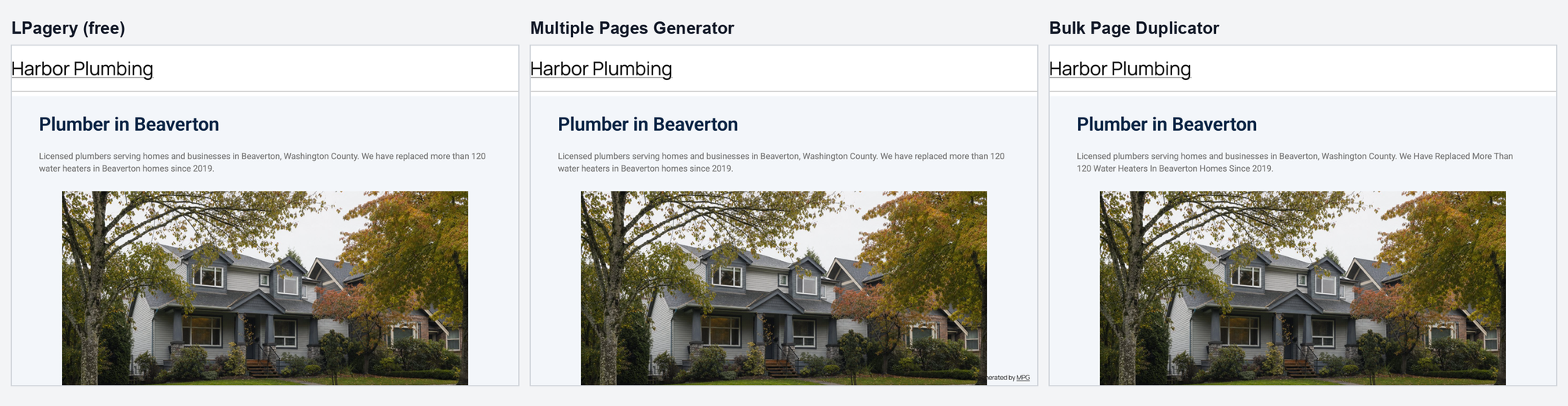
"Pages match the template" means the layout came through, each page had one H1 and the text read as written. WP All Import dropped block settings, Big SEO Programmatic printed a second H1 and changed the layout, and Bulk Page Duplicator turned our sentences into Title Case. MPG answered on 192 of 200 URLs, so it misses the 200-row check by 8 pages. WP All Import, Big SEO Programmatic and Page Generator count as No for Elementor because their free versions cannot use an Elementor page as the template (see their sections). LPagery Pro's Elementor result comes from the free version's test, which uses the same copy of the template's post meta.
If you are deciding between a WordPress plugin and a hosted tool such as Webflow or an AI writer, our programmatic SEO tools comparison covers both. This article stays inside WordPress and goes deeper on what the free plugins do at scale.
How we tested the mass page generators
Jonas Lindemann from the LPagery team ran every test in our WordPress lab on 13 and 14 October 2026: WordPress 7.1.3, the Twenty Twenty-Five theme, Yoast SEO active, Apache and PHP in Docker. Each plugin ran alone on a fresh copy of the same example site, Harbor Plumbing, and was removed again before the next one. Every plugin is the free version from WordPress.org. LPagery Pro ran from our own source build, and for each Pro feature we name the plan our plugin code requires.
We installed 10 plugins. 7 of them could make the pages, and those 7 went through every job below; the other 3 are listed under "left out" with what stopped them. The 25-page job for LPagery, MPG, Page Generator and WP All Import was run on 13 October for our programmatic SEO tools comparison, in the same lab with the same files; this article reuses those numbers and adds four new tests.
- The plugin as a location page generator: 25 location pages from one CSV file with three columns (town, county, one local sentence) and one template page, with a Yoast meta description that uses the columns. We counted the steps from activation to 25 published pages, timed the run, and checked every page as a logged-out visitor: title, meta description, H1, leftover placeholders. Then we changed one sentence of the template and one row of the file and used the plugin's own way to update.
- 200 pages from one sheet: 8 services times 25 towns, three columns (service, town, county), template "{service} in {town}". We recorded how many pages the free version made from the single file, what it said about limits, the steps and the seconds.
- Parent page and URL: in the same run, every plugin was asked to put the pages under a published "Service areas" page, so a URL reads /service-areas/drain-cleaning-in-beaverton/.
- Removing all 200 pages with the plugin's own delete or undo, or with WordPress's Pages screen when the free version has none. We counted the steps and the pages left.
- An Elementor page as the template: a layout built with free Elementor widgets (heading, text, image, button) holding the placeholders. We checked whether the generated page kept the Elementor layout with the town filled in.
Seconds are lab timings from the final click until the pages answered, on a laptop. Compare plugins with each other, not with your own server. None of the plugins loaded a file of its own on the generated pages. Where a generated page weighed less than the page we made by hand (WP All Import, Big SEO Programmatic), it was because parts of the layout were lost, as their sections describe.
Test results side by side
The 25-page job, every plugin on the same file and template:
Plugin | Steps to 25 pages | Time | Unique meta descriptions | Pages with one H1 | Update test |
|---|---|---|---|---|---|
LPagery (free) | 8 | 26 seconds | 25 of 25 | 25 of 25 | Made 25 copies with -2 URLs; updates need Extended |
LPagery Pro | 7 | 28 seconds | 25 of 25 | 25 of 25 | Both changes live, 10 steps |
Multiple Pages Generator | 11 | 16 seconds | 25 of 25 | 25 of 25 | Both changes live, 5 steps |
Bulk Page Duplicator | 10 | 5 seconds | 25 of 25 | 25 of 25 | No change: the dry run marked all 25 rows Skip (slug exists) |
WP All Import | 14 | 24 seconds | 0 of 25 | 25 of 25 | Both changes live, 9 steps |
Page Generator | 11 | 33 seconds | 0 of 25 | 25 of 25 | Made 25 copies with -2 URLs |
PageForge | 17 | 4 seconds | 25 of 25 | 25 of 25 | No change: every row reported "Exists" |
Big SEO Programmatic | 14 | under 1 second | 25 of 25 | 0 of 25 | Both changes live |
The four new tests, free versions unless the row says Pro:
Plugin | Pages from one 200-row file | Under a parent page | Remove all | Elementor template |
|---|---|---|---|---|
LPagery (free) | 100 (first 100 rows) | No, Standard plan | WordPress Pages screen, 7 steps | Yes |
LPagery Pro | 200 | Yes | Delete Pages (Extended), 5 steps | Same as free |
Multiple Pages Generator | 192 URLs answered | Yes, as a path in the URL format | Delete the project, 2 steps | Yes |
Bulk Page Duplicator | 200 | Yes | Rollback (Delete All), 3 steps | Yes |
WP All Import | 200 | Yes | Delete under Manage Imports, 4 steps | Not run: no template page |
Page Generator | 200 | No | Trash Generated Content, 3 steps | Not run: page builders are Pro |
PageForge | 100 | No | WordPress Pages screen, 7 steps | No: 1 page made, the other 24 rows reported Exists |
Big SEO Programmatic | 200 | No | Delete Pages, 3 steps | Not run: its code copies the page content only, not Elementor's layout data |
1. LPagery
LPagery is the mass page generator for WordPress sites that want real pages from a template page and a CSV, Excel file or Google Sheet, with the SEO fields filled per page.
On the 25-page job LPagery took 8 steps, the fewest of the free plugins: pick the template page, upload the file, check the rows in Confirm Creation and confirm. Every page got its own title, meta description (LPagery filled the placeholders in the template's Yoast field) and H1. Our guide on how to bulk create pages in WordPress walks through those clicks.
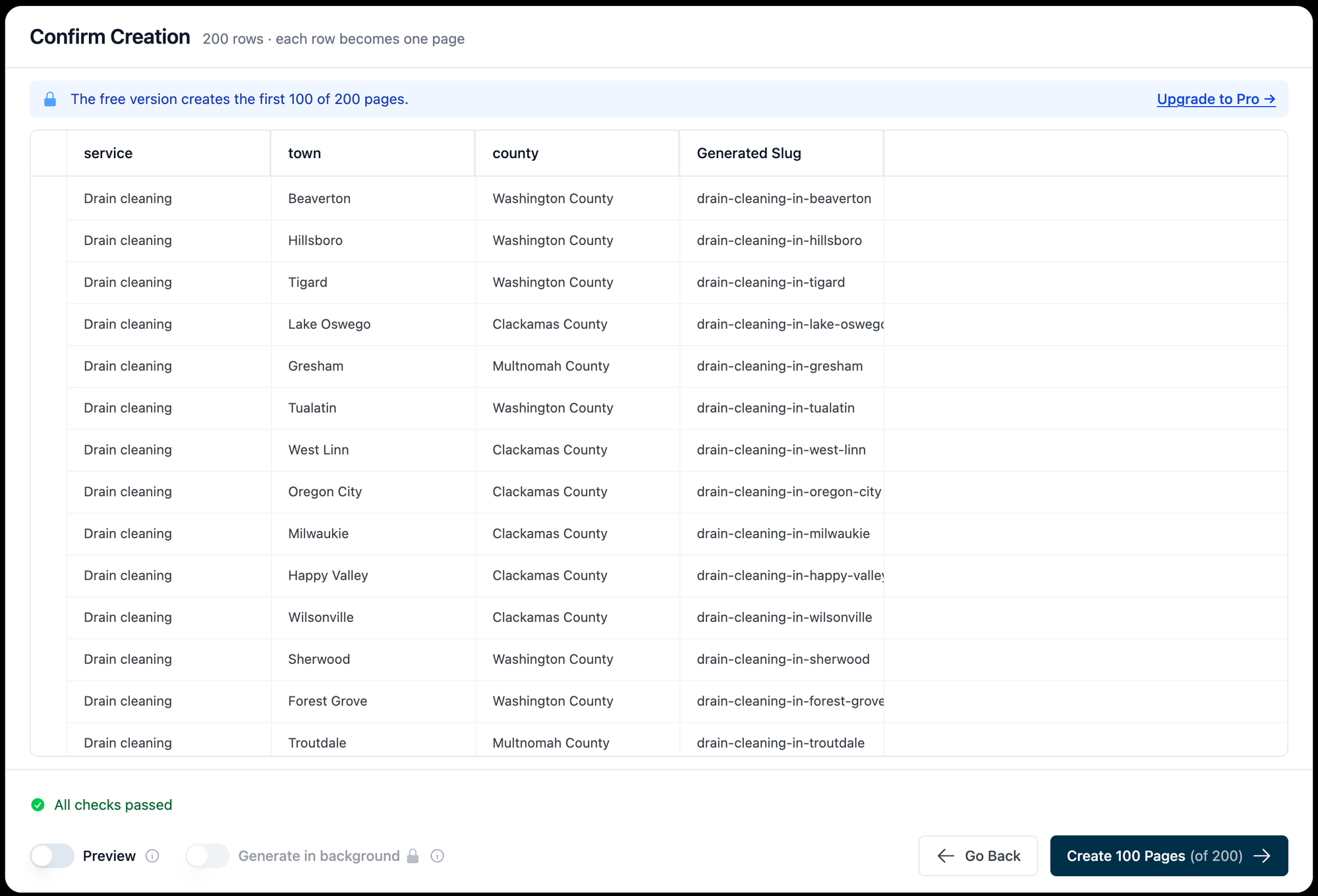
The 200-row sheet showed the free version's limit. Confirm Creation said "The free version creates the first 100 of 200 pages." and the button read Create 100 Pages (of 200). Splitting the file in two and running Create twice gave all 200 pages: 14 steps and 24 seconds of generation for both runs. The free version has no parent page or URL slug setting (both are labelled Pro; our plugin code puts them on the Standard plan) and no delete for a page set, so removing the 200 pages took 7 steps on WordPress's Pages screen.
LPagery Pro made all 200 pages from the single file in 26 seconds, with the URL slug {service}-in-{town} and the parent page Service areas, so every URL read /service-areas/drain-cleaning-in-beaverton/ and so on; our plumber location pages tutorial shows those settings. Delete Pages in Manage removed all 200 in 5 steps; our plugin code puts it on the Extended plan. With an Elementor page as the template, the free version kept the Elementor layout and filled the town into the heading and the button. LPagery copies the template's post meta, which is where Elementor keeps its layout. Our guide to bulk creating pages with Elementor covers that setup.
- 25-page job: 8 steps, 26 seconds, 25 of 25 unique meta descriptions
- 200-row file: 100 pages per run on the free version, 200 in two runs; 200 in one run on Pro
- Parent page: Standard plan; Pro put all 200 pages under /service-areas/
- Remove all: 7 steps on the Pages screen (free), 5 steps with Delete Pages (Extended)
- Elementor template: Yes
- Update test: the free version made 25 copies with -2 URLs; Extended updated all 25 in place
Extended also adds Google Sheets sync, so edits in the sheet reach the pages on a schedule. LPagery AI writes text and images per row from one instruction per column. It runs in the LPagery app, which sends the finished rows to the plugin; our lab has no app account, so that part was not tested hands-on.
Pros
- Fewest steps of the free plugins on the 25-page job
- Real WordPress pages, listed under Pages and editable one by one
- Fills the SEO plugin fields of the template per page (we tested Yoast)
- Kept the Elementor layout of the template
- Pro puts 200 pages under a parent page in one run and removes them in a few clicks
Cons
- The free version makes copies when you upload a changed file; in-place updates and Google Sheets sync need Extended
- Free: 3 placeholder columns and 100 pages per run
- URL slug, parent page and status settings need the Standard plan
- No bulk delete on the free version
Pricing read on lpagery.io on 13 October 2026: Standard $19 a month, Extended $27 a month, Ultimate $77 a month, less on yearly billing. LPagery on WordPress.org and the Bulk Page Generator page.
2. Multiple Pages Generator (MPG)
Multiple Pages Generator by Themeisle is the best free mass page generator when your spreadsheet keeps changing, because its pages are rendered from the template on every visit.
On the 25-page job MPG took 11 steps: name a project, upload the file, pick a published template page and set the URL format. MPG, WP All Import and Big SEO Programmatic were the free plugins that passed the update test without copies; with MPG a template edit showed on every page at once, and a changed file took 5 steps.
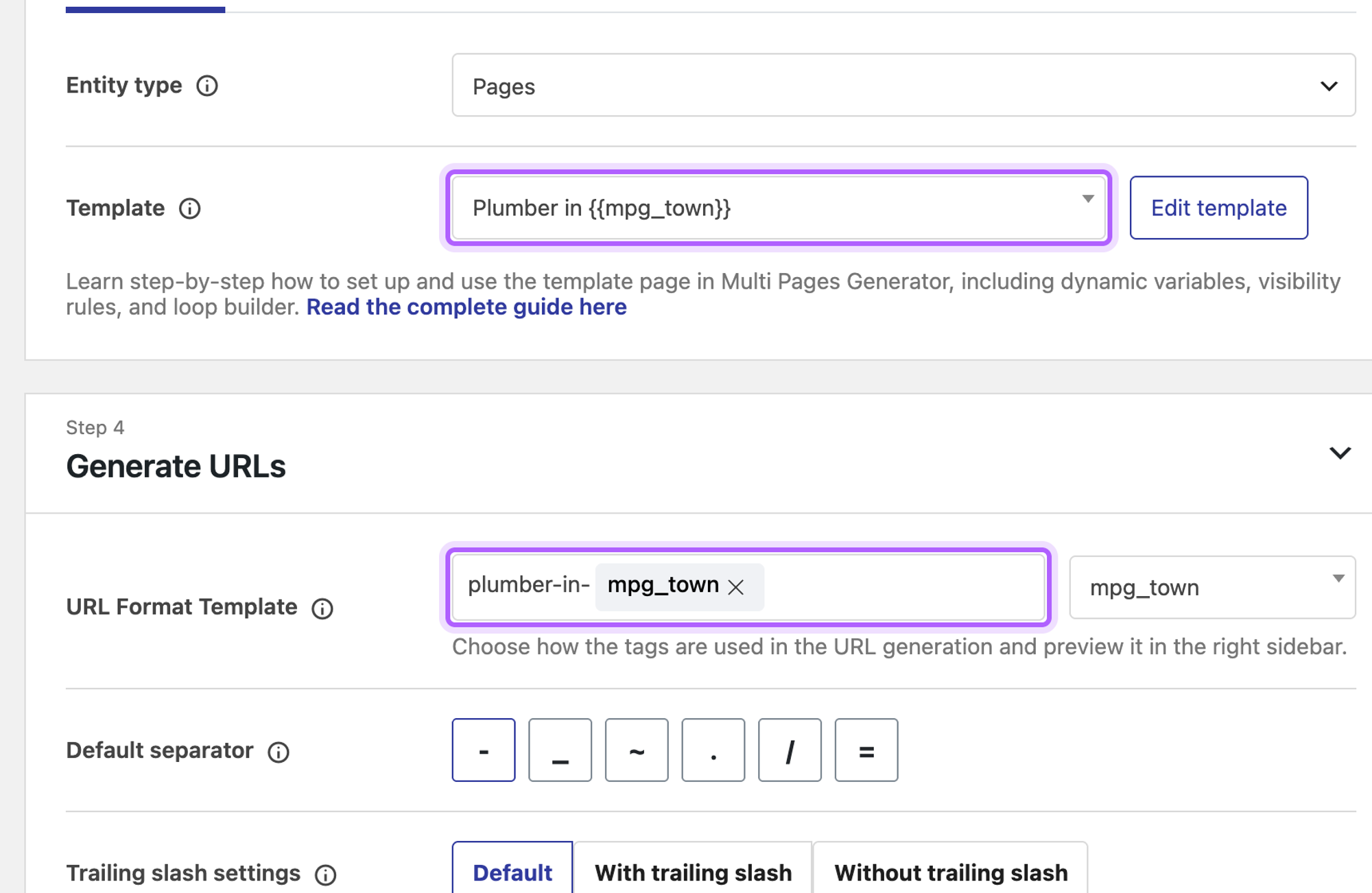
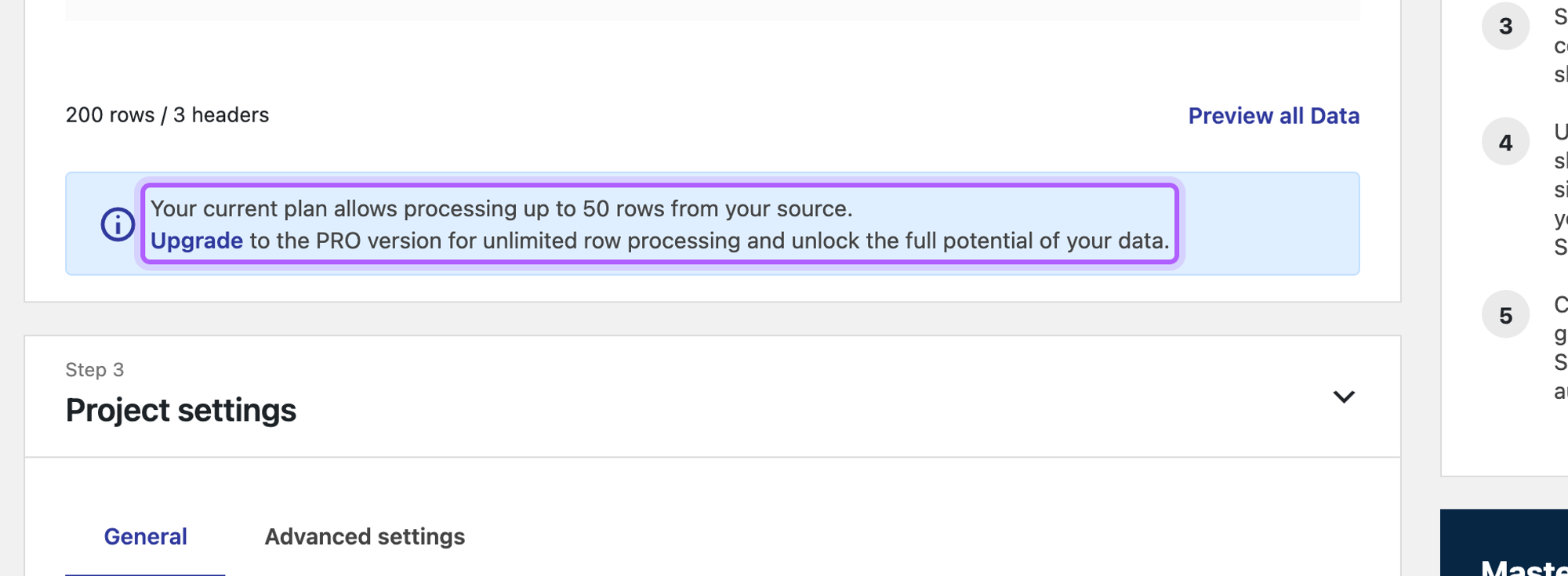
With the 200-row file MPG showed "Your current plan allows processing up to 50 rows from your source." Even so, 192 of the 200 URLs answered after Publish, in 16 seconds. The other 8 did not answer at the address we expected, and we did not trace why. MPG's URL format is a path, so service-areas/ in front of the tags put every URL under /service-areas/. In our run the text between two tags did not stick in the URL editor, so the URLs read /service-areas/drain-cleaningbeaverton/; check the URL preview before you publish. Deleting the project took 2 steps and every URL answered 404 right after, because MPG's pages are virtual: they are not in the Pages list and exist only while the plugin is active.
- 25-page job: 11 steps, 16 seconds, 25 of 25 unique meta descriptions
- 200-row file: 192 of 200 URLs answered despite the 50-row notice
- Parent page: as a path in the URL format
- Remove all: delete the project, 2 steps, URLs return 404
- Elementor template: Yes
- Update test: both changes live, 5 steps, no copies
Pros
- Updates from a changed file on the free version
- Template edits reach every page with no extra step
- Fills SEO plugin fields from the template
- Unlimited columns
Cons
- Virtual pages: not in the Pages list, gone when the plugin is deactivated
- The template must be a published page with the tags in its own title
- Free pages carry a small Generated by MPG link
- A 50-row notice on the free plan
- 3.9 out of 5 from 27 ratings on WordPress.org
MPG Pro costs from $99 a year for one site, read on themeisle.com on 13 October 2026. MPG on WordPress.org and LPagery vs Multiple Pages Generator.
3. Bulk Page Duplicator
Bulk Page Duplicator is a small free plugin that copies one page many times and replaces the placeholder text you name, with a dry run before and an undo button after.
It replaces any text you type, so we typed {town}, {county}, {local_note} and imported the CSV. Two things needed fixing by hand. The import read the header line as a value, so it had to be deleted from the values box. And with a draft template, the first run created 0 pages and skipped all 25 with "Slug "" already exists": the template needs a URL slug before it works. After that it made the 25 pages in 5 seconds with 25 of 25 unique meta descriptions, because it also replaces text in the SEO fields. That was 10 steps.
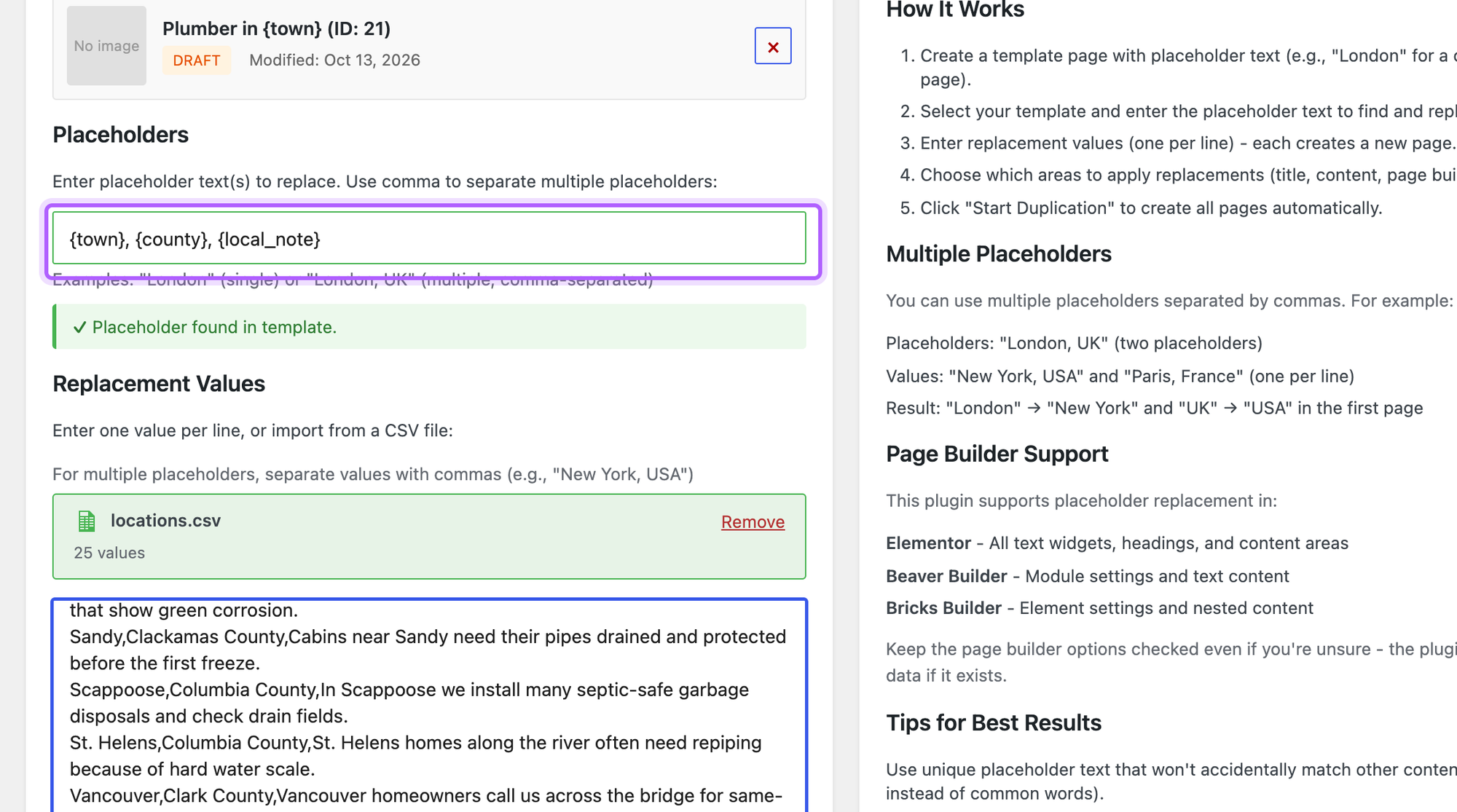
Watch the capital letters. Bulk Page Duplicator replaces a placeholder in several letter cases, and a lowercase placeholder such as {local_note} came out in Title Case: "We Have Replaced More Than 120 Water Heaters In Beaverton Homes Since 2019." on the Beaverton page, and "Drain Cleaning in Beaverton" as a page title. It does not update pages it made: for the update test the dry run marked all 25 rows Skip because their slugs already existed. And because values are split at commas, our changed sentence, which had a comma in it, stopped the run with "Each line must have 3 comma-separated values (one for each placeholder)." With 200 rows it made 200 pages, with a parent page set under Parent Page. Rollback (Delete All) under Recent Operations removed them in 3 steps. It kept the Elementor layout and filled the town in.
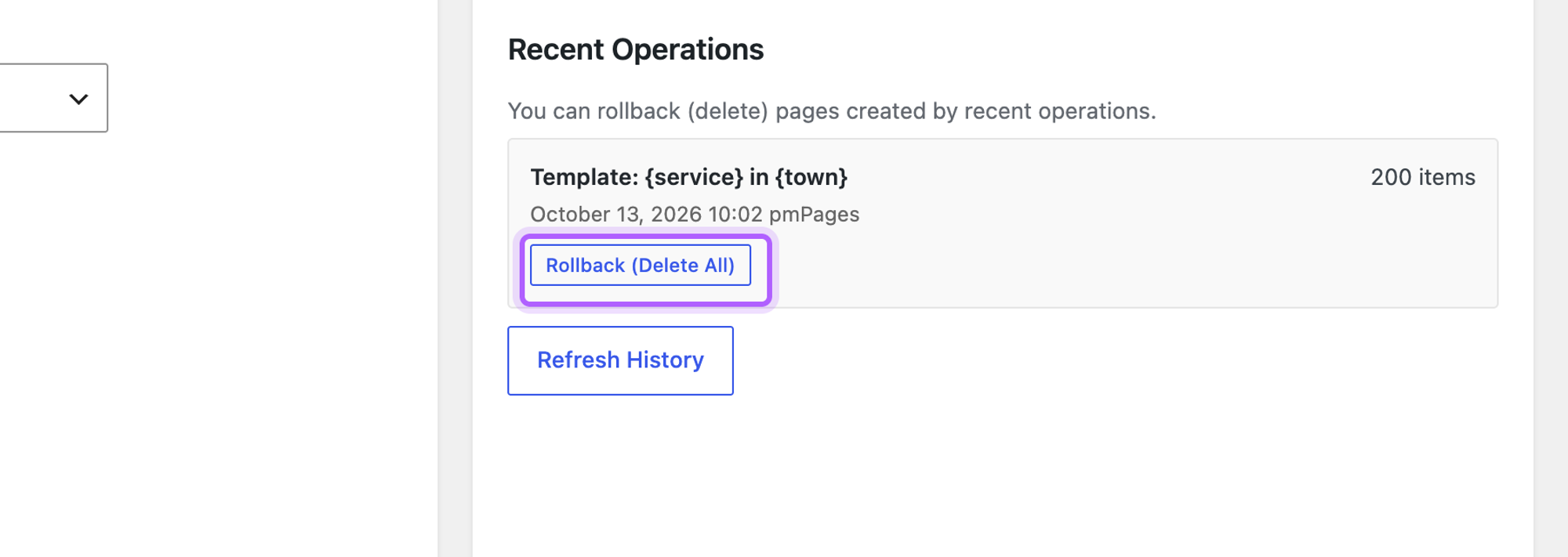
- 25-page job: 10 steps, 5 seconds, 25 of 25 meta descriptions
- 200-row file: 200 pages
- Remove all: Rollback (Delete All), 3 steps
- Elementor template: Yes
- Update test: no change: the dry run marked all 25 rows Skip (slug exists)
Pros
- Dry run shows every title and slug before anything is created
- Rollback removes a whole run
- Replaces text in SEO fields and page builder data
Cons
- The CSV import keeps the header row
- A draft template without a slug creates nothing
- Lowercase placeholders come out in Title Case
- Values are split at commas, so a sentence with a comma breaks the row
- 500+ active installs, 5.0 out of 5 from 2 ratings
Bulk Page Duplicator is free with no paid version. Bulk Page Duplicator on WordPress.org.
4. WP All Import
WP All Import is the free choice when the pages must sit under a parent page or go into any post type, and you can live without SEO fields on the free version.
On the 25-page job it took 14 steps (only PageForge, with 17, took more) and broke our block template: it reads anything in curly braces as a field tag, so block settings such as the hero overlay were dropped. A template written as plain HTML avoids that, and our guide to bulk creating posts covers WP All Import for posts. 0 of 25 pages got a meta description, because custom fields are Pro.
![WP All Import's Drag & Drop step with the title field Plumber in {town[1]} and the template in the content box](https://cdn.sanity.io/images/mjl6isa5/production/a85659217b90dc108ea868227c2166273a9d2745-2200x1200.png?w=2000&auto=format)
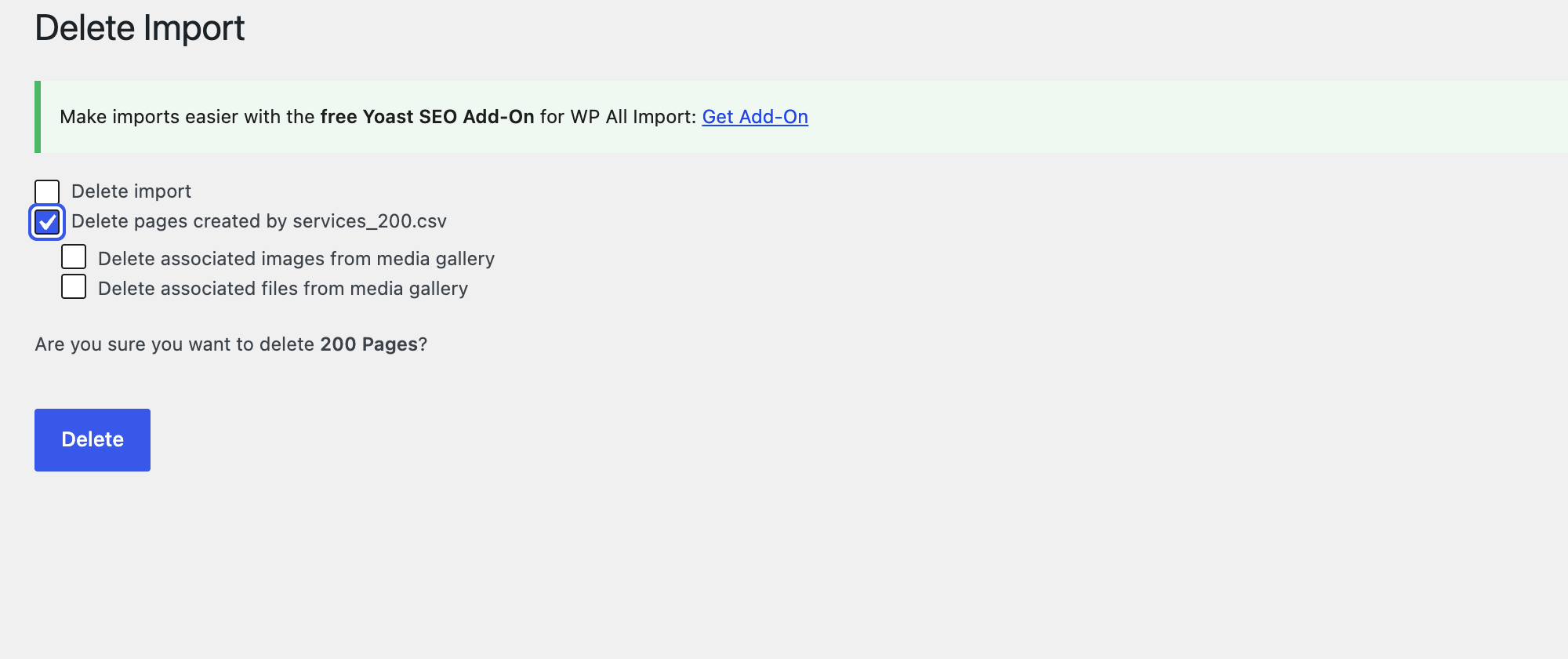
At scale it did well. One import made all 200 pages in 5 seconds, and the page parent setting under Other Page Options put every one of them under /service-areas/. Delete under Manage Imports has a Delete pages created by option, which removed all 200 pages in 4 steps. We did not run the Elementor test: WP All Import has no template page, and Elementor keeps its layout in custom fields, which the free version does not import.
- 25-page job: 14 steps, 24 seconds, 0 of 25 meta descriptions, block settings lost
- 200-row file: 200 pages from one import, 5 seconds
- Parent page: yes, on the free version
- Remove all: 4 steps
- Update test: both changes live, 9 steps
Pros
- No row or page limit hit with 200 rows
- Parent page and page template on the free version
- Removes everything an import made in a few steps
- 100,000+ active installs
Cons
- Block markup loses its settings, so templates need plain HTML
- No meta descriptions without Pro or an add-on
- More steps than most on the 25-page job
- The template lives inside the import, not on a page
WP All Import Pro costs from $149 a year, read on wpallimport.com on 13 October 2026. WP All Import on WordPress.org.
5. Big SEO Programmatic
Big SEO Programmatic is a free mass page generator that reads a CSV from a URL, fills a title and meta description template, and updates the pages it made when you run it again.
It has no file upload: the source must be a CSV at a URL, so we uploaded the file to the media library and pasted its address. The template page has to be published, because the Content Template list only shows published pages. The 25 pages then took 14 steps and under 1 second, with 25 of 25 unique meta descriptions and 0 of 25 pages with one H1: the generated pages do not take over the template's page template setting, so the theme printed the title as a second H1 above the hero. The layout also changed: the hero text moved to the left edge, the second button lost its outline, and a visitor loaded 13 files and 1,018 KB against 15 files and 1,512 KB for the same page made by hand. Running it again with the changed file updated the pages in place: both changes were live and no copies were made.
It was the fastest at scale: 200 pages from the 200-row file in 2 seconds. A slash in the URL Pattern became a hyphen (/service-areas-leak-detection-in-canby/), so we found no way to put pages under a parent page. Delete Pages in the project list removed all 200 in 3 steps.

- 25-page job: 14 steps, under 1 second, 25 of 25 unique meta descriptions
- 200-row file: 200 pages in 2 seconds
- Remove all: Delete Pages, 3 steps
- Update test: both changes live, no copies
- 100+ active installs, no ratings yet
Pros
- Updates pages in place on the free version
- Title and meta description templates
- Fast, and removes a whole project's pages in a few steps
Cons
- CSV from a URL only, no upload
- The template page must be published
- Two H1s per page and a changed layout with our block template
- No parent page
- Very small install base and no ratings yet
Big SEO Programmatic is free. Big SEO Programmatic on WordPress.org.
6. Page Generator (WP Zinc)
Page Generator, the free version of Page Generator Pro, fits short keyword lists that you type in, such as a list of towns, when you do not want a spreadsheet.
The free version does not read a CSV, so each column became a keyword with its terms pasted in. The 25 pages took 11 steps and had no meta description, and generating again made copies. With 200 terms per keyword it made 200 pages in 22 seconds. We found no parent page setting in the free content group, and its sidebar says page builders, posts, custom post types and scheduling need Page Generator Pro. Trash Generated Content moved all 200 pages to the trash in 3 steps; Delete Generated Content next to it deletes them for good.
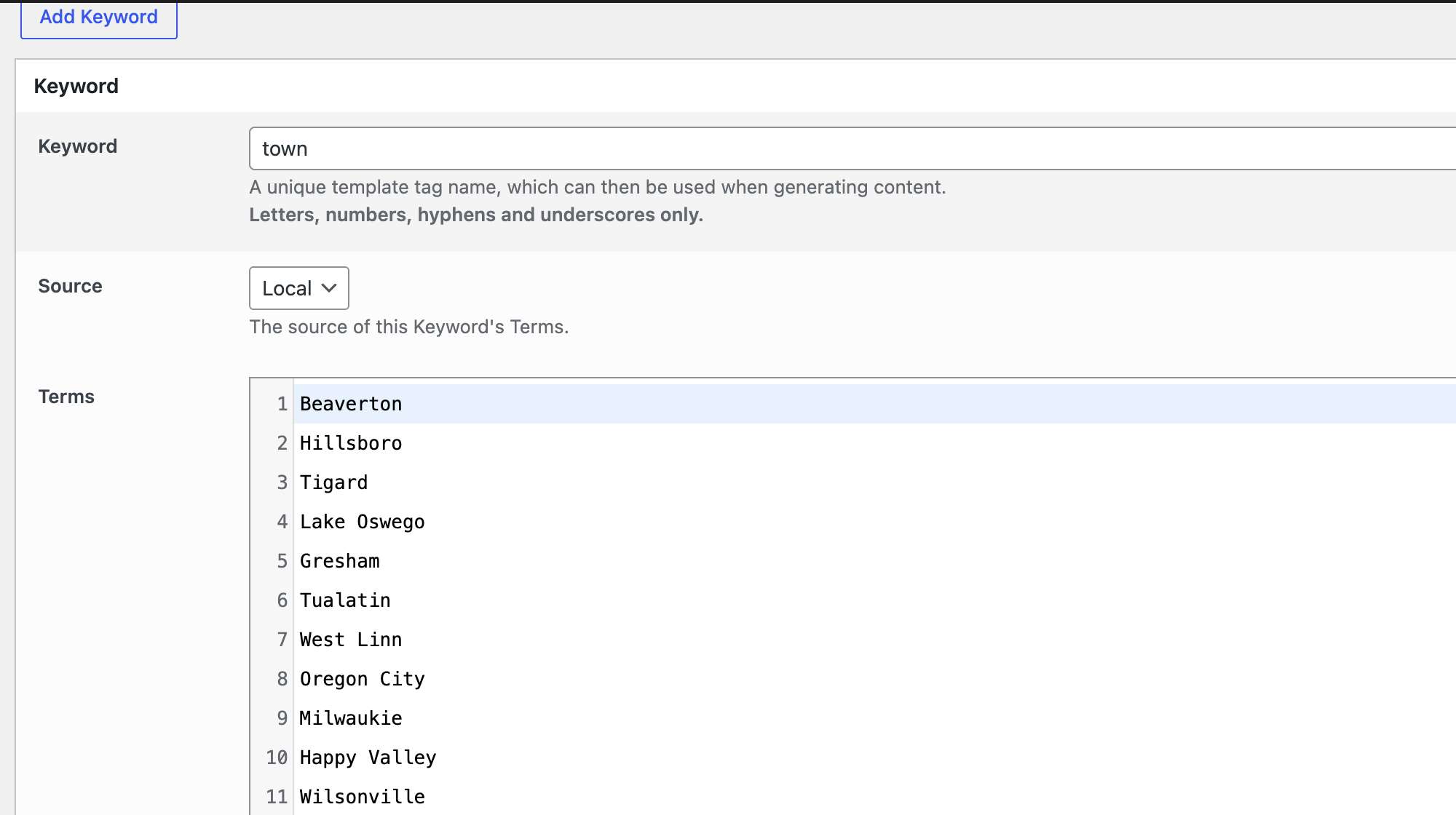
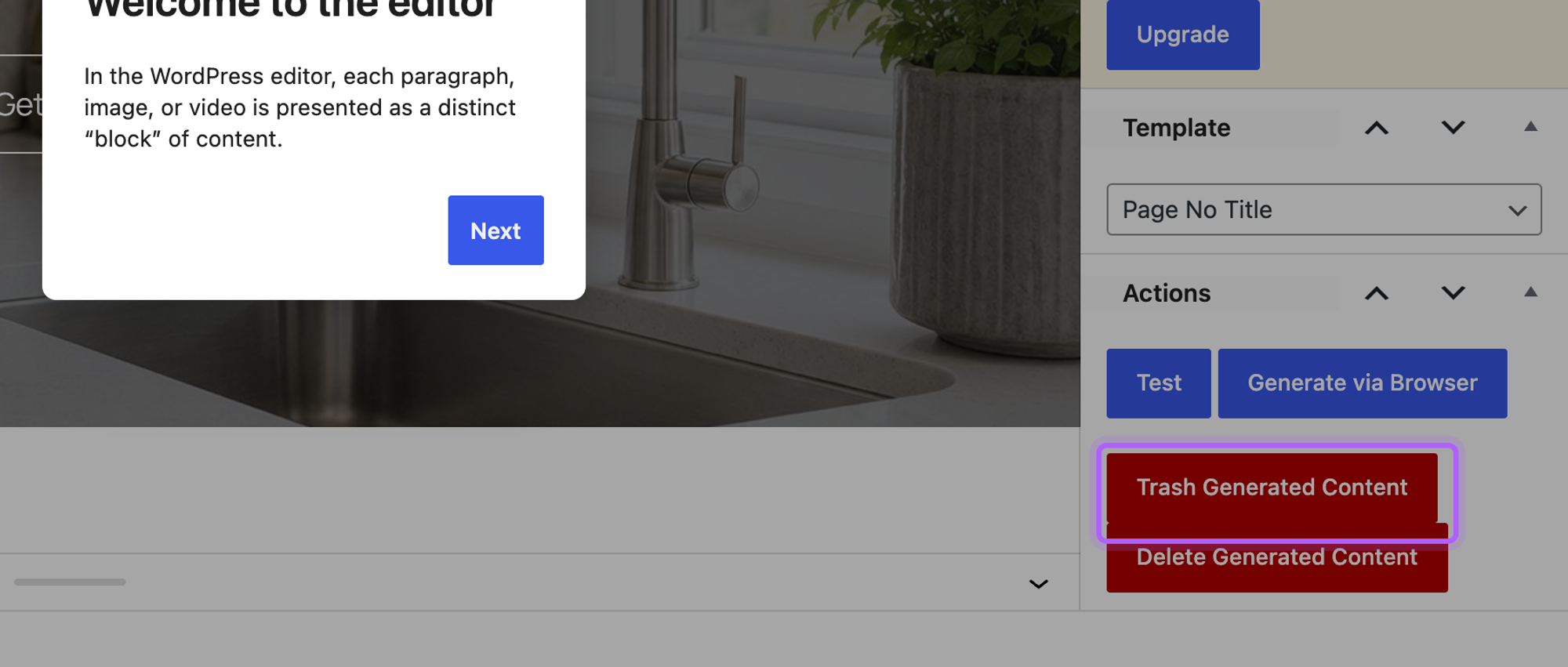
- 25-page job: 11 steps, 33 seconds, 0 of 25 meta descriptions
- 200 terms per keyword: 200 pages
- Parent page: not on the free version
- Elementor: page builders are Page Generator Pro
- Update test: 25 copies with -2 URLs
Pros
- No spreadsheet needed
- Real WordPress pages
- Trash and delete buttons for everything a group made
Cons
- No CSV import, no SEO fields and no page builders on the free version
- Generating again makes copies
- No parent page setting
Page Generator Pro costs $99 a year for one site or $299 once, read on wpzinc.com on 13 October 2026. Page Generator on WordPress.org and LPagery vs Page Generator Pro.
7. PageForge
PageForge is a newer mass page generator that writes an SEO title and meta description from a pattern and uses an existing page as the layout.
PageForge took 17 steps: upload the CSV under Data Sources, create a template with a Title Pattern, Meta Description Pattern and Slug Pattern, pick the existing page under Base Layout from Existing Page or Template, then choose both on Generate Pages and click Start. The 25 pages were live in 4 seconds, each with a unique title, meta description and H1. The Target Post Type starts on PageForge's own post type, so pick Page if you want normal pages.
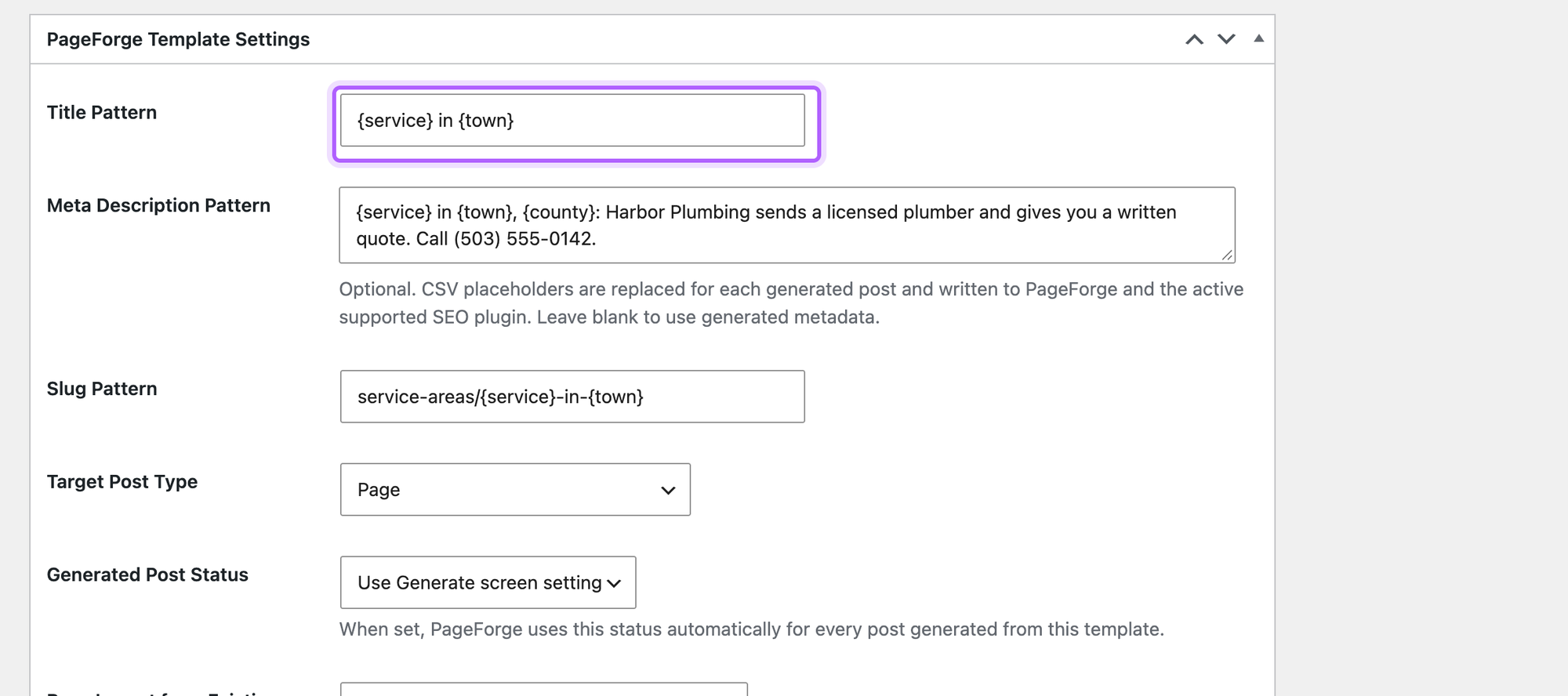
PageForge failed the update test. After we changed the template and one row and ran Start again, the log reported "Exists" for every row and no page changed. The free version makes up to 100 pages per run and reads CSV only; the Data Sources screen says Google Sheets is not included in the free build. From the 200-row file it made 100 pages in 4 seconds and said "Free build processes up to 100 pages per run. 100 rows were skipped." We found no parent page setting, and a slash in the Slug Pattern became a hyphen (/service-areas-water-heater-repair-in-sandy/). There is no delete either, so removing its pages goes through the Pages screen. With our Elementor page as the base layout it made only 1 page and reported "Exists" for the other 24 rows, although the same slug pattern had worked with the block template.
- 25-page job: 17 steps, 4 seconds, 25 of 25 unique meta descriptions
- 200-row file: 100 pages from one run
- Elementor template: No: 1 page made, the other 24 rows reported Exists
- Update test: no change, every row reported Exists
Pros
- SEO title and meta description patterns on the free version
- Any existing page as the base layout
- Fast runs
Cons
- Does not update pages it already made
- Our Elementor template produced 1 page instead of 25
- 100 rows per run and CSV only on the free version
- Defaults to its own post type
- 60+ active installs
PageForge Starter costs $49 a month or $467 a year for one site, read on pageforge.pro on 13 October 2026; Google Sheets and scheduling are listed on the paid plans. PageForge on WordPress.org and LPagery vs PageForge.
Which mass page generator should you choose?
- Choose LPagery if you want real pages built from your own designed page with SEO fields per page, can live with 100 pages per run on the free version, and will pay for Extended when the pages must follow your spreadsheet or Google Sheet.
- Choose Multiple Pages Generator if your data changes often, you are fine with virtual pages, and you want updates on the free version.
- Choose Bulk Page Duplicator for a one-off batch of copies under a parent page that you may want to undo, and check its letter case and commas in a dry run first.
- Choose WP All Import if the pages must sit under a parent page or in another post type and your template is plain HTML.
- Choose Page Generator if you have a few short keyword lists and no spreadsheet.
- Choose PageForge if you want SEO title and meta patterns and will not need to update the pages later.
- Choose Big SEO Programmatic if your CSV already lives at a URL and you want free in-place updates, and can accept a plugin with very few users so far.
Whichever you pick, put something specific to each row on the page. In the same lab, the 25 pages built from three columns were 89% identical to each other in their visible text; pages built from twelve columns per town were 57% identical. Our guides to local landing pages and programmatic SEO in WordPress cover what to put on them.
Plugins we tested or checked but left out
- Mass Pages/Posts Creator (1,000+ installs): makes pages from a prefix and a comma-separated list of names, all with the same content. In our test it made 25 pages, all with the status Pending, because Publish is locked on the free version (templates, author and parent pages are marked Pro too). The {town} placeholders stayed in the content, and with a space after each comma, as in the plugin's own example, every title after the first got a double space ("Plumber in Hillsboro").
- Bulk Page Creator (10,000+ installs, last updated in May 2022): makes pages from a list of names with one shared content. It made 25 pages in our test with identical text: the placeholders {town}, {county} and {local_note} were still on every page, because it has no data columns.
- WP Ultimate CSV Importer (20,000+ installs): the desktop upload stayed on Uploading in four runs in our lab, so we could not finish the job.
- Bulk Page Stub Creator: makes empty pages from a list of titles and slugs, by its own description; not a template tool.
- Not installed: SEO Landing Page Generator (40+ installs, built around its own US city list) and P2PForge (no reported installs), both too new or too small to recommend yet.
- Magic Page Plugin: paid only, from $9.99 a month or $99 a year for one site (magicpageplugin.com, read 13 October 2026), with no free version to test. Our LPagery vs Magic Page Plugin page compares it.
- Page Generator Pro and MPG Pro: the paid versions were not tested in this run; their free versions are on the list. Our bulk page generator comparison covers the paid features.
FAQ
What is the best WordPress page generator plugin?
Overall, LPagery, based on LPagery Pro (Extended plan for updates, sync and delete): it was the only plugin that passed all seven of our checks and took the fewest steps (8); the free version scored 3 of 7. On the free versions, Multiple Pages Generator passed the most checks (6 of 7), followed by Bulk Page Duplicator (5) and WP All Import (4). We did not test the other plugins' paid plans. The right one depends on whether you need updates, a parent page, SEO fields or an Elementor layout.
Is there a free mass page generator for WordPress?
Yes. Every plugin on this list has a free version on WordPress.org. The limits we hit: LPagery makes 100 pages per run with 3 columns, PageForge 100 rows per run, MPG shows a 50-row notice, Page Generator has no CSV import and WP All Import has no SEO fields without Pro.
How many pages can a free bulk page generator create?
From our 200-row file: WP All Import made 200 pages in one run, Page Generator 200, LPagery 100 per run (200 in two runs) and PageForge 100. MPG answered on 192 of 200 URLs despite its 50-row notice.
Can I bulk create pages from an Elementor template?
Yes, with a plugin that copies Elementor's layout data. In our test LPagery, MPG and Bulk Page Duplicator kept the Elementor layout with the town filled in. PageForge made 1 page from our Elementor template and reported "Exists" for the other 24 rows. Page Generator needs Pro for page builders, and WP All Import's free version does not import the custom fields Elementor uses. Elementor itself cannot create pages in bulk.
Can generated pages go under a parent page like /service-areas/?
On the free versions, WP All Import and Bulk Page Duplicator have a parent page setting, and MPG gets the same URL with a path in its URL format. LPagery needs the Standard plan for parent pages and URL slugs.
How do I delete pages I created in bulk?
Use the plugin's own delete if it has one: WP All Import's Delete with the pages option took 4 steps, deleting an MPG project took 2, Bulk Page Duplicator's Rollback (Delete All) 3 and LPagery's Delete Pages (Extended) 5. Without one, WordPress's Pages screen does it: set Screen Options to show all pages, select them, Move to Trash, then Empty Trash (7 steps in our test).
Are mass generated pages bad for SEO?
Pages that only swap a town name are close to identical, and Google's spam policies name scaled content made mainly to rank. Give each page facts of its own, such as local details, prices or reviews, and only make pages you would link to from your own site.
Sources
- Lab measurements: our tests on WordPress 7.1.3, 13 and 14 October 2026
- WordPress.org plugin pages for LPagery, MPG, WP All Import, Page Generator, PageForge and Bulk Page Duplicator, read on 13 October 2026
- Pricing pages read on 13 October 2026: LPagery, MPG, Page Generator Pro, WP All Import, PageForge, Magic Page Plugin
- Google Search Central: spam policies, scaled content abuse
I've worked in SEO for more than ten years and helped over 100 businesses rank higher, mostly local businesses, e-commerce stores and SaaS companies. As co-founder of LPagery I work on local SEO, programmatic SEO and AI search visibility, and I test the strategies in these articles on our own sites and with our customers.
I've worked in SEO for more than ten years and helped over 100 businesses rank higher, mostly local businesses, e-commerce stores and SaaS companies. As co-founder of LPagery I work on local SEO, programmatic SEO and AI search visibility, and I test the strategies in these articles on our own sites and with our customers.