AI Blog Post Generator for WordPress: 5 Best of 7 Tested

Updated
Part of the guide: Programmatic SEO and local landing pages in WordPress
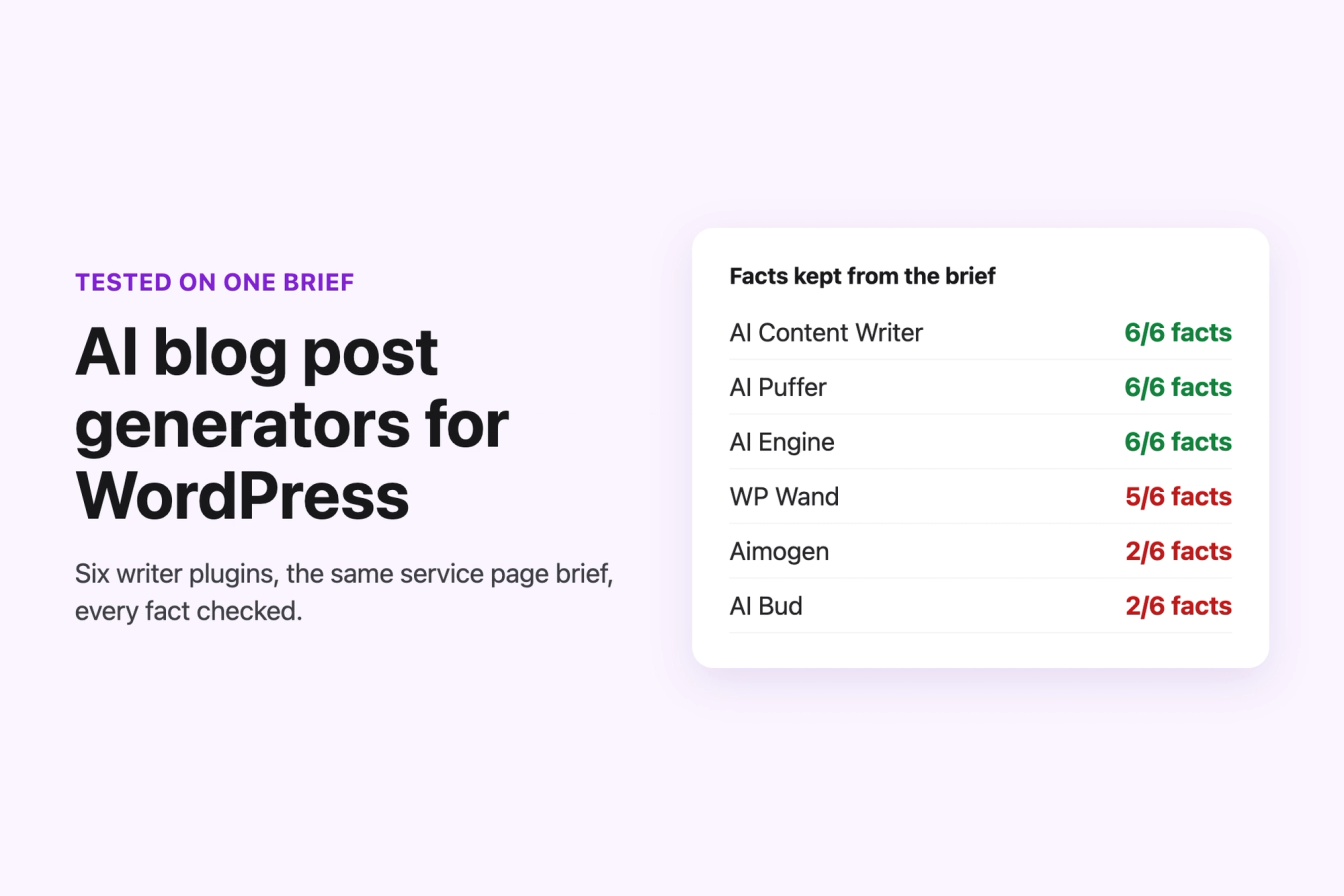
An AI blog post generator for WordPress writes a draft from your brief inside wp-admin and saves it as a post, so you edit, schedule and publish it like any other post. We gave seven free AI content generator plugins from wordpress.org the same two briefs (a 600-word blog post and a 400-word local service page with six facts it had to keep) and checked every output against the brief: facts kept, length, claims the AI added, SEO fields, links, editing, bulk and scheduled posts, and cost.
Best overall: AI Content Writer, which kept all six service page facts at 455 words and can publish one post a day from a campaign. Best for editing posts you already have: AI Engine, whose Shorter Text cut a 55-word paragraph to 34 words in place in 5 seconds. Best for SEO fields: AI Puffer. Whether you want a WordPress AI blog that publishes on its own or help with one article, these five are the ones worth installing. For unique text on many pages from a spreadsheet we also describe LPagery AI, our own product, from its code; that part was not tested hands-on.
Last tested 13 October 2026 on WordPress 7.1.3. We make LPagery, which is described after the five ranked plugins. We have no ties to any other plugin here, and nobody paid to be included. The Outrank link further down is an affiliate link: we earn a commission if you buy. It did not affect the ranking, and Outrank is not in the ranked five.
Plugin | Best for | Facts kept (blog / service page) | Service page length (400 asked) | Bulk or schedule in the free version | Active installs |
|---|---|---|---|---|---|
AI Content Writer | Scheduled posts that publish themselves | 5 of 5 / 6 of 6 | 455 words | Yes: campaigns up to 20 posts, hourly to monthly | 200+ |
AI Engine | Editing paragraphs in the block editor | 5 of 5 / 6 of 6 | 614 words | No | 90k+ |
AI Puffer | Posts with excerpt, meta description and tags filled | 5 of 5 / 6 of 6 | 428 words | Bulk yes; the schedule column was not applied in our runs | 10k+ |
WP Wand | Batches of drafts from a title list | 5 of 5 / 5 of 6 | 1,433 words | Yes: 5 bulk and 5 scheduled runs a month | 1k+ |
Aimogen | Many AI providers, OpenAI EU processing | 2 of 5 / 2 of 6 | 579 words | One post with a publish date; bulk is Pro | 400+ |
LPagery (described, not ranked) | Many pages from a sheet; AI part not tested hands-on | Not tested hands-on | Not tested hands-on | Bulk pages from a sheet (free); AI needs a paid plan | 3k+ |
From us: LPagery
We make LPagery, and this list ranks blog writers, so LPagery is not in it. LPagery is a bulk page tool. If you need unique text on many pages at once, such as one page per town or service, LPagery builds them from one template and a spreadsheet, and LPagery AI writes each page's heading, intro and meta description from that row's data. We ran the free plugin in our lab; the AI part was not tested hands-on and is described from its code further down. See the Bulk Page Generator.
What the test showed before you pick one
Three things decided the ranking more than any feature list, and none of the ranking articles for this search measured them.
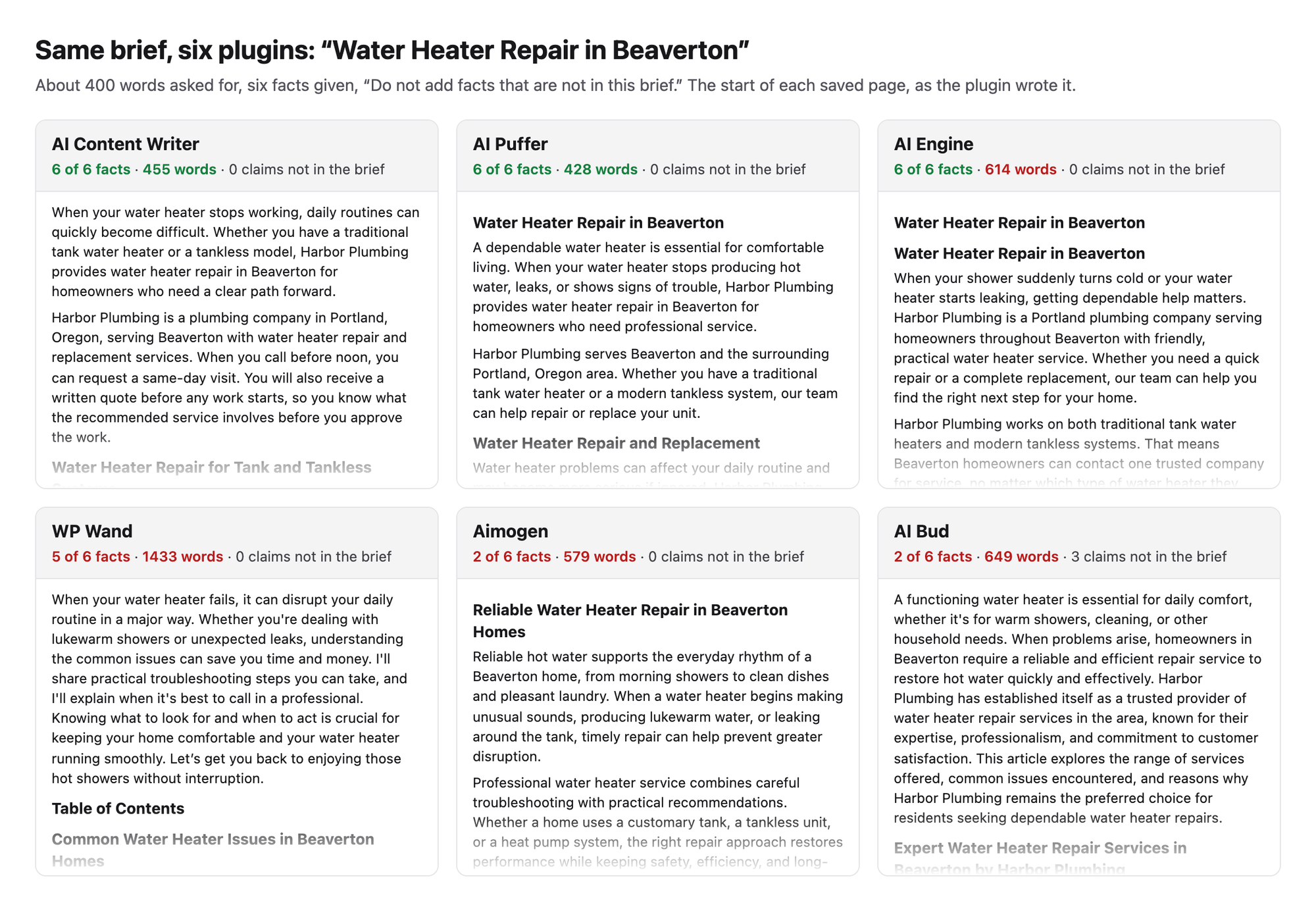
- How much of your brief survives. With the brief pasted into one free-text field, AI Content Writer, AI Puffer and AI Engine kept all six facts. Aimogen and AI Bud turn your text into a topic for their own title and section prompts, and kept only 2 of 6 (Aimogen) and 2 of 6 (AI Bud): no phone number, no guarantee, no written quote.
- What the AI adds on its own. The service brief ended with "Do not add facts that are not in this brief." AI Bud still called the team "licensed and experienced technicians" and promised "transparent pricing" twice. WP Wand's blog post priced replacement cartridges at $10 to $25 and plumber's grease at $5, numbers no brief gave it. A business page that says "licensed" when you are not is a problem you publish under your own name.
- Length control. Asked for about 400 words, WP Wand wrote 1,433 and added a table of contents and an FAQ by default. AI Content Writer (455) and AI Puffer (428) were the only two within 300 to 500 words.
Two more findings apply to every plugin we ran: none of the outputs contained a single link to another page of the site, so internal links stay your job, and none of the writers offers a label that tells readers a post was written with AI.
How we tested the AI blog post generators
Jonas Lindemann from the LPagery team, which builds WordPress plugins, ran every test on 13 October 2026 in a local WordPress lab: WordPress 7.1.3, PHP 8.3.35, the Twenty Twenty-Five theme, Apache in Docker, driven by a script in headless Chrome. Every plugin started from a fresh copy of the same example site, Harbor Plumbing in Portland, Oregon, and was tested alone. Each plugin got the same OpenAI API key; where it let us pick the model we chose GPT-5.6 Luna, OpenAI's low-cost model. Where GPT-5.6 Luna was missing or failed we used another low-cost model that worked (GPT-4o Mini in WP Wand, GPT-4.1 Nano in AI Bud).
This article goes deeper on writing than our test of the best AI plugins for WordPress, which covers chatbots, alt text, SEO meta and translation as well. We reused that test's blog post results for AI Engine, AI Puffer and MxChat (same brief, same lab, same day), plus five of its screenshots, and ran everything else new for this article.
The tests:
- Blog post brief: "How to Fix a Leaking Kitchen Faucet", about 600 words, five facts (shut-off valves, cartridge or O-ring, the phone number, same-day visits, a one-year guarantee).
- Local service page brief, the page type local businesses need most (see our local SEO plugin test): "Water Heater Repair in Beaverton", about 400 words, H2 subheadings, a call to action, six facts (tank and tankless, same-day visits when you call before noon, a written quote, a one-year guarantee on parts and labor, the phone number, Beaverton), and the line "Do not add facts that are not in this brief."
- Claims check: a script flagged every sentence with licences, years in business, 24/7 or emergency service, prices, free estimates, ratings, other guarantees, other phone numbers or pricing promises, and we read each flagged sentence before counting it.
- Editing: the same 55-word paragraph in an existing post, shortened with the plugin's own editor tool.
- Bulk and scheduling: three post titles queued at once with whatever bulk or schedule feature the free version has.
- SEO fields and links: excerpt, meta description, focus keyword and tags saved with the post, and links inside the text.
- Cost, data flow and AI labels: the cost the plugin shows, or an estimate from the output length at OpenAI's list price; which servers each plugin sends your text and key to, read in its code; and any option to label AI content for readers.
We installed 13 plugins in total. Seven ran the writing briefs: AI Content Writer, AI Engine, AI Puffer, WP Wand, Aimogen, AI Bud and MxChat; the best five are ranked below. Five need their own account or send your key to their own server, so we opened them up to that point and stopped: BotWriter, AI WP Writer, AutoWP, GetGenie and Jetpack AI. LPagery's free plugin was run in the lab; its AI part was not, so it is described after the ranking without a rank. AI response times are single runs and vary from run to run, so read them as rough figures.
1. AI Content Writer
AI Content Writer is the best AI blog post generator for WordPress in this test if you want an AI blog on WordPress whose posts follow your brief and publish on a schedule without you.
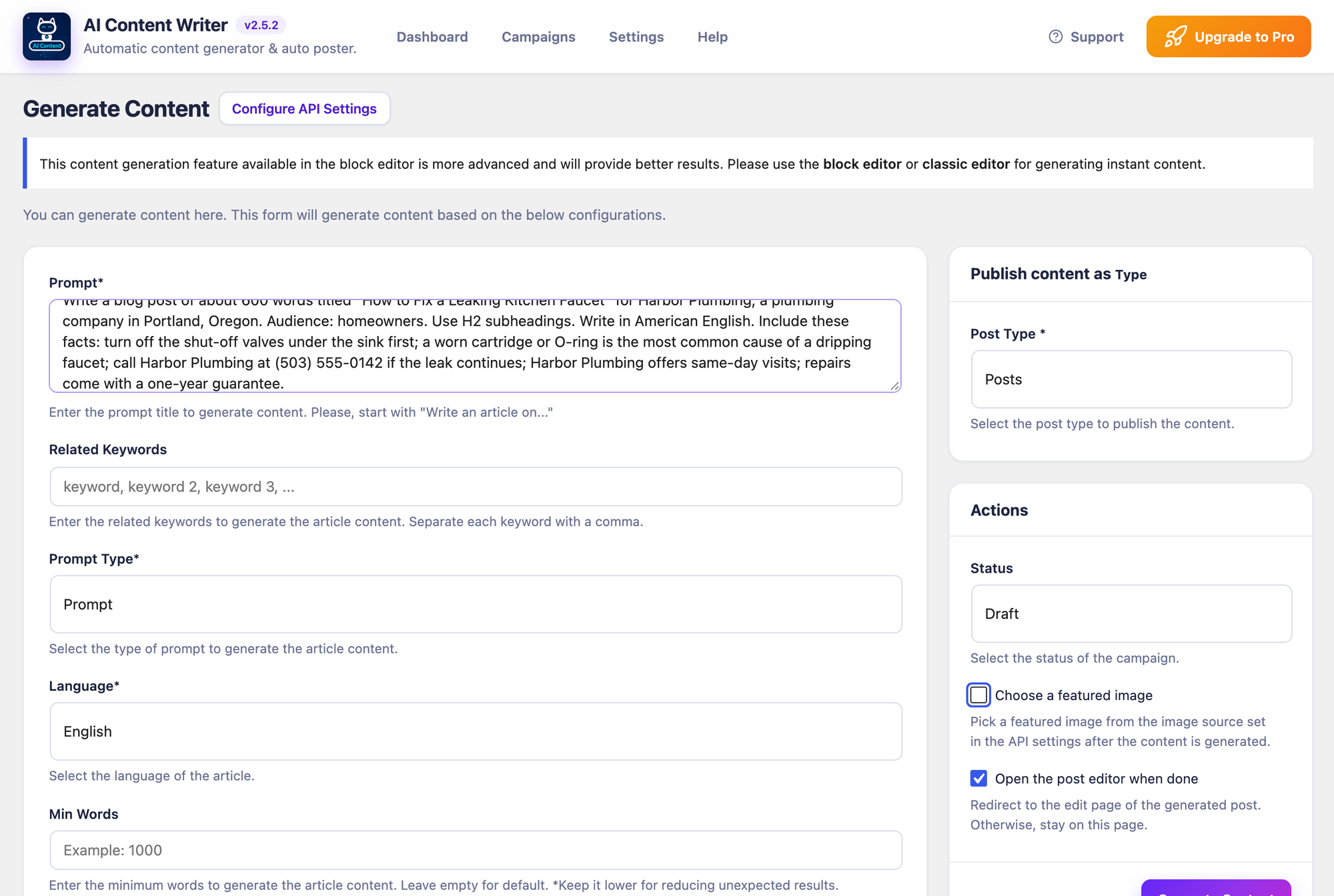
Setup took seven steps under AI Content Writer > Settings > API: pick ChatGPT as the API model, paste the key, save, then pick the model (the list loads after the first save; gpt-5.6-luna was on it). The single-post writer is Generate Content: one Prompt field, a post type, a status and Generate Content. We pasted each brief into Prompt and nothing else.
Both outputs were the closest to the brief of any plugin. The blog post had 697 words and all five facts, the service page 455 words and all six facts, with no claims the brief did not give. The service page was in the editor 10.3 seconds after the click. Every post came with an excerpt, an SEO title, a 140-character meta description, a focus keyword and five tags. The plugin stores these with the post and, with no SEO plugin active, prints the meta description in the page head (we checked the published page); its settings say it writes them into Yoast SEO, Rank Math, All in One SEO or SEOPress when one of them is active (our test of free SEO plugins compares those).
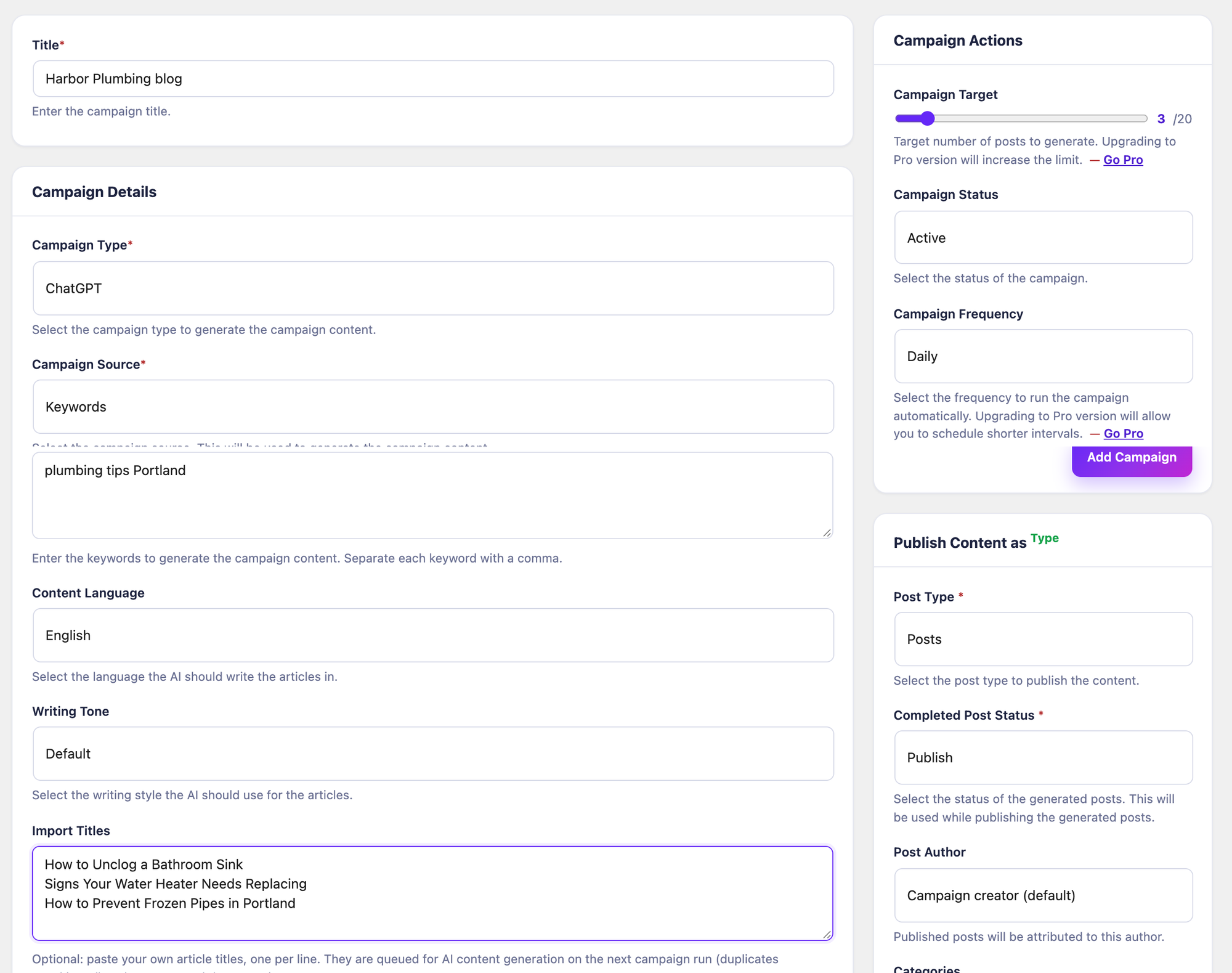
Campaigns are the reason it ranks first. A campaign of type ChatGPT takes your own titles under Import Titles, a Campaign Target (up to 20 posts in the free version), a Campaign Frequency from Hourly to Monthly and a Completed Post Status. With Publish and Daily, the first run is due 24 hours after you save. We ran the due WP-Cron event by hand instead of waiting a day: the first run wrote the article (917 words) into the campaign queue, the second published it as a normal post with its meta description in the page head. One article per run, so Daily means one new post a day.
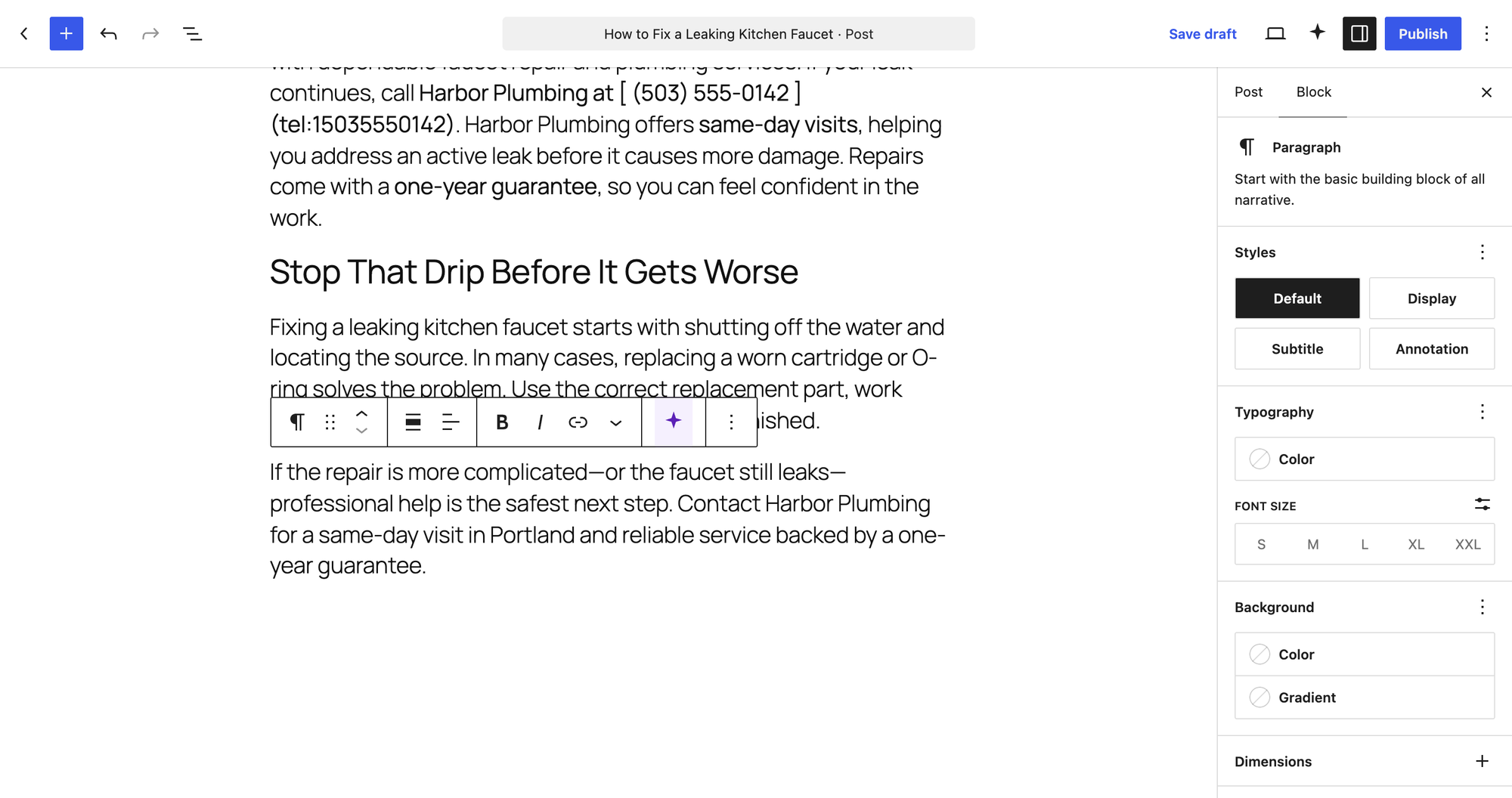
Two things to check before you rely on it. Posts arrive as one Classic block; Convert to blocks in the editor fixes that in one click. And in two of four runs a link came out as Markdown text instead of a link: the phone number appeared as " (503) 555-0142 " in the post. Read every post before it goes live, or set the campaign to Draft.
- Setup: 7 steps, own key (ChatGPT or Gemini in the free version).
- Blog post: 697 words, 5 of 5 facts, 0 added claims.
- Service page: 455 words, 6 of 6 facts, 0 added claims, 10.3 seconds.
- SEO fields: excerpt, SEO title, meta description, focus keyword, 5 tags. Internal links: 0.
- Edit a paragraph: no tool for that; the editor sidebar writes new content from a prompt.
- Scheduled posts: campaign published one post per run; 10 steps to set up.
- Adds to the page a visitor loads: 0 KB.
Pros
- Kept every fact of both briefs and stayed close to the requested length.
- Campaigns publish on a schedule in the free version, with your own titles.
- Fills SEO fields and hands them to the common SEO plugins.
Cons
- Small user base: 200+ active installs and 2 ratings on wordpress.org.
- Content arrives as one Classic block, and Markdown links sometimes stay as plain text.
- No way to rewrite a selected paragraph; Claude, DeepSeek and OpenRouter are Pro.
AI Content Writer Pro costs from $39 a year or $99 lifetime for one site and raises the campaign target from 20 to 999 posts, adds drip scheduling, three more AI providers and a Related Articles links section (read on the vendor's pricing page on 13 October 2026).
AI Content Writer on WordPress.org and AI Content Writer Pro.
2. AI Engine
AI Engine is the pick if you already have posts and want AI to shorten, correct or rewrite paragraphs where they are, plus a careful writer for new drafts.
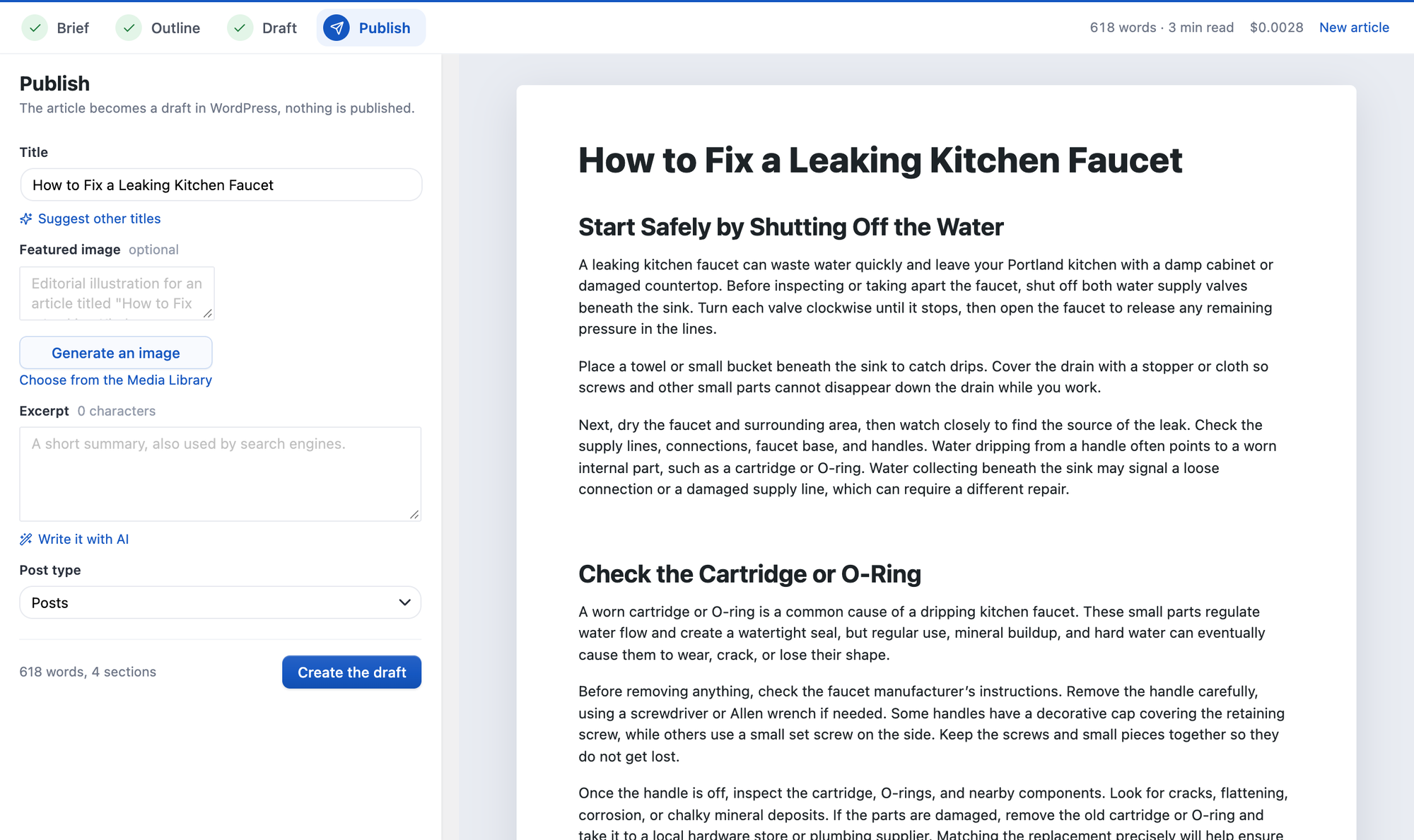
The writer, Tools > Generate Content, works in four stages: Brief, Outline, Draft and Publish. For the service page we picked Short ~600 words (the shortest option) and pasted the brief into Notes for the writer. The outline took 6.7 seconds and the draft 26.5 seconds. It kept all six facts and added nothing, at 614 words; in our sister test the blog post had 644 words and all five facts. The Publish step shows what the run cost on your key: $0.0022 for the service page and $0.0028 for the blog post. It saves no excerpt, meta description or tags.
Editing is where it wins. Turn on AI Copilot under Modules (it is off by default), select text in the block editor and the toolbar gets an AI Wand with Correct Text, Enhance Text, Longer Text, Shorter Text, Translate Text, Suggest Synonyms and Generate Image, all in the free version. Shorter Text turned our 55-word paragraph into 34 words in 5 seconds and replaced it in place, with the shut-off valve instruction still in it.
The free version has no bulk or scheduled writing; you schedule its drafts with WordPress's own publish date. One security note: AI Engine prints your API key into the source of its admin pages, so do not share screenshots of page source or HTML exports from them.
- Setup: 3 steps, own key (OpenAI, Anthropic, Google, OpenRouter and others).
- Blog post: 644 words, 5 of 5 facts, 0 added claims, $0.0028 shown.
- Service page: 614 words, 6 of 6 facts, 0 added claims, 33.2 seconds, $0.0022 shown.
- Edit a paragraph: Shorter Text, 55 to 34 words in place, 5 seconds.
- SEO fields: none saved. Internal links: 0. Bulk or schedule: not in the free version.
Pros
- The best in-editor editing of the test, free and in place.
- Shows the cost of every article, so you know what your key is spending.
- Most used plugin here: 90k+ active installs, 4.9 out of 5 from 870 ratings.
Cons
- No bulk writing, no schedule, no SEO fields in the free version.
- The shortest length option is about 600 words, so short pages come out long (614 for a 400-word brief).
- Prints the API key into its admin page source.
AI Engine Pro starts at $79 a year for one site (read on the Meow Apps pricing page on 13 October 2026).
AI Engine on WordPress.org and AI Engine Pro.
3. AI Puffer
AI Puffer (formerly AI Power) is the pick when the post should arrive with its SEO fields filled and you want several posts from one list.
The setup wizard asks what you want to do, then for your key, in seven steps. AI Puffer > Content Writer takes the brief as the Topic and writes in the plugin's default Short template. The service page took 17 seconds: 428 words, all six facts and no added claims in the text. The saved post had an excerpt, a meta description, a focus keyword and eight tags. Two details were not ours: the title and tags called the business "Harbor Plumbing Services", and one tag was "emergency water heater service", which the brief does not offer. In the sister test the blog post had 716 words and all five facts.
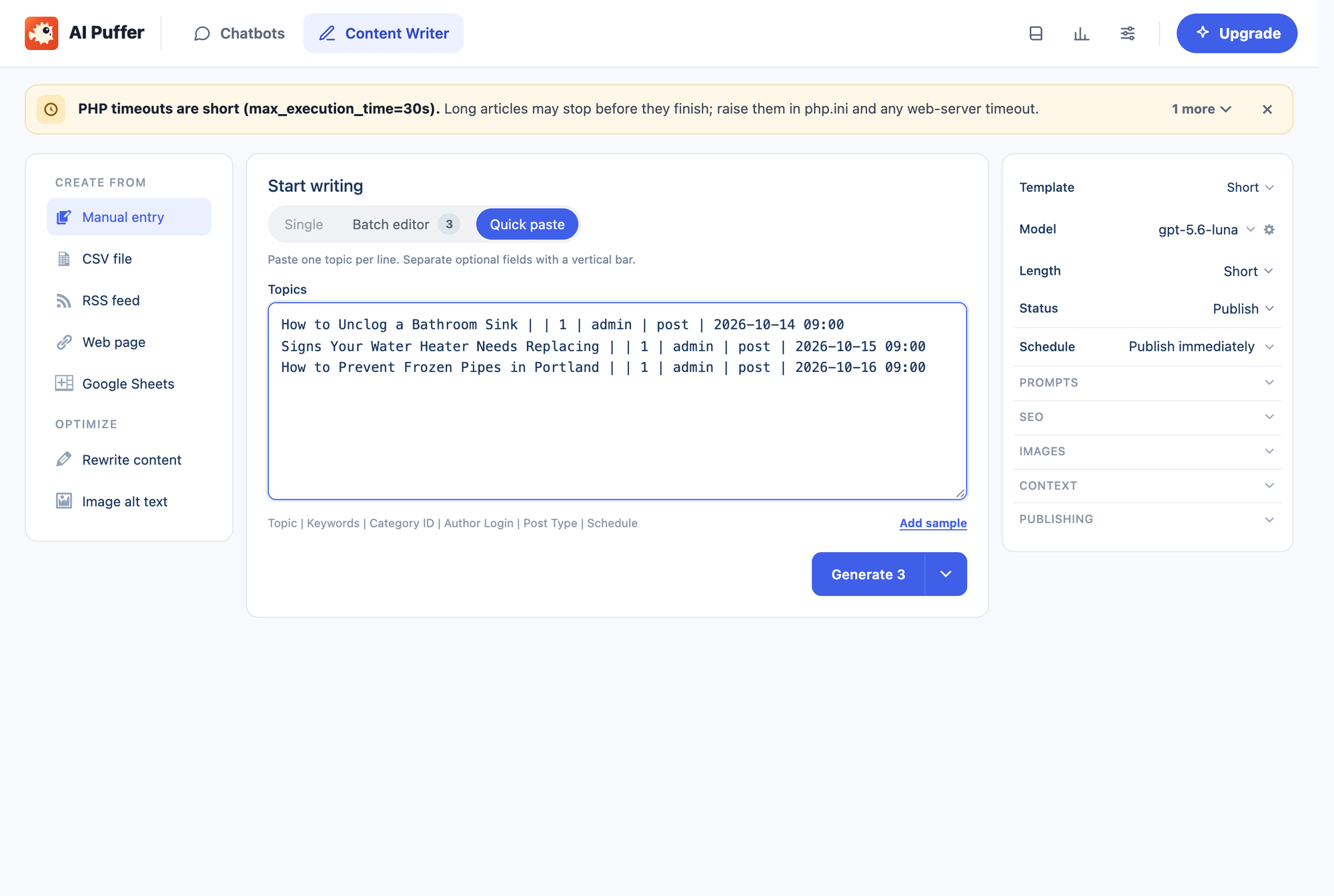
Quick paste writes several posts from one list, one line per post: Topic | Keywords | Category ID | Author Login | Post Type | Schedule. Our three titles became three posts of 749 to 755 words in 65.5 seconds. The dates in the Schedule column were not applied in any of our three runs: with Status set to Draft the posts were drafts dated today, and with Publish they went live at once. The form's own schedule setting stood on Publish immediately, so check that setting and the post dates after your first run.
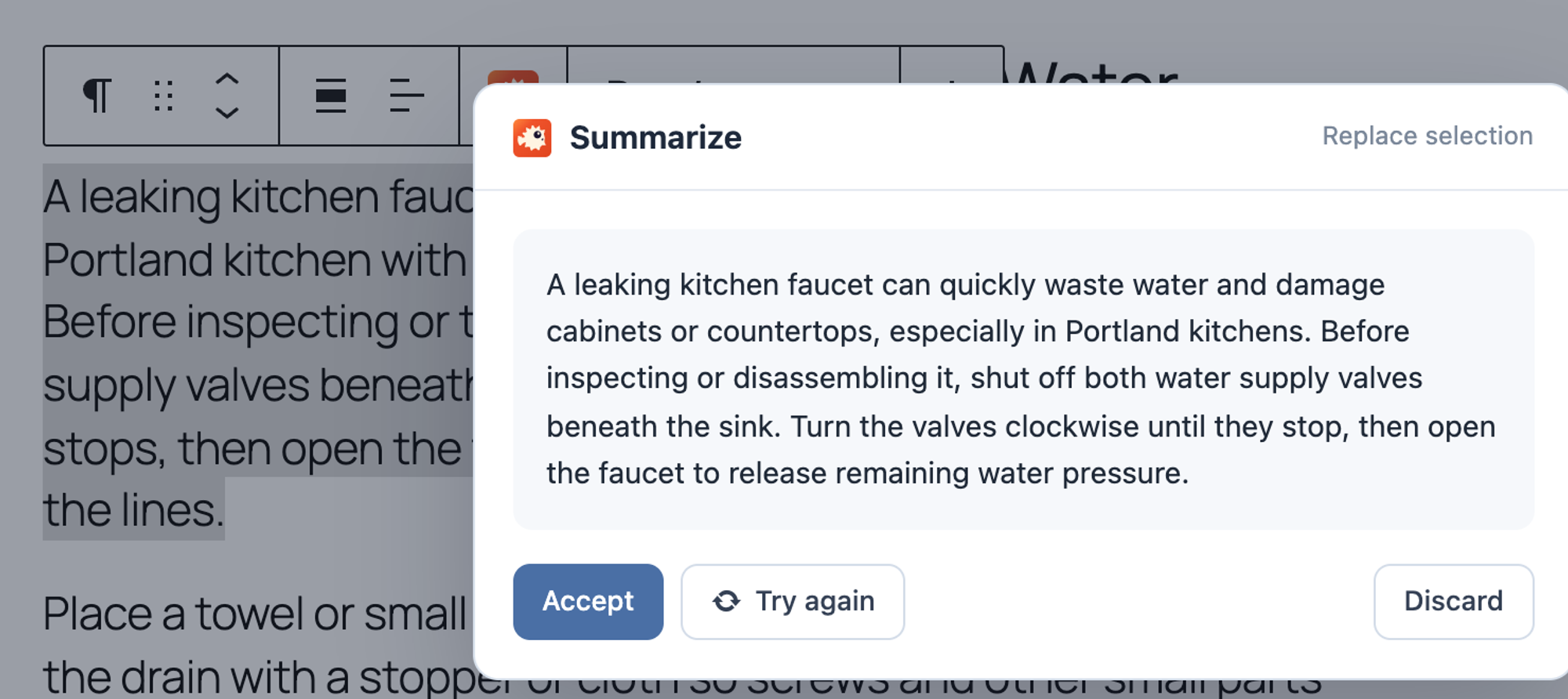
For editing, select text and the block toolbar shows Assistant: Rewrite, Expand, Fix grammar and spelling, Summarize, Create outline (H2/H3), Generate FAQs and Simplify tone. There is no shorter option; Summarize cut our paragraph from 55 to 47 words and showed the result in a dialog with Accept, Try again and Discard.
- Setup: 7 steps, own key, or AI Puffer Cloud with 25 free credits a month after email verification.
- Blog post: 716 words, 5 of 5 facts. Service page: 428 words, 6 of 6 facts, 17 seconds.
- SEO fields: excerpt, meta description, focus keyword, 8 tags. Internal links: 0.
- Bulk: 3 posts in 65.5 seconds; schedule dates not applied in our runs.
- Edit a paragraph: Summarize, 55 to 47 words, with a preview to accept.
Pros
- The most complete SEO fields of the test.
- Bulk writing from a pasted list or a CSV file in the free version.
- Edits show a preview before anything changes.
Cons
- Invented a company name variant and an emergency service tag.
- The schedule column did not schedule anything in our runs.
- A busy admin with many modules, and a PHP time limit warning on hosts with 30 seconds.
AI Puffer Pro costs $7.99 a month or $95.88 a year for one site (read on the vendor's pricing page on 13 October 2026).
AI Puffer on WordPress.org and AI Puffer pricing.
4. WP Wand
WP Wand is the pick when you want batches of drafts from a list of titles and a scheduled topic list in the free version, and you will edit every post.
WP Wand lives in the block editor: AI Assistant in the admin bar opens 44 templates, and we used Blog Post Writer with the title as Topic and the brief as Content. It failed on GPT-5.6 Luna and on every GPT-5 model with "Unsupported parameter: 'max_tokens' is not supported with this model", so we ran it on GPT-4o Mini. The defaults write in the first person ("I've been there") and add a table of contents and an FAQ. Both outputs ran long: 1,558 words for the 600-word brief and 1,433 for the 400-word page, which kept 5 of 6 facts and dropped the one-year guarantee. The blog post priced parts in four sentences, $10 to $25 for a cartridge and $5 for grease, and never mentioned Portland.
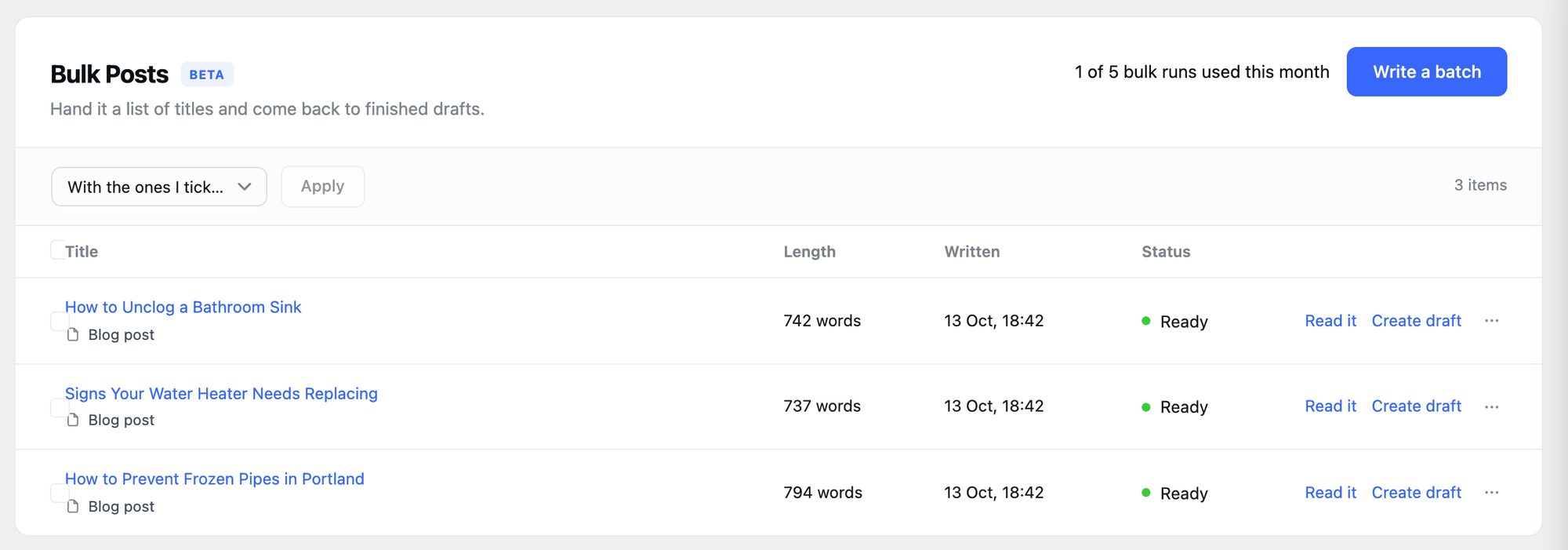
Bulk Posts is where it is useful. Write a batch takes up to 10 titles; our three came back as 742, 737 and 794-word posts in a list marked Ready, and Create draft turns each into a WordPress draft. Automated Posts works from a topic list on a schedule (every hour, day, week or month, 1 to 5 posts per run) and can save as Draft, Pending review or Published; we read that form but did not wait for a run. The free version allows 5 bulk runs and 5 scheduled runs a month.
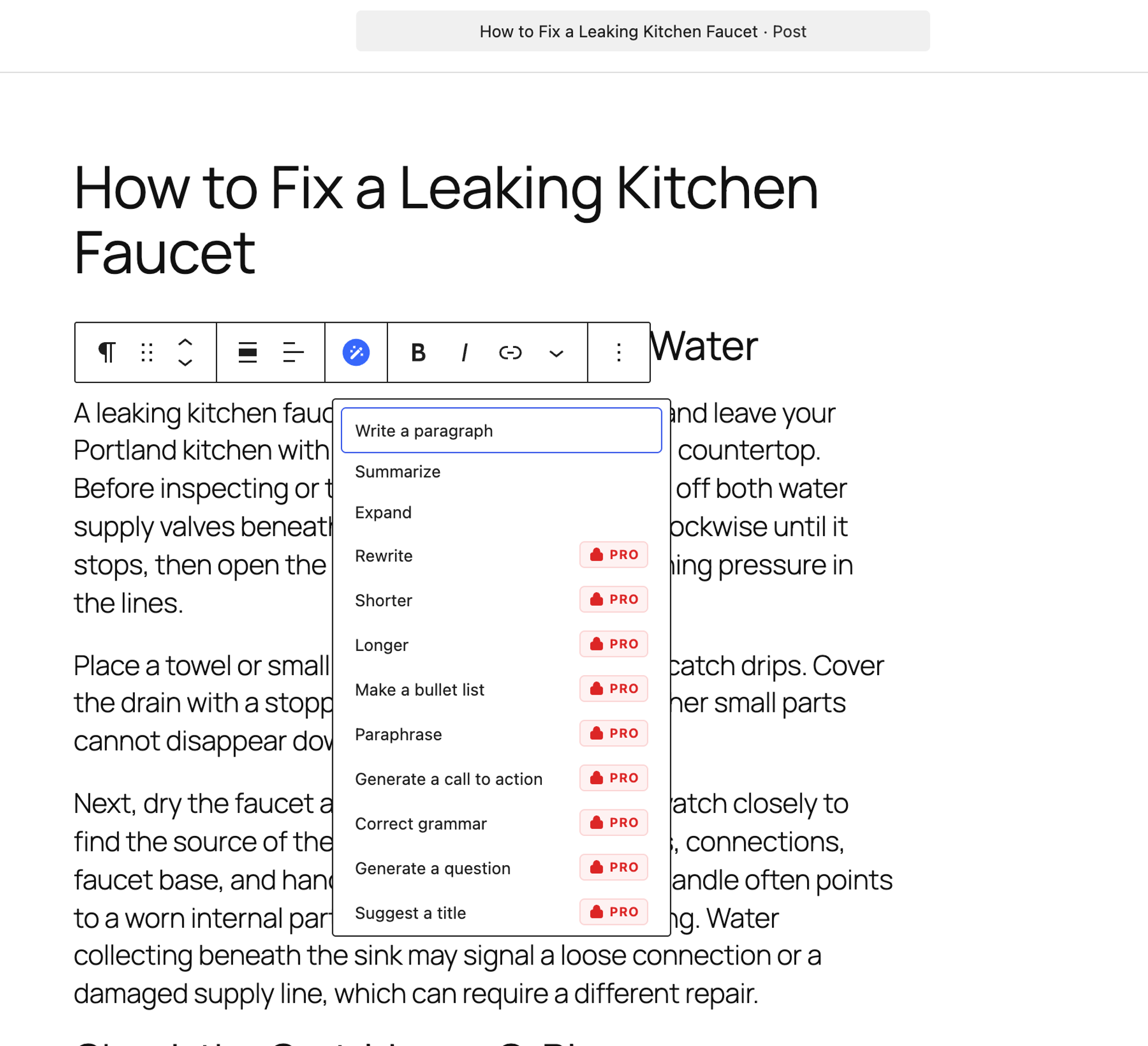
Editing: select text, click the WP Wand button in the block toolbar. Shorter and 14 other actions are marked PRO; Summarize is free and turned our 55-word paragraph into 37 words, inserted below the original, which stays until you delete it.
- Setup: 7 steps, own key (OpenAI, Gemini, Claude, DeepSeek or OpenRouter).
- Blog post: 1,558 words, 5 of 5 facts, 4 sentences with invented prices.
- Service page: 1,433 words, 5 of 6 facts, 28 seconds.
- Bulk: 3 titles to 3 posts (8 steps). Scheduled topic lists: in the free version.
- SEO fields: none from the post writer. Internal links: 0 (only table of contents anchors).
Pros
- The most generous free bulk and scheduling: 5 runs of each a month.
- Bulk posts wait in a review list before they become drafts.
- Works with five AI providers.
Cons
- Fails on GPT-5 models in version 2.1.1; we had to use GPT-4o Mini.
- Long outputs with a table of contents, an FAQ and first-person stories by default.
- Invented prices in the blog post; Shorter and Rewrite are Pro.
WP Wand Pro costs from $29 a year or $79 lifetime for one site, with 10 bulk and 10 automated runs a month (read on the vendor's pricing page on 13 October 2026).
WP Wand on WordPress.org and WP Wand pricing.
5. Aimogen
Aimogen is the pick when you need a provider the others lack (xAI, Perplexity, Groq, Nvidia, Ollama and more) or OpenAI's EU data processing, and you will write a detailed outline yourself.
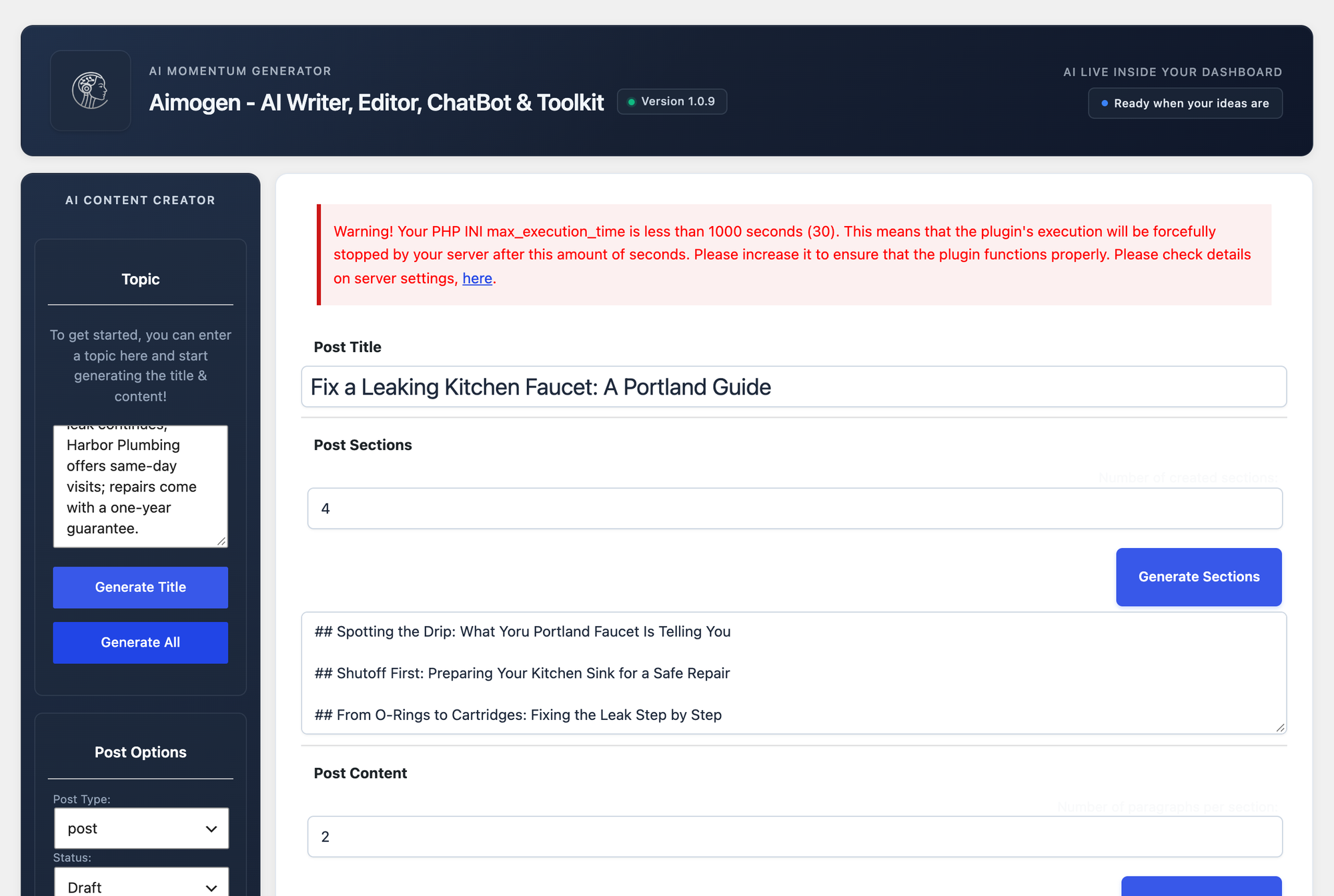
Setup took four steps: paste the key under Settings > API Keys and save. The same tab has an OpenAI Processing Region setting with United States and Europe, the only data residency option in this test. AI Content Creator takes a Topic, a number of sections and paragraphs per section, and Generate All writes the title, sections, content and excerpt; it also has a Publish Date field, so a single post can be scheduled from there.
The output followed the plugin's own prompts more than our brief. The service page took 20.5 seconds and kept 2 of 6 facts: Beaverton and tankless, but no phone number, no same-day visits, no written quote and no guarantee. The blog post kept 2 of 5. The Topic field feeds a title prompt, and the title then drives everything else, so facts from a long brief get lost. Put your facts in the section list or in the prompt templates instead. Bulk post creation and the advanced content editor are Pro, and we found no AI action in the block toolbar.
- Setup: 4 steps, own key (OpenAI or AimogenAPI plus nine other providers).
- Blog post: 977 words, 2 of 5 facts, 29.7 seconds.
- Service page: 579 words, 2 of 6 facts, 20.5 seconds, 0 added claims.
- SEO fields: excerpt. Internal links: 0. Bulk: Pro. One post can get a publish date.
Pros
- The widest provider list and an EU processing option for OpenAI.
- Separate steps for title, sections and content, so you can correct the outline before the text is written.
- A publish date right in the writer.
Cons
- Kept only 2 facts of either brief when the brief went into Topic.
- New: 400+ active installs, tested up to WordPress 7.0.7.
- Bulk creation and the advanced editor are Pro.
Aimogen Pro costs $9 a month, $59 a year or $249 lifetime for one site (read on the WPBay product page on 13 October 2026).
Aimogen on WordPress.org and Aimogen Pro.
For many pages at once: LPagery (AI part not tested hands-on)
LPagery is the pick when you need unique content on many pages at once, such as one page per town or service, written from the data in a spreadsheet instead of one post at a time.
Every writer above makes one post per prompt or one post per title. LPagery works the other way round: you build one template page with placeholders such as {town}, keep one row per page in a sheet, and the plugin creates or updates all pages in one run. In our lab the free version from wordpress.org created 5 town pages from the Harbor Plumbing template and a CSV file in 7 steps and adds nothing to the pages a visitor loads. Our guide to bulk creating pages in WordPress shows the steps.
The AI part, LPagery AI, runs in the LPagery app, which connects to your site through the plugin. You add an AI column next to your data and write one instruction, for example a heading or intro for {service} in {city}; LPagery then writes that text for every row, plus meta titles, meta descriptions and an AI image with alt text if you add an image column, and syncs the finished pages to WordPress (how LPagery AI started). From the app's code: the models are GPT-4o Mini, GPT-4.1 Mini, GPT-5 Mini, GPT-5.4 Mini, Gemini 2.0 Flash and Gemini 2.5 Flash; a text costs 1 credit and an image 10 credits; the plans include 100 (Standard), 500 (Extended) or 1,000 (Ultimate) credits a month, with no API key. The prompt is built from your business profile, tone and instructions and each row's data, and the code leaves out the free-text business description on purpose, so stock trust claims such as "licensed and insured" are not repeated on every page.
We did not test LPagery AI hands-on, because the lab has no LPagery app account. The paragraph above comes from the code and our site, not from a run, so it has no facts-kept score like the others.
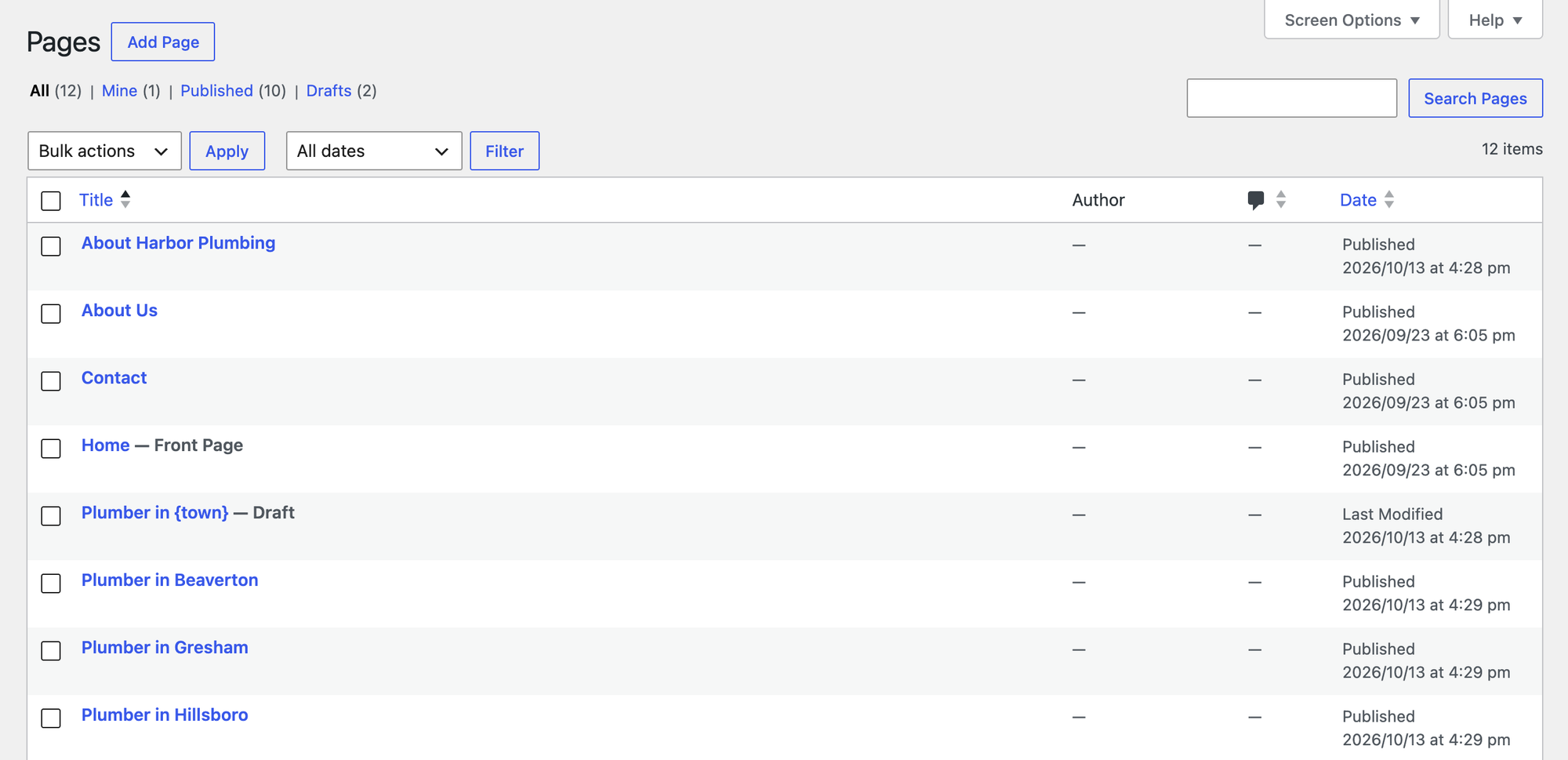
- Free version: 5 pages from one template in 7 steps, three placeholder columns.
- Adds to the page: nothing.
- LPagery AI: heading, intro, main content, meta title and description and an image per row; GPT or Gemini; not tested hands-on.
Pros
- Unique text per page from each row's own data, for hundreds of pages.
- AI credits come with the paid plans; no OpenAI account or key.
- Pages stay normal WordPress pages built from your template, in any page builder, Elementor included.
Cons
- Not a blog writer: one template, many similar pages.
- The AI columns need a paid plan and the LPagery app; the free plugin has no AI credits.
- More setup than a one-off writer: a template page and a sheet.
LPagery Standard costs $19 a month, or $14.25 a month billed yearly, for one site, with 100 AI credits a month (our pricing page, 13 October 2026).
Also worth knowing: Outrank (hosted service, not tested hands-on)
Outrank is a hosted SEO service that runs outside WordPress: it researches keywords, writes articles and publishes them to your site on a schedule. We did not test it hands-on; everything in this section comes from outrank.so, read on 15 October 2026. Its page lists WordPress as an integration that publishes to any WordPress site, with a separate WordPress.com option, and articles can be saved as drafts in WordPress for review before they go live. The Organic Growth plan costs $99 a month for "30 Articles a month generated and published on auto-pilot", with 60 and 90 articles a month as upgrades and a free trial.
Outrank also says it places "relevant links to your site inside real articles on real blogs". Google's spam policies list "using automated programs or services to create links to your site" as link spam, so read its terms before you switch that on (Google's spam policies).
At the time of writing (15 October 2026), the code LPAGERY gave 10% off the first month. Outrank's own page does not mention the code, so check that it is accepted at checkout. Try Outrank (affiliate link: we earn a commission if you buy; it did not affect the ranking).
How to generate, edit, schedule and publish an AI blog post in WordPress
To generate WordPress posts with AI and get them live, this is the full run with our winner, AI Content Writer, as we did it in the lab. The scheduling part uses WordPress's own publish date, so it works the same with every plugin in this list. If you would rather write the plugin yourself, our tutorial on building an AI text generator plugin for WordPress covers the code, and creating WordPress posts programmatically shows how to save the result as a post.
- Install AI Content Writer, open AI Content Writer > Settings > API, pick ChatGPT, paste your OpenAI key, save, pick the model and save again.
- Open Generate Content, paste your full brief into Prompt (facts, audience, length, and "Do not add facts that are not in this brief"), set Status to Draft and click Generate Content.
- The editor opens with the draft. In our run it took 12.3 seconds and came back at 692 words. Click the content, then Convert to blocks.
- Read it against your brief: phone number, prices, guarantees, place names, and any link that shows up as text. Shorten or rewrite paragraphs by hand, or with an editor tool such as AI Engine's Shorter Text.
- Add two or three internal links to related posts yourself; none of the plugins added one. Our guide to internal linking explains which pages to link.
- In the Post panel, click the date next to Publish (it says Immediately), pick the day and time, and click Schedule.
- Click Schedule again in the pre-publish panel. The post status is now Scheduled, and WordPress publishes it at that time.
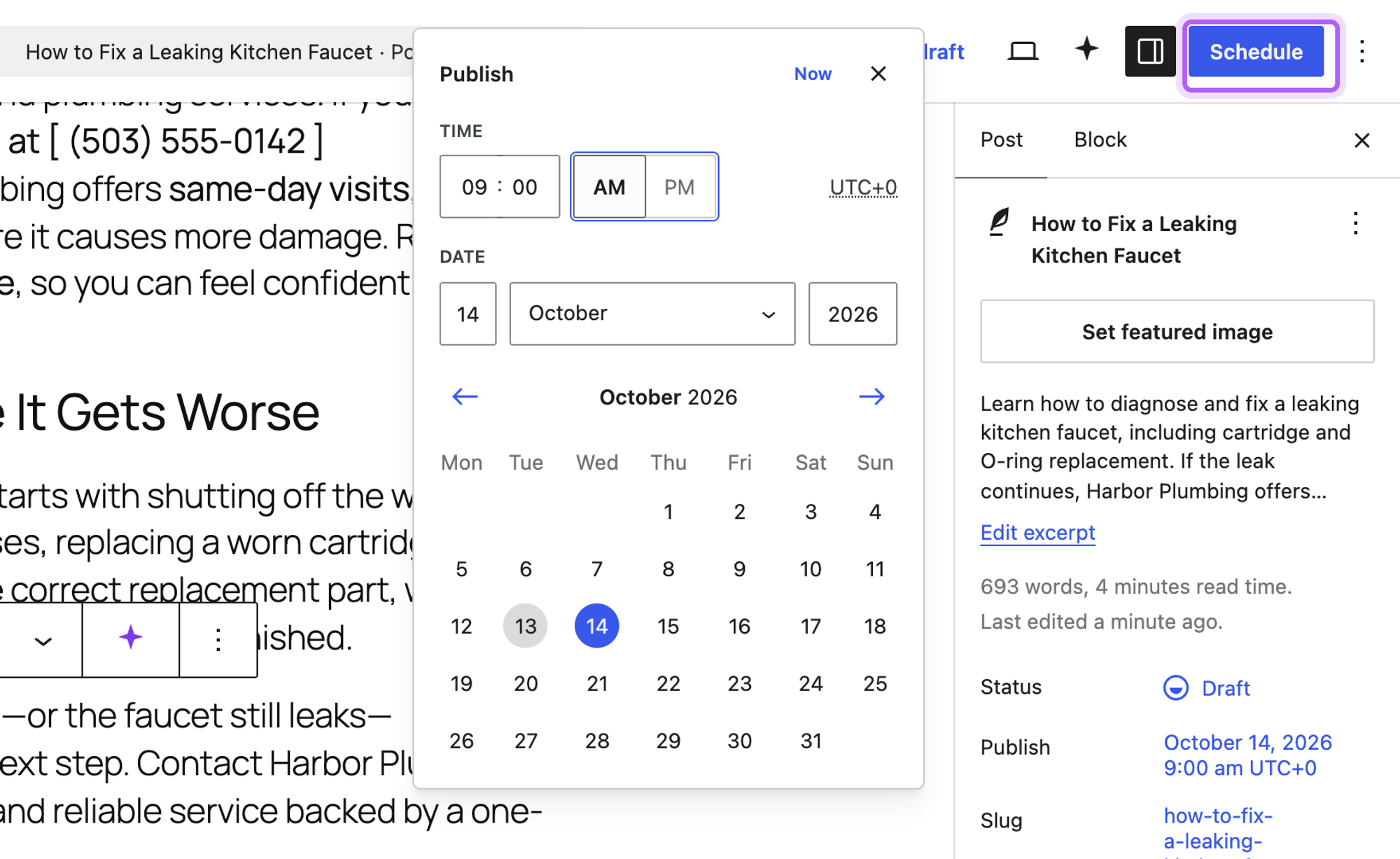
In our run the post was saved with status future and the date 2026-10-14 09:00:00, which is WordPress for scheduled. To publish AI posts on a rhythm without opening the editor each time, use an AI Content Writer campaign with Completed Post Status Publish and a Campaign Frequency, or WP Wand's Automated Posts. Keep Draft as the status until you trust the output: publishing a checked draft takes one click, and a wrong fact on a live page can cost you a customer. To post the same content to many posts at once without AI, see how to bulk create posts in WordPress.
Test results side by side
Plugin | Blog post: words, facts | Service page: words, facts | Claims not in the brief | Service page time | Edit 55-word paragraph | SEO fields saved | Model |
|---|---|---|---|---|---|---|---|
AI Content Writer | 697, 5 of 5 | 455, 6 of 6 | 0 | 10.3 s | No paragraph tool | Excerpt, SEO title, meta description, focus keyword, tags | GPT-5.6 Luna |
AI Engine | 644, 5 of 5 | 614, 6 of 6 | 0 | 33.2 s | Shorter Text, 34 words, in place | None | GPT-5.6 Luna |
AI Puffer | 716, 5 of 5 | 428, 6 of 6 | 0 | 17 s | Summarize, 47 words, preview | Excerpt, meta description, focus keyword, tags | GPT-5.6 Luna |
WP Wand | 1,558, 5 of 5 | 1,433, 5 of 6 | 4 | 28 s | Summarize, 37 words, below original | None | GPT-4o Mini |
Aimogen | 977, 2 of 5 | 579, 2 of 6 | 0 | 20.5 s | No toolbar tool | Excerpt | GPT-5.6 Luna |
AI Bud | 1,144, 1 of 5 | 649, 2 of 6 | 3 | 9.4 s | No toolbar tool | Excerpt | GPT-4.1 Nano |
MxChat | 1,798, 5 of 5 | Not run | 0 | n/a | Not tested | None | GPT-5.6 Luna |
Claims not in the brief counts sentences we confirmed by hand: WP Wand's four price sentences, AI Bud's "licensed and experienced technicians" and two "transparent pricing" sentences. Internal links in the text were 0 for every plugin. The writers we measured (AI Content Writer, WP Wand, Aimogen, AI Bud and AI Puffer) add 0 KB to the pages a visitor loads; AI Engine and MxChat add weight only when their chatbot is switched on.
What an AI blog post costs per article and per 100 articles
With your own key you pay the AI provider, not the plugin. AI Engine is the only writer that shows the cost: $0.0028 for the 644-word blog post and $0.0022 for the service page on GPT-5.6 Luna, so about $0.22 to $0.28 per 100 articles. The others do not show it, so the table estimates it from the length of each output at OpenAI's list price for the output tokens (GPT-5.6 Luna $1.20, GPT-4o Mini $0.60 and GPT-4.1 Nano $0.40 per million tokens, read on 13 October 2026). The real bill is higher, because the prompt and the model's reasoning count too: AI Engine's shown cost was 2.2 to 2.7 times its output-only figure.
Plugin | Model | Service page words | Output-only cost per article | Per 100 articles (output only) |
|---|---|---|---|---|
AI Content Writer | GPT-5.6 Luna | 455 | $0.0007 | $0.07 |
AI Engine | GPT-5.6 Luna | 614 | $0.0010 | $0.10 |
AI Puffer | GPT-5.6 Luna | 428 | $0.0007 | $0.07 |
WP Wand | GPT-4o Mini | 1,433 | $0.0011 | $0.11 |
Aimogen | GPT-5.6 Luna | 579 | $0.0009 | $0.09 |
AI Bud | GPT-4.1 Nano | 649 | $0.0003 | $0.03 |
Even at three times these figures, a draft costs well under one cent on a small model. The plugin price and your editing time are the real costs. Hosted credit systems work differently: AI Puffer Cloud gives 25 credits a month, GetGenie 2,500 words a month and BotWriter 10 posts a month on their free plans, and LPagery AI uses 1 credit per text from the 100 to 1,000 credits in its paid plans. Pricing pages: OpenAI and LPagery.
What each plugin sends, and to whom
Your brief, and in editor tools the text you select, leaves your site for the model. Where it goes depends on the plugin; we read this in each plugin's code, version as tested.
Plugin | Where your text and key go | Notes |
|---|---|---|
AI Content Writer | Straight to OpenAI or Google | Stock images from Pexels, Unsplash or Pixabay if you turn thumbnails on |
AI Engine | Straight to the provider you pick | Prints the API key into its admin page source |
AI Puffer | Straight to the provider, or through AI Puffer Cloud if you use its credits | |
WP Wand | Straight to OpenAI, Google, Anthropic, DeepSeek or OpenRouter | Asks to share diagnostic data; we clicked No thanks |
Aimogen | Straight to the provider, or through AimogenAPI | OpenAI processing region US or EU |
BotWriter | Through BotWriter's own server, with your API key in each request | Says so in a notice on its settings page |
AI WP Writer, AutoWP | Their own services, with an account by email | |
LPagery AI | LPagery's servers, which call OpenAI or Google | No API key; sends your business profile, instructions and each row's data |
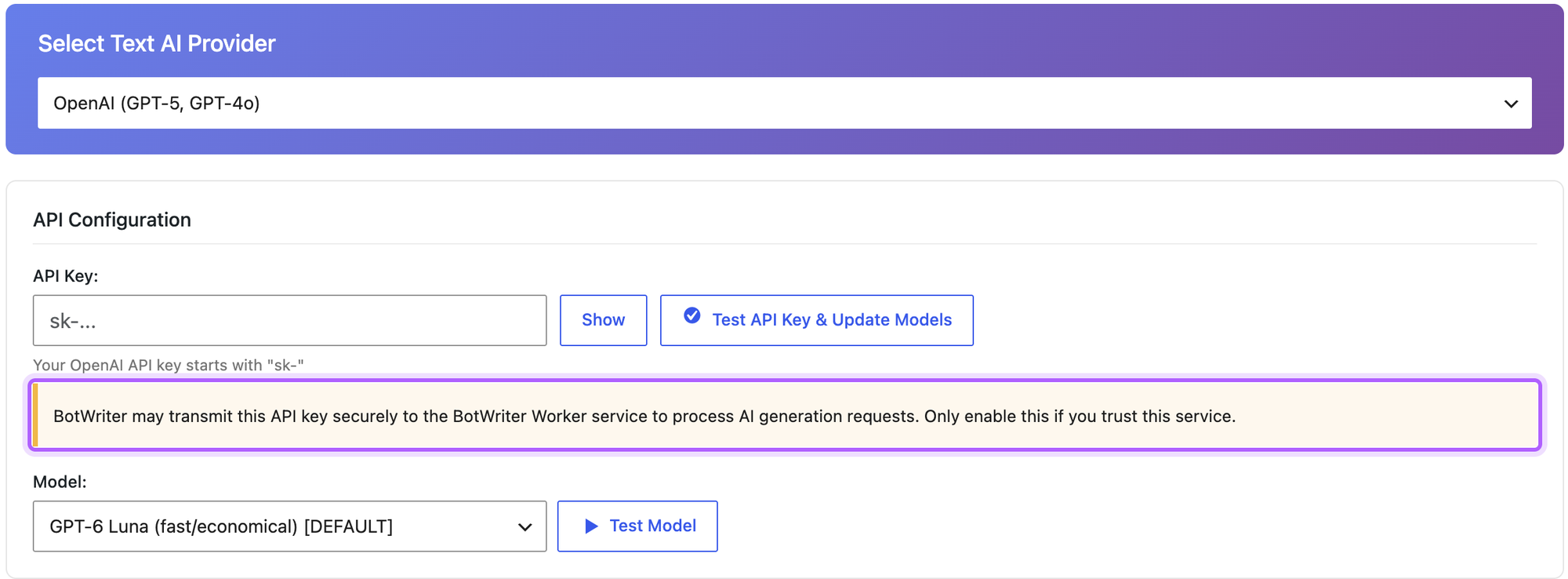
We did not send our key to BotWriter, for the reason in that notice. If your clients' content or your key must not pass through a third party, pick a plugin that calls the provider directly.
Do you need to label AI-written posts?
None of the seven writers adds a label for readers, and we found no setting for one in their screens or code. Whether you need one depends on where you publish and what you publish. The EU AI Act, Article 50(4), which applies from 2 August 2026, requires disclosure for AI-generated text "published with the purpose of informing the public on matters of public interest", unless the content has had human review or editorial control and someone holds editorial responsibility for it. Google's guidance asks you to "consider adding information on how your content was created" where readers would expect it, and warns that generating "many pages without adding value for users" can break its spam policies. That is the line between programmatic SEO built on real data and pages that only swap a keyword.
If you want a label, AI Content Writer campaigns can add the same sentence to every post: Insert Content with Position After Content. For single posts, add a short line at the end yourself, for example "Drafted with AI and checked by our team." Sources: Article 50 of the EU AI Act and Google's guidance on generative AI content.
Which AI blog post generator should you choose?
- Choose AI Content Writer if you want posts that stick to your facts and publish on a schedule, and you will check each one.
- Choose AI Engine if your posts exist and you want to shorten, correct or rewrite them paragraph by paragraph, or you want to see the cost of each article.
- Choose AI Puffer if every post should arrive with its excerpt, meta description, focus keyword and tags filled.
- Choose WP Wand if you want batches of drafts from title lists in the free version and you are fine editing long outputs.
- Choose Aimogen if you need a provider the others do not support, or OpenAI's EU processing region.
- Choose LPagery if you need many similar pages with unique content, such as one per town, from a sheet. Our guide to programmatic SEO in WordPress shows when that beats single posts.
AI writers we tested but left out
- AI Bud: kept 1 of 5 blog facts and 2 of 6 service page facts, added "licensed" and "transparent pricing" claims, lists no OpenAI model newer than GPT-4.1, and saves posts as one Classic block.
- MxChat: a chatbot plugin with a writer; in the sister test it wrote 1,798 words for a 600-word brief and put 8.8 KB of CSS into the post itself.
- BotWriter: sends your API key to its own server with every request, so we did not run it with ours; the free plan allows 10 posts a month.
- AI WP Writer and AutoWP: both need an account with their own service before they write anything; AI WP Writer also says free credits are not given to sites on localhost.
- GetGenie and Jetpack AI: both need an account (GetGenie or WordPress.com) before the first word; see the screens in our sister test.
- SEOWriting.ai, Arvow and other hosted writers that publish to WordPress: paid services with their own accounts; we did not test them (Outrank is described above).
FAQ
Can AI write a whole WordPress blog post?
Yes. Every plugin in this test saved a complete post with headings in one run, in 9.4 to 33.2 seconds for a service page. Whether it is usable depends on the plugin: with the same brief, three plugins kept every fact and two lost most of them. Read each post against your brief before it goes live.
Is AI-generated content bad for SEO?
Google judges the page, not the tool. Its guidance warns against generating many pages that add no value, and none of our outputs contained an internal link, a real example from the business or anything a competitor could not write the same way. How AI Overviews choose sources explains why first-hand details matter for AI search too. Add those yourself, and a meta description if the plugin did not write one.
How do I schedule AI-generated posts in WordPress?
Open the draft, click the date next to Publish in the Post panel, pick a future date and click Schedule twice. For automatic posting, AI Content Writer campaigns and WP Wand's Automated Posts create and publish posts on a schedule in their free versions; AI Content Writer published one post per daily run in our test.
Do I need an OpenAI API key?
For the plugins we ranked, yes, or a key from another provider they support. You pay the provider per use: AI Engine showed $0.0022 for a 400-word page. Plugins with their own credits (GetGenie, AI Puffer Cloud, BotWriter, AI WP Writer) need an account instead, and LPagery AI uses credits from its paid plans.
Which free AI blog post generator follows instructions best?
In our test, AI Content Writer and AI Puffer: both kept all six service page facts and stayed between 300 and 500 words (455 and 428). AI Engine kept every fact too, at 614 words. Plugins that turn your brief into a topic for their own prompts, such as Aimogen and AI Bud, lost most of the facts.
I've worked in SEO for more than ten years and helped over 100 businesses rank higher, mostly local businesses, e-commerce stores and SaaS companies. As co-founder of LPagery I work on local SEO, programmatic SEO and AI search visibility, and I test the strategies in these articles on our own sites and with our customers.
This post may contain affiliate links which we earn a commission on when purchasing a given product.
I've worked in SEO for more than ten years and helped over 100 businesses rank higher, mostly local businesses, e-commerce stores and SaaS companies. As co-founder of LPagery I work on local SEO, programmatic SEO and AI search visibility, and I test the strategies in these articles on our own sites and with our customers.