How to Create an AI Text Generator Plugin for WordPress

Updated
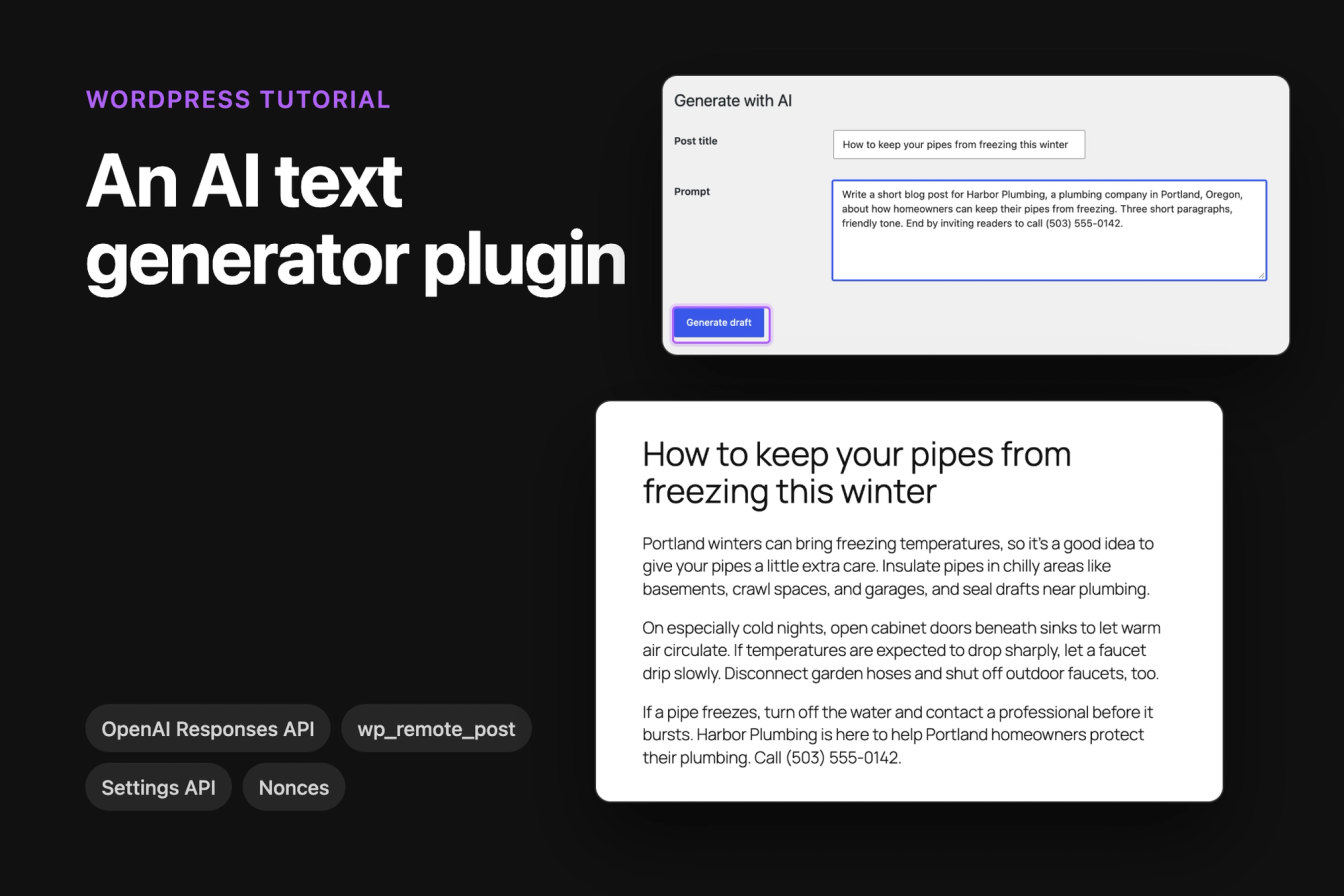
This tutorial builds a small WordPress plugin that sends a prompt to the OpenAI API and saves the answer as a draft post. It has a settings page for the API key, a Generate with AI page under Posts, and the nonce, capability checks, sanitizing and escaping that a plugin handling an API key needs.
All code was tested on WordPress 7.1.3 with the Twenty Twenty-Five theme and PHP 8.3, against the OpenAI Responses API with the gpt-6-luna model in October 2026.
What the plugin does
An administrator saves an OpenAI API key under Settings. Anyone who can write posts then opens Posts > Generate with AI, types a title and a prompt, and clicks Generate draft. The plugin sends the prompt to OpenAI with wp_remote_post(), turns the answer into Paragraph blocks and saves it as a draft, so a person reads and edits the text before it goes live.
The plugin is one PHP file with four parts:
- a settings page for the API key and the model
- a function that calls the OpenAI API
- an admin page with the prompt form
- a form handler that checks the request and creates the draft
Before you start: API key, endpoint and model
You need an OpenAI API key from platform.openai.com, under API keys. The API is billed per token, separately from a ChatGPT subscription, so add a payment method or credit to the API account first.
OpenAI has two endpoints that generate text. The older Chat Completions endpoint (/v1/chat/completions) still works, but OpenAI recommends the Responses API (/v1/responses) for new projects, and this plugin uses it. The request takes the prompt as input and your standing rules as instructions.
For the model, we use gpt-6-luna, OpenAI's cheapest general model at the time of testing ($0.10 per million input tokens and $0.50 per million output tokens). A three-paragraph blog post costs a fraction of a cent. The model name is a setting, so you can switch to a larger model later without touching the code. Check the models page for current names and prices.
Step 1: Create the plugin file
Create the folder wp-content/plugins/ai-text-generator/ and a file ai-text-generator.php inside it. Start the file with the plugin header:
1<?php
2/**
3 * Plugin Name: AI Text Generator
4 * Description: Writes draft posts from a prompt with the OpenAI Responses API.
5 * Version:     1.0.0
6 * Requires PHP: 7.4
7 */
8
9if ( ! defined( 'ABSPATH' ) ) {
10    exit;
11}
The ABSPATH check stops the file from running when someone opens its URL directly. Add the parts from steps 2 to 5 below this header, in order. The complete file is further down.
Then open Plugins in the dashboard. AI Text Generator is listed with the description from the header. Click Activate.

Step 2: Add a settings page for the API key
This part adds Settings > AI Text Generator with two fields, the API key and the model. It uses the Settings API, so WordPress handles the nonce, the capability check and saving:
1add_action( 'admin_menu', 'aitg_add_settings_page' );
2function aitg_add_settings_page() {
3    add_options_page( 'AI Text Generator', 'AI Text Generator', 'manage_options', 'aitg-settings', 'aitg_render_settings_page' );
4}
5
6add_action( 'admin_init', 'aitg_register_settings' );
7function aitg_register_settings() {
8    register_setting( 'aitg_settings', 'aitg_api_key', array(
9        'type'              => 'string',
10        'sanitize_callback' => 'aitg_sanitize_api_key',
11        'default'           => '',
12    ) );
13    register_setting( 'aitg_settings', 'aitg_model', array(
14        'type'              => 'string',
15        'sanitize_callback' => 'sanitize_text_field',
16        'default'           => 'gpt-6-luna',
17    ) );
18}
19
20// An empty field keeps the saved key, so the page never has to print the key.
21function aitg_sanitize_api_key( $value ) {
22    $value = trim( sanitize_text_field( (string) $value ) );
23    return '' === $value ? get_option( 'aitg_api_key', '' ) : $value;
24}
25
26function aitg_render_settings_page() {
27    if ( ! current_user_can( 'manage_options' ) ) {
28        return;
29    }
30    $has_key = '' !== aitg_get_api_key();
31    ?>
32    <div class="wrap">
33        <h1>AI Text Generator</h1>
34        <form method="post" action="options.php">
35            <?php settings_fields( 'aitg_settings' ); ?>
36            <table class="form-table" role="presentation">
37                <tr>
38                    <th scope="row"><label for="aitg_api_key">OpenAI API key</label></th>
39                    <td>
40                        <?php if ( defined( 'AITG_OPENAI_API_KEY' ) ) : ?>
41                            <p>The key is set in <code>wp-config.php</code>.</p>
42                        <?php else : ?>
43                            <input type="password" id="aitg_api_key" name="aitg_api_key" class="regular-text" value="" autocomplete="off"
44                                placeholder="<?php echo esc_attr( $has_key ? 'Saved. Leave empty to keep it.' : 'sk-...' ); ?>">
45                            <p class="description">Create a key at platform.openai.com under API keys.</p>
46                        <?php endif; ?>
47                    </td>
48                </tr>
49                <tr>
50                    <th scope="row"><label for="aitg_model">Model</label></th>
51                    <td>
52                        <input type="text" id="aitg_model" name="aitg_model" class="regular-text"
53                            value="<?php echo esc_attr( get_option( 'aitg_model', 'gpt-6-luna' ) ); ?>">
54                    </td>
55                </tr>
56            </table>
57            <?php submit_button(); ?>
58        </form>
59    </div>
60    <?php
61}register_setting() gives each option a sanitize callback. options.php checks the nonce from settings_fields() and the manage_options capability before it saves anything.
The key field is a password field that is always empty when the page loads. The page never prints the saved key, not even into the page source, and the placeholder only says that a key is saved. Because aitg_sanitize_api_key() keeps the old key when the field is empty, you can save a new model without typing the key again.
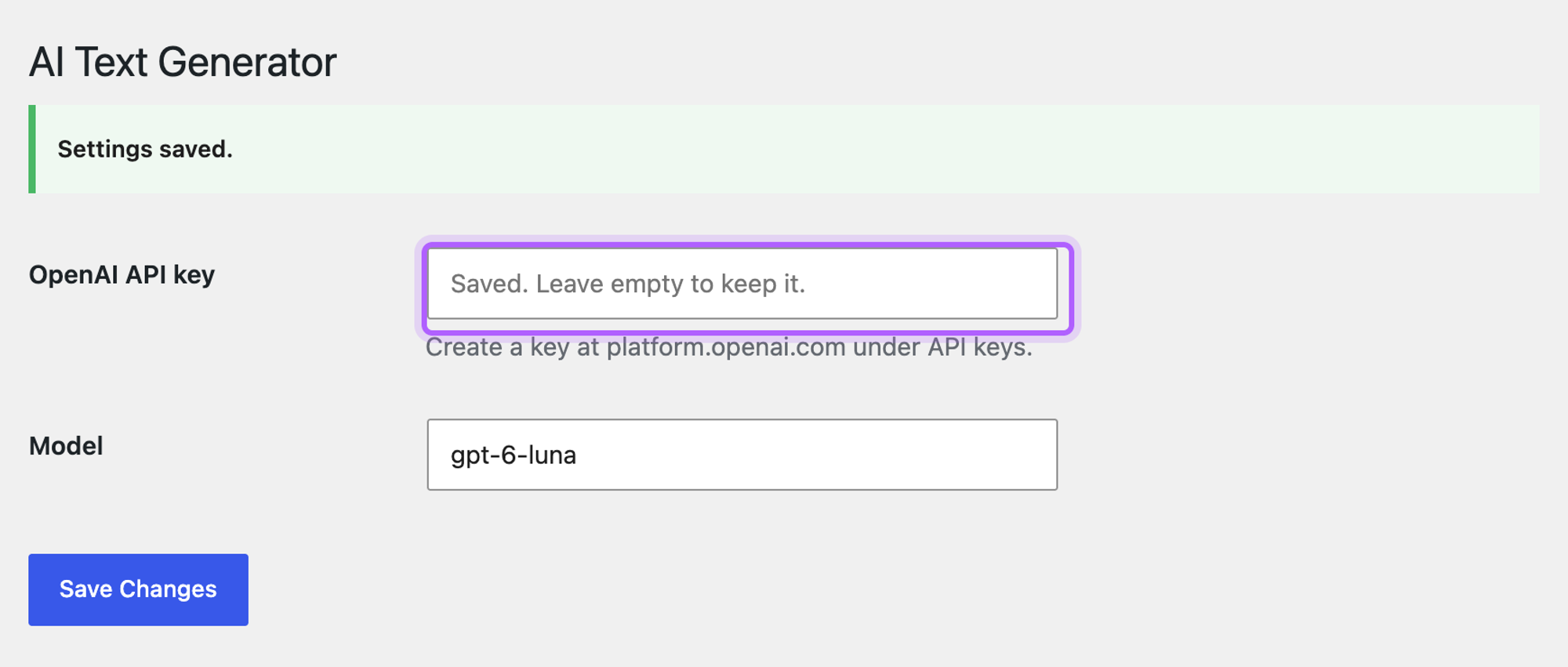
The option is stored in plain text in the wp_options table, where anyone with database access or a full backup can read it. If you can edit wp-config.php, you can keep the key there instead:
define( 'AITG_OPENAI_API_KEY', 'sk-...' );The plugin then uses the constant, and the settings page shows The key is set in wp-config.php in place of the field. Put the line above /* That's all, stop editing! */.
Step 3: Send the prompt to the OpenAI API with wp_remote_post
This function sends one prompt to https://api.openai.com/v1/responses and returns the text, or a WP_Error with a message the admin page can show:
1function aitg_get_api_key() {
2    if ( defined( 'AITG_OPENAI_API_KEY' ) ) {
3        return AITG_OPENAI_API_KEY;
4    }
5    return (string) get_option( 'aitg_api_key', '' );
6}
7
8function aitg_generate_text( $prompt ) {
9    $api_key = aitg_get_api_key();
10    if ( '' === $api_key ) {
11        return new WP_Error( 'aitg_no_key', 'Add your OpenAI API key under Settings > AI Text Generator.' );
12    }
13
14    $response = wp_remote_post( 'https://api.openai.com/v1/responses', array(
15        'timeout' => 60,
16        'headers' => array(
17            'Authorization' => 'Bearer ' . $api_key,
18            'Content-Type'  => 'application/json',
19        ),
20        'body'    => wp_json_encode( array(
21            'model'             => get_option( 'aitg_model', 'gpt-6-luna' ),
22            'instructions'      => 'You write clear, friendly website copy. Answer in plain paragraphs separated by blank lines, without headings, Markdown or em dashes.',
23            'input'             => $prompt,
24            'reasoning'         => array( 'effort' => 'none' ),
25            'max_output_tokens' => 1500,
26            'store'             => false,
27        ) ),
28    ) );
29
30    if ( is_wp_error( $response ) ) {
31        return $response;
32    }
33
34    $code = wp_remote_retrieve_response_code( $response );
35    $body = json_decode( wp_remote_retrieve_body( $response ), true );
36
37    if ( 200 !== $code ) {
38        $message = isset( $body['error']['message'] ) ? $body['error']['message'] : 'HTTP ' . $code;
39        return new WP_Error( 'aitg_api_error', 'OpenAI API error: ' . $message );
40    }
41
42    if ( 'completed' !== ( $body['status'] ?? '' ) ) {
43        $reason = $body['incomplete_details']['reason'] ?? ( $body['status'] ?? 'unknown' );
44        return new WP_Error( 'aitg_incomplete', 'The answer was cut off (' . $reason . '). Raise max_output_tokens or shorten the prompt.' );
45    }
46
47    // The text sits in the output items of type "message", in content parts of type "output_text".
48    $text = '';
49    foreach ( $body['output'] ?? array() as $item ) {
50        if ( 'message' !== ( $item['type'] ?? '' ) ) {
51            continue;
52        }
53        foreach ( $item['content'] ?? array() as $part ) {
54            if ( 'output_text' === ( $part['type'] ?? '' ) ) {
55                $text .= $part['text'];
56            }
57        }
58    }
59
60    if ( '' === trim( $text ) ) {
61        return new WP_Error( 'aitg_empty', 'The API returned no text.' );
62    }
63    return $text;
64}
Here is what each part of the request does:
instructionsholds the rules for every answer. Asking for plain paragraphs without Markdown keeps**and#out of your posts. Add your own style rules here, such as the tone or words to avoid.reasoningwitheffortset tononeskips the model's thinking step, which a short piece of copy does not need. It is faster and cheaper.max_output_tokenscaps the length of the answer, and with it the cost of one request.storeset tofalseasks OpenAI not to keep the response for later retrieval through the API. It defaults totrue.timeoutset to 60 seconds gives the model time to answer. WordPress waits 5 seconds by default, which is often too short.
wp_remote_post() uses the WordPress HTTP API, so it works on hosts without the PHP cURL extension and respects proxy settings in wp-config.php. wp_json_encode() builds the JSON body.
The answer comes back in an output array. It can hold more than one item, so the function collects the text from every item of type message and every content part of type output_text. The official SDKs have an output_text shortcut for this; the raw HTTP response does not. If the response status is not completed, the answer was cut off, and the function returns an error with the reason instead of half a post.
Step 4: Add the Generate with AI page
This part adds Generate with AI under Posts, for every user with the edit_posts capability (Administrators, Editors, Authors and Contributors):
1add_action( 'admin_menu', 'aitg_add_generate_page' );
2function aitg_add_generate_page() {
3    add_posts_page( 'Generate with AI', 'Generate with AI', 'edit_posts', 'aitg-generate', 'aitg_render_generate_page' );
4}
5
6function aitg_render_generate_page() {
7    if ( ! current_user_can( 'edit_posts' ) ) {
8        return;
9    }
10    $key    = 'aitg_notice_' . get_current_user_id();
11    $notice = get_transient( $key );
12    delete_transient( $key );
13    ?>
14    <div class="wrap">
15        <h1>Generate with AI</h1>
16        <?php if ( $notice ) : ?>
17            <div class="notice notice-<?php echo esc_attr( $notice['type'] ); ?>">
18                <p><?php echo wp_kses( $notice['message'], array( 'a' => array( 'href' => array() ) ) ); ?></p>
19            </div>
20        <?php endif; ?>
21        <form method="post" action="<?php echo esc_url( admin_url( 'admin-post.php' ) ); ?>">
22            <input type="hidden" name="action" value="aitg_generate">
23            <?php wp_nonce_field( 'aitg_generate' ); ?>
24            <table class="form-table" role="presentation">
25                <tr>
26                    <th scope="row"><label for="aitg_title">Post title</label></th>
27                    <td>
28                        <input type="text" id="aitg_title" name="aitg_title" class="regular-text"
29                            value="<?php echo esc_attr( $notice['title'] ?? '' ); ?>">
30                    </td>
31                </tr>
32                <tr>
33                    <th scope="row"><label for="aitg_prompt">Prompt</label></th>
34                    <td>
35                        <textarea id="aitg_prompt" name="aitg_prompt" rows="6" class="large-text" required><?php echo esc_textarea( $notice['prompt'] ?? '' ); ?></textarea>
36                    </td>
37                </tr>
38            </table>
39            <?php submit_button( 'Generate draft' ); ?>
40        </form>
41    </div>
42    <?php
43}
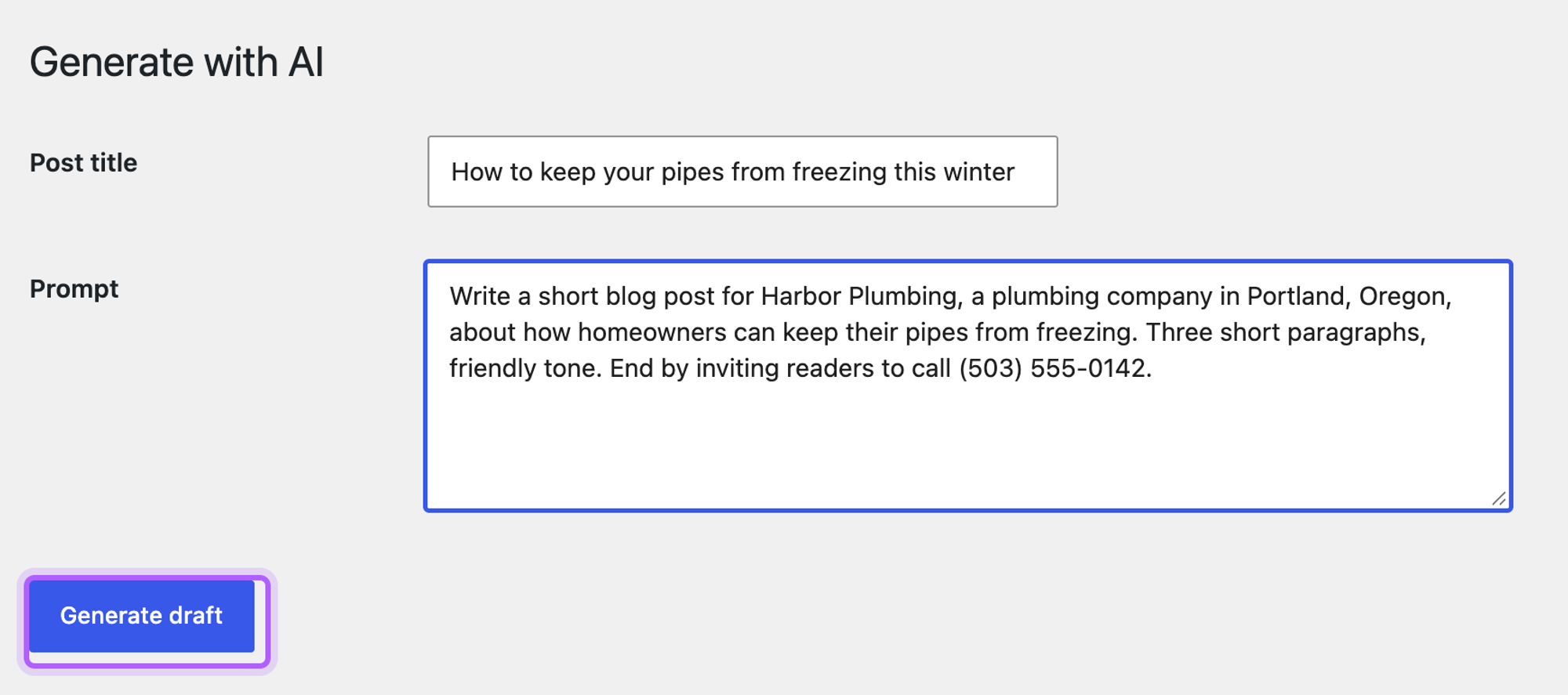
The form posts to admin-post.php with the action aitg_generate, and wp_nonce_field() adds a nonce that the handler checks. After an error, the page fills the title and prompt back in from the stored notice, so nothing has to be typed again. Every value printed into the page goes through esc_attr(), esc_textarea() or wp_kses().
Step 5: Handle the form and save the text as a draft
The last part runs when the form is sent. It checks the user and the nonce, sends the prompt and creates the draft:
1add_action( 'admin_post_aitg_generate', 'aitg_handle_generate' );
2function aitg_handle_generate() {
3    if ( ! current_user_can( 'edit_posts' ) ) {
4        wp_die( 'Sorry, you are not allowed to create posts.', 403 );
5    }
6    check_admin_referer( 'aitg_generate' );
7
8    $title  = sanitize_text_field( wp_unslash( $_POST['aitg_title'] ?? '' ) );
9    $prompt = sanitize_textarea_field( wp_unslash( $_POST['aitg_prompt'] ?? '' ) );
10    $back   = admin_url( 'edit.php?page=aitg-generate' );
11
12    $text = '' === $prompt ? new WP_Error( 'aitg_no_prompt', 'Enter a prompt.' ) : aitg_generate_text( $prompt );
13    if ( is_wp_error( $text ) ) {
14        aitg_notice( 'error', esc_html( $text->get_error_message() ), $title, $prompt );
15        wp_safe_redirect( $back );
16        exit;
17    }
18
19    $post_id = wp_insert_post( array(
20        'post_title'   => '' !== $title ? $title : wp_trim_words( $prompt, 8, '' ),
21        'post_content' => aitg_text_to_blocks( $text ),
22        'post_status'  => 'draft',
23        'post_author'  => get_current_user_id(),
24    ), true );
25
26    if ( is_wp_error( $post_id ) ) {
27        aitg_notice( 'error', esc_html( $post_id->get_error_message() ), $title, $prompt );
28    } else {
29        aitg_notice( 'success', sprintf( 'Draft created. <a href="%s">Edit the draft</a>', esc_url( get_edit_post_link( $post_id, 'raw' ) ) ) );
30    }
31    wp_safe_redirect( $back );
32    exit;
33}
34
35// One message for the next page load, stored per user.
36function aitg_notice( $type, $message, $title = '', $prompt = '' ) {
37    set_transient( 'aitg_notice_' . get_current_user_id(), compact( 'type', 'message', 'title', 'prompt' ), MINUTE_IN_SECONDS );
38}
39
40// Each blank-line-separated paragraph becomes a Paragraph block.
41function aitg_text_to_blocks( $text ) {
42    $blocks = array();
43    foreach ( preg_split( '/\n\s*\n/', trim( $text ) ) as $paragraph ) {
44        $paragraph = preg_replace( '/\s+/', ' ', trim( $paragraph ) );
45        $blocks[]  = "<!-- wp:paragraph -->\n<p>" . esc_html( $paragraph ) . "</p>\n<!-- /wp:paragraph -->";
46    }
47    return implode( "\n\n", $blocks );
48}current_user_can( 'edit_posts' ) and check_admin_referer() come first, before anything is read from $_POST. wp_unslash() removes the slashes WordPress adds to form data, then sanitize_text_field() and sanitize_textarea_field() clean the title and the prompt.
aitg_text_to_blocks() escapes the generated text with esc_html() and wraps each paragraph in a Paragraph block. The model's text is never treated as HTML, and the draft opens in the block editor as normal blocks. wp_insert_post() saves it as a draft owned by the current user.
Fill in the form and click Generate draft. In our test, the request took about four seconds, then the page showed Draft created. with a link to the new post:

The draft holds the generated text as Paragraph blocks, ready to edit and publish like any other post:

We published the draft in the editor and opened it logged out: the post showed the title and every generated paragraph.
If you want to create posts from code in other places too, our tutorial on creating a WordPress post programmatically covers wp_insert_post() in more detail.
The complete plugin file
Here are all five parts in one file. Save it as wp-content/plugins/ai-text-generator/ai-text-generator.php:
1<?php
2/**
3 * Plugin Name: AI Text Generator
4 * Description: Writes draft posts from a prompt with the OpenAI Responses API.
5 * Version:     1.0.0
6 * Requires PHP: 7.4
7 */
8
9if ( ! defined( 'ABSPATH' ) ) {
10    exit;
11}
12
13// Settings > AI Text Generator: the API key and the model.
14add_action( 'admin_menu', 'aitg_add_settings_page' );
15function aitg_add_settings_page() {
16    add_options_page( 'AI Text Generator', 'AI Text Generator', 'manage_options', 'aitg-settings', 'aitg_render_settings_page' );
17}
18
19add_action( 'admin_init', 'aitg_register_settings' );
20function aitg_register_settings() {
21    register_setting( 'aitg_settings', 'aitg_api_key', array(
22        'type'              => 'string',
23        'sanitize_callback' => 'aitg_sanitize_api_key',
24        'default'           => '',
25    ) );
26    register_setting( 'aitg_settings', 'aitg_model', array(
27        'type'              => 'string',
28        'sanitize_callback' => 'sanitize_text_field',
29        'default'           => 'gpt-6-luna',
30    ) );
31}
32
33// An empty field keeps the saved key, so the page never has to print the key.
34function aitg_sanitize_api_key( $value ) {
35    $value = trim( sanitize_text_field( (string) $value ) );
36    return '' === $value ? get_option( 'aitg_api_key', '' ) : $value;
37}
38
39function aitg_render_settings_page() {
40    if ( ! current_user_can( 'manage_options' ) ) {
41        return;
42    }
43    $has_key = '' !== aitg_get_api_key();
44    ?>
45    <div class="wrap">
46        <h1>AI Text Generator</h1>
47        <form method="post" action="options.php">
48            <?php settings_fields( 'aitg_settings' ); ?>
49            <table class="form-table" role="presentation">
50                <tr>
51                    <th scope="row"><label for="aitg_api_key">OpenAI API key</label></th>
52                    <td>
53                        <?php if ( defined( 'AITG_OPENAI_API_KEY' ) ) : ?>
54                            <p>The key is set in <code>wp-config.php</code>.</p>
55                        <?php else : ?>
56                            <input type="password" id="aitg_api_key" name="aitg_api_key" class="regular-text" value="" autocomplete="off"
57                                placeholder="<?php echo esc_attr( $has_key ? 'Saved. Leave empty to keep it.' : 'sk-...' ); ?>">
58                            <p class="description">Create a key at platform.openai.com under API keys.</p>
59                        <?php endif; ?>
60                    </td>
61                </tr>
62                <tr>
63                    <th scope="row"><label for="aitg_model">Model</label></th>
64                    <td>
65                        <input type="text" id="aitg_model" name="aitg_model" class="regular-text"
66                            value="<?php echo esc_attr( get_option( 'aitg_model', 'gpt-6-luna' ) ); ?>">
67                    </td>
68                </tr>
69            </table>
70            <?php submit_button(); ?>
71        </form>
72    </div>
73    <?php
74}
75
76// The API call.
77function aitg_get_api_key() {
78    if ( defined( 'AITG_OPENAI_API_KEY' ) ) {
79        return AITG_OPENAI_API_KEY;
80    }
81    return (string) get_option( 'aitg_api_key', '' );
82}
83
84function aitg_generate_text( $prompt ) {
85    $api_key = aitg_get_api_key();
86    if ( '' === $api_key ) {
87        return new WP_Error( 'aitg_no_key', 'Add your OpenAI API key under Settings > AI Text Generator.' );
88    }
89
90    $response = wp_remote_post( 'https://api.openai.com/v1/responses', array(
91        'timeout' => 60,
92        'headers' => array(
93            'Authorization' => 'Bearer ' . $api_key,
94            'Content-Type'  => 'application/json',
95        ),
96        'body'    => wp_json_encode( array(
97            'model'             => get_option( 'aitg_model', 'gpt-6-luna' ),
98            'instructions'      => 'You write clear, friendly website copy. Answer in plain paragraphs separated by blank lines, without headings, Markdown or em dashes.',
99            'input'             => $prompt,
100            'reasoning'         => array( 'effort' => 'none' ),
101            'max_output_tokens' => 1500,
102            'store'             => false,
103        ) ),
104    ) );
105
106    if ( is_wp_error( $response ) ) {
107        return $response;
108    }
109
110    $code = wp_remote_retrieve_response_code( $response );
111    $body = json_decode( wp_remote_retrieve_body( $response ), true );
112
113    if ( 200 !== $code ) {
114        $message = isset( $body['error']['message'] ) ? $body['error']['message'] : 'HTTP ' . $code;
115        return new WP_Error( 'aitg_api_error', 'OpenAI API error: ' . $message );
116    }
117
118    if ( 'completed' !== ( $body['status'] ?? '' ) ) {
119        $reason = $body['incomplete_details']['reason'] ?? ( $body['status'] ?? 'unknown' );
120        return new WP_Error( 'aitg_incomplete', 'The answer was cut off (' . $reason . '). Raise max_output_tokens or shorten the prompt.' );
121    }
122
123    // The text sits in the output items of type "message", in content parts of type "output_text".
124    $text = '';
125    foreach ( $body['output'] ?? array() as $item ) {
126        if ( 'message' !== ( $item['type'] ?? '' ) ) {
127            continue;
128        }
129        foreach ( $item['content'] ?? array() as $part ) {
130            if ( 'output_text' === ( $part['type'] ?? '' ) ) {
131                $text .= $part['text'];
132            }
133        }
134    }
135
136    if ( '' === trim( $text ) ) {
137        return new WP_Error( 'aitg_empty', 'The API returned no text.' );
138    }
139    return $text;
140}
141
142// Posts > Generate with AI: the prompt form.
143add_action( 'admin_menu', 'aitg_add_generate_page' );
144function aitg_add_generate_page() {
145    add_posts_page( 'Generate with AI', 'Generate with AI', 'edit_posts', 'aitg-generate', 'aitg_render_generate_page' );
146}
147
148function aitg_render_generate_page() {
149    if ( ! current_user_can( 'edit_posts' ) ) {
150        return;
151    }
152    $key    = 'aitg_notice_' . get_current_user_id();
153    $notice = get_transient( $key );
154    delete_transient( $key );
155    ?>
156    <div class="wrap">
157        <h1>Generate with AI</h1>
158        <?php if ( $notice ) : ?>
159            <div class="notice notice-<?php echo esc_attr( $notice['type'] ); ?>">
160                <p><?php echo wp_kses( $notice['message'], array( 'a' => array( 'href' => array() ) ) ); ?></p>
161            </div>
162        <?php endif; ?>
163        <form method="post" action="<?php echo esc_url( admin_url( 'admin-post.php' ) ); ?>">
164            <input type="hidden" name="action" value="aitg_generate">
165            <?php wp_nonce_field( 'aitg_generate' ); ?>
166            <table class="form-table" role="presentation">
167                <tr>
168                    <th scope="row"><label for="aitg_title">Post title</label></th>
169                    <td>
170                        <input type="text" id="aitg_title" name="aitg_title" class="regular-text"
171                            value="<?php echo esc_attr( $notice['title'] ?? '' ); ?>">
172                    </td>
173                </tr>
174                <tr>
175                    <th scope="row"><label for="aitg_prompt">Prompt</label></th>
176                    <td>
177                        <textarea id="aitg_prompt" name="aitg_prompt" rows="6" class="large-text" required><?php echo esc_textarea( $notice['prompt'] ?? '' ); ?></textarea>
178                    </td>
179                </tr>
180            </table>
181            <?php submit_button( 'Generate draft' ); ?>
182        </form>
183    </div>
184    <?php
185}
186
187// The form handler: checks, API call, draft post.
188add_action( 'admin_post_aitg_generate', 'aitg_handle_generate' );
189function aitg_handle_generate() {
190    if ( ! current_user_can( 'edit_posts' ) ) {
191        wp_die( 'Sorry, you are not allowed to create posts.', 403 );
192    }
193    check_admin_referer( 'aitg_generate' );
194
195    $title  = sanitize_text_field( wp_unslash( $_POST['aitg_title'] ?? '' ) );
196    $prompt = sanitize_textarea_field( wp_unslash( $_POST['aitg_prompt'] ?? '' ) );
197    $back   = admin_url( 'edit.php?page=aitg-generate' );
198
199    $text = '' === $prompt ? new WP_Error( 'aitg_no_prompt', 'Enter a prompt.' ) : aitg_generate_text( $prompt );
200    if ( is_wp_error( $text ) ) {
201        aitg_notice( 'error', esc_html( $text->get_error_message() ), $title, $prompt );
202        wp_safe_redirect( $back );
203        exit;
204    }
205
206    $post_id = wp_insert_post( array(
207        'post_title'   => '' !== $title ? $title : wp_trim_words( $prompt, 8, '' ),
208        'post_content' => aitg_text_to_blocks( $text ),
209        'post_status'  => 'draft',
210        'post_author'  => get_current_user_id(),
211    ), true );
212
213    if ( is_wp_error( $post_id ) ) {
214        aitg_notice( 'error', esc_html( $post_id->get_error_message() ), $title, $prompt );
215    } else {
216        aitg_notice( 'success', sprintf( 'Draft created. <a href="%s">Edit the draft</a>', esc_url( get_edit_post_link( $post_id, 'raw' ) ) ) );
217    }
218    wp_safe_redirect( $back );
219    exit;
220}
221
222// One message for the next page load, stored per user.
223function aitg_notice( $type, $message, $title = '', $prompt = '' ) {
224    set_transient( 'aitg_notice_' . get_current_user_id(), compact( 'type', 'message', 'title', 'prompt' ), MINUTE_IN_SECONDS );
225}
226
227// Each blank-line-separated paragraph becomes a Paragraph block.
228function aitg_text_to_blocks( $text ) {
229    $blocks = array();
230    foreach ( preg_split( '/\n\s*\n/', trim( $text ) ) as $paragraph ) {
231        $paragraph = preg_replace( '/\s+/', ' ', trim( $paragraph ) );
232        $blocks[]  = "<!-- wp:paragraph -->\n<p>" . esc_html( $paragraph ) . "</p>\n<!-- /wp:paragraph -->";
233    }
234    return implode( "\n\n", $blocks );
235}
How the plugin protects the key and the form
We checked each of these in the lab:
- Only users with
manage_options(Administrators) can open the settings page. An Editor sees Generate with AI but not the settings. - A Subscriber can open neither page, and a request to the handler gets Sorry, you are not allowed to create posts.
- A form sent without a valid nonce stops with The link you followed has expired.
- The saved key never appears in the settings page or its source.
- Generated text is escaped before it is saved, so HTML in an answer shows as text.
The same nonce and capability pattern protects any admin form. Our tutorial on custom meta boxes uses it to save fields on the post edit screen.
Error: Incorrect API key provided
OpenAI rejected the key. The plugin shows the API's own message, which names the start and end of the key it received:

Copy the key again from platform.openai.com and paste it into Settings > AI Text Generator without spaces. A key that was deleted or belongs to another project gives the same error. If the key is in wp-config.php, the settings field is not used, so fix it there.
Error: The answer was cut off (max_output_tokens)
The model reached max_output_tokens before it finished, and the response status is incomplete. We reproduced it with the limit set to 16 tokens. The plugin creates no post in that case. Raise max_output_tokens in aitg_generate_text(), or ask for a shorter text in the prompt.
Error: Unsupported parameter: 'reasoning.effort' is not supported with this model
You set an older model such as gpt-4o-mini in the settings. Older models have no reasoning step, and the API rejects the reasoning parameter for them. Use a current model, or delete the 'reasoning' line from the request if you need to keep the old one.
Error: cURL error 28: Operation timed out
WordPress gave up waiting for the answer. Its default timeout is 5 seconds, and a long answer from a larger model can take longer. The plugin sets 'timeout' => 60; raise it if you ask for long texts. A firewall on the server that blocks outgoing requests to api.openai.com shows the same error, which your host can check.
What to build next
You can add a dropdown for the model, a Generate button in the block editor sidebar, or a log of prompts and costs. If you would rather use a ready-made plugin, our overview of AI blog post generators for WordPress compares a few.
To change what admins see in the dashboard, such as moving the new menu item, see how to customize the WordPress admin dashboard.
If you need unique text on many generated pages, every LPagery Pro plan includes monthly AI credits for the LPagery AI App, which writes content for each page LPagery creates.
I've worked in SEO for more than ten years and helped over 100 businesses rank higher, mostly local businesses, e-commerce stores and SaaS companies. As co-founder of LPagery I work on local SEO, programmatic SEO and AI search visibility, and I test the strategies in these articles on our own sites and with our customers.