Create WordPress Posts Programmatically Without Plugins

Updated
This tutorial creates WordPress posts with code: one post with wp_insert_post(), then a batch from a CSV file, with categories, tags, custom fields, a featured image and protection against duplicates. It also covers the ways to create posts without PHP, and a no-code option for many similar pages.
Every snippet was run on WordPress 7.1.3 with PHP 8.3 and WP-CLI. The example is a plumbing company that publishes its finished jobs as posts in a Projects category. The last section uses LPagery 3.1.0, the free version from wordpress.org.
Create one post with wp_insert_post()
wp_insert_post() takes an array of post fields and returns the new post's ID. Save this as create-post.php:
1<?php
2$post_id = wp_insert_post(
3    array(
4        'post_title'    => 'Sump pump replaced in Troutdale',
5        'post_name'     => 'sump-pump-replaced-troutdale',
6        'post_content'  => '<!-- wp:paragraph --><p>The old pump failed during a storm. We installed a new pump with a battery backup the same afternoon.</p><!-- /wp:paragraph -->',
7        'post_status'   => 'publish',
8        'post_author'   => 1,
9        'post_category' => array( get_cat_ID( 'Projects' ) ),
10        'tags_input'    => array( 'Troutdale', 'sump pump' ),
11        'meta_input'    => array( 'job_town' => 'Troutdale' ),
12    ),
13    true
14);
15
16if ( is_wp_error( $post_id ) ) {
17    echo 'Could not create the post: ' . $post_id->get_error_message() . "\n";
18} else {
19    echo 'Created post ' . $post_id . ': ' . get_permalink( $post_id ) . "\n";
20}
What the fields do, all checked in our test:
post_title,post_name(the slug) andpost_content. Write the content as block markup, as here, so it opens as normal blocks in the editor.post_status:publish,draft,pending,privateorfuture.post_author: the user ID. Without it, WordPress uses the current user, which in a script is often nobody.post_category: category IDs.get_cat_ID( 'Projects' )looks up the ID by name.tags_input: tag names. WordPress creates tags that don't exist yet.meta_input: custom fields, saved with the post.
The second argument, true, makes WordPress return an error object with a message when something goes wrong. Without it, a failed insert only returns 0.
Where to run the code
wp_insert_post() creates a new post every time it runs, so where you call it matters more than the call itself.
With WP-CLI
If your host gives you SSH access with WP-CLI, run the file once from the WordPress folder:
wp eval-file create-post.php --user=adminIt printed Created post 11: https://example.com/sump-pump-replaced-troutdale/ in our test. Running the same command again created a second post with the slug sump-pump-replaced-troutdale-2, so run it once, or check for an existing post first (see below). --user sets the current user, which matters when your code doesn't set post_author.
Without WP-CLI: a file that runs once
Without SSH, upload this file to wp-content/mu-plugins/. It creates the post on the first page view after the upload and stores an option, so it never runs again:
1<?php
2/**
3 * Plugin Name: Create the Troutdale project post once
4 */
5
6add_action( 'init', function () {
7    // Runs on the first request after the file is uploaded, then never again.
8    if ( get_option( 'harbor_troutdale_post_created' ) ) {
9        return;
10    }
11    update_option( 'harbor_troutdale_post_created', 1 );
12
13    wp_insert_post(
14        array(
15            'post_title'   => 'Sump pump replaced in Troutdale',
16            'post_content' => '<!-- wp:paragraph --><p>The old pump failed during a storm. We installed a new pump with a battery backup the same afternoon.</p><!-- /wp:paragraph -->',
17            'post_status'  => 'publish',
18            'post_author'  => 1,
19        )
20    );
21} );
In our test, several page views on the front end and in wp-admin created exactly one post. Delete the file afterwards.
Avoid the common advice of calling the function from functions.php or the admin_init hook. admin_init also runs for the background requests wp-admin makes, so in our test three admin page views created six copies of the same post.
Add a featured image
media_sideload_image() downloads an image from an address into the Media Library and attaches it to the post. Add this after the post is created, with $post_id from wp_insert_post():
1require_once ABSPATH . 'wp-admin/includes/media.php';
2require_once ABSPATH . 'wp-admin/includes/file.php';
3require_once ABSPATH . 'wp-admin/includes/image.php';
4
5// Downloads the image into the Media Library, attached to the post
6$image_id = media_sideload_image( 'https://example.com/photos/sump-pump.jpg', $post_id, 'New sump pump with battery backup', 'id' );
7
8if ( ! is_wp_error( $image_id ) ) {
9    update_post_meta( $image_id, '_wp_attachment_image_alt', 'New sump pump with battery backup in a basement pit' );
10    set_post_thumbnail( $post_id, $image_id );
11}
The three require_once lines load the media functions, which WordPress only loads in wp-admin by default. The description you pass becomes the image's title. The alt text stayed empty in our test until the update_post_meta() line set it. To send images from another system instead, see how to upload an image with the WordPress REST API.
Create many posts from a CSV file
This script reads a CSV file with one row per post and creates the posts. Before each insert, it checks whether a post with the same slug exists, so you can run it again after adding rows without creating duplicates.
title,slug,town,summary
Sump pump replaced in Troutdale,sump-pump-replaced-troutdale,Troutdale,The old pump failed during a storm. We installed a new pump with a battery backup the same afternoon.
Tankless water heater installed in Gresham,tankless-water-heater-gresham,Gresham,"A 15-year-old tank started to leak, so we replaced it with a wall-mounted tankless unit in one day."
Whole-house repipe in Beaverton,whole-house-repipe-beaverton,Beaverton,We replaced the galvanized pipes of a 1960s ranch house with PEX in three days.1<?php
2$file = fopen( __DIR__ . '/projects.csv', 'r' );
3$header = fgetcsv( $file );
4$category = get_cat_ID( 'Projects' );
5
6while ( ( $values = fgetcsv( $file ) ) !== false ) {
7 $row = array_combine( $header, $values );
8
9 // Skip rows that already have a post, so the script can run again safely.
10 if ( get_page_by_path( $row['slug'], OBJECT, 'post' ) ) {
11 echo 'Skipped (exists): ' . $row['title'] . "\n";
12 continue;
13 }
14
15 $post_id = wp_insert_post(
16 array(
17 'post_title' => $row['title'],
18 'post_name' => $row['slug'],
19 'post_content' => '<!-- wp:paragraph --><p>' . esc_html( $row['summary'] ) . '</p><!-- /wp:paragraph -->',
20 'post_status' => 'publish',
21 'post_category' => array( $category ),
22 'tags_input' => array( $row['town'] ),
23 'meta_input' => array( 'job_town' => $row['town'] ),
24 ),
25 true
26 );
27
28 echo is_wp_error( $post_id )
29 ? 'Failed: ' . $row['title'] . ': ' . $post_id->get_error_message() . "\n"
30 : 'Created ' . $post_id . ': ' . $row['title'] . "\n";
31}
32fclose( $file );Put projects.csv next to the script and run wp eval-file create-posts-from-csv.php --user=admin. In our test, the first run printed one Created line per row, and a second run printed Skipped (exists) three times. The comma inside the quoted Gresham summary stayed in the text.
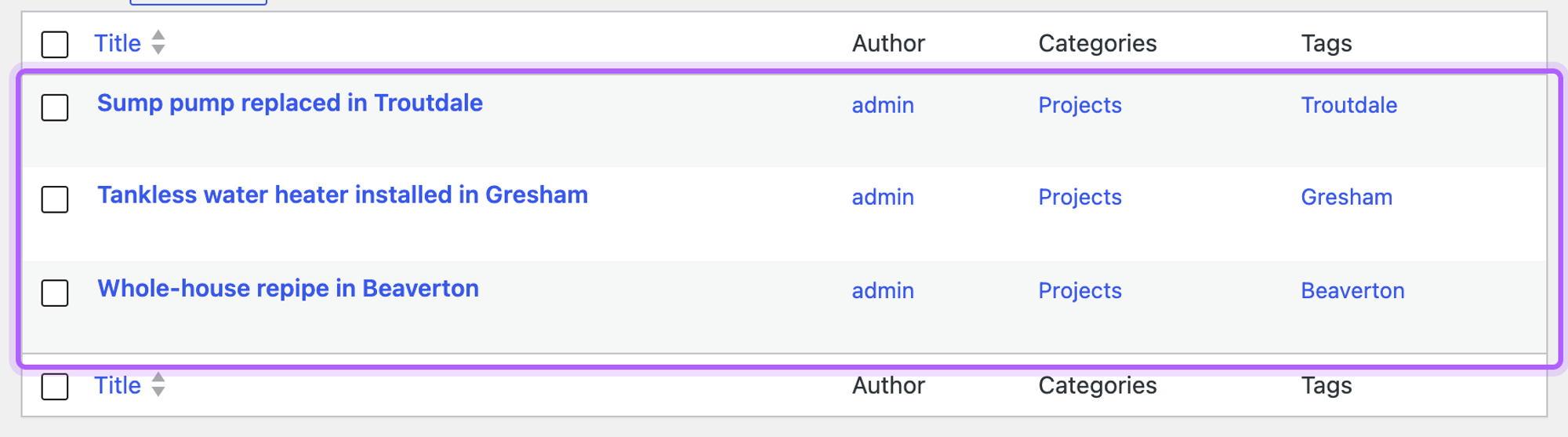
Each post got the Projects category, its town as a tag and the job_town custom field. For import plugins and other ways to create many posts at once, see how to bulk create posts in WordPress.
Create a page or a custom post type
Add 'post_type' => 'page' to the array to create a page, or the name of your custom post type. For a child page, add 'post_parent' with the parent page's ID.
Create a post with WP-CLI or the REST API
For a quick post without a PHP file, WP-CLI has a command of its own:
wp post create --post_title="Sump pump replaced in Troutdale" --post_status=publish \
--post_category=projects --tags_input="Troutdale" --user=admin --porcelain--post_category takes the category's slug here, and --porcelain prints only the new ID.
From another system, such as a form tool or your own app, the REST API creates posts over HTTP. It needs an application password; the REST API upload tutorial linked in the featured image section shows how to create one and set the three variables:
1curl -X POST "$SITE/wp-json/wp/v2/posts" \
2  --user "$WP_USER:$APP_PASSWORD" \
3  -H "Content-Type: application/json" \
4  -d '{
5    "title": "Sump pump replaced in Troutdale",
6    "content": "<!-- wp:paragraph --><p>The old pump failed during a storm.</p><!-- /wp:paragraph -->",
7    "status": "publish",
8    "categories": [3]
9 }'categories takes category IDs; replace 3 with yours. WordPress answered with status 201 and the new post as JSON, and the post's author was the user the application password belongs to.
Many pages from one template, without code
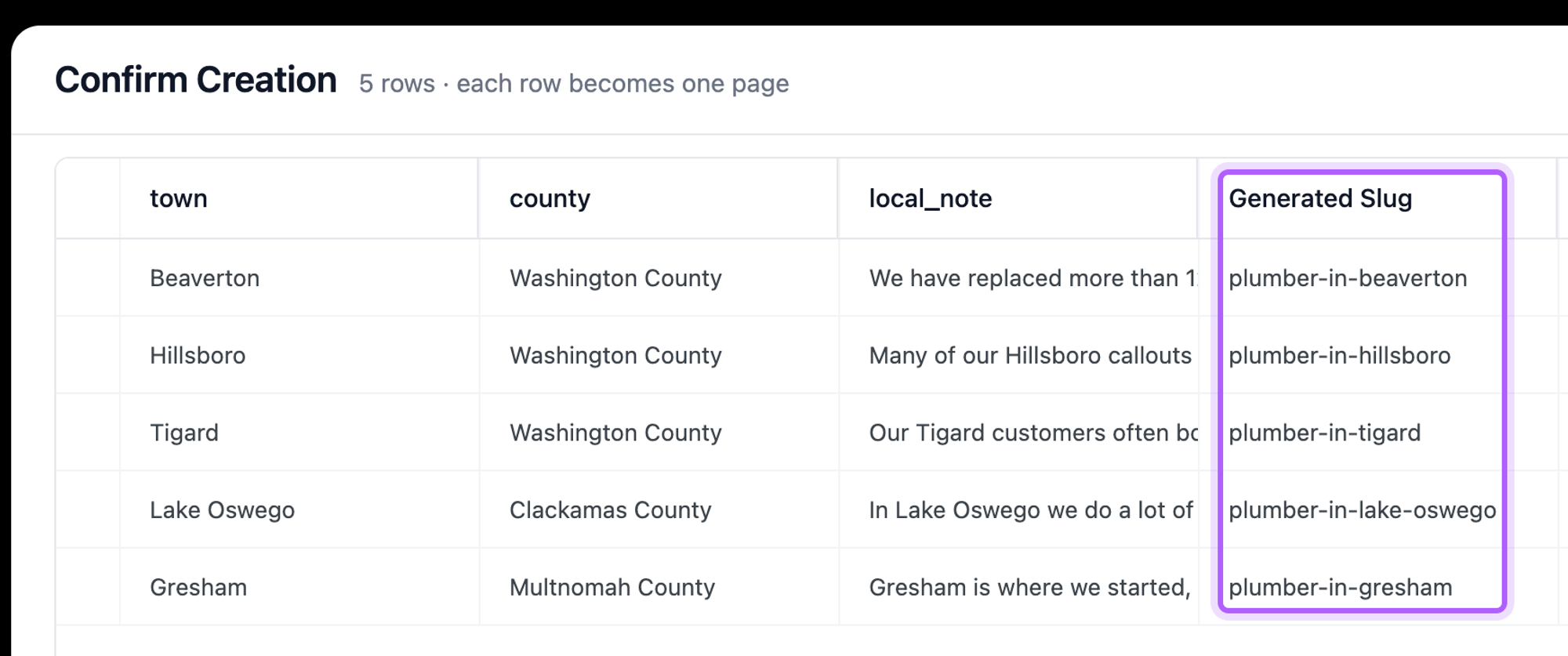
When every page follows the same layout, such as one page per town your business serves, you don't need a script. The free LPagery plugin does the same job in wp-admin: you build one template page with placeholders like {town}, upload a spreadsheet with one row per town, and LPagery creates one page per row. In our test with LPagery 3.1.0 from wordpress.org, five rows became five published pages, each with its town filled in, and the template page stayed a draft:
The free version uses up to three placeholder columns and creates up to 100 pages per run. LPagery Pro removes both limits, and its Extended plan adds Google Sheets sync and custom post types. Our tutorial on service area pages walks through every step.
The post shows up as a Classic block in the editor
The content was saved as plain text or HTML without block markup. The editor then puts all of it in one Classic block:
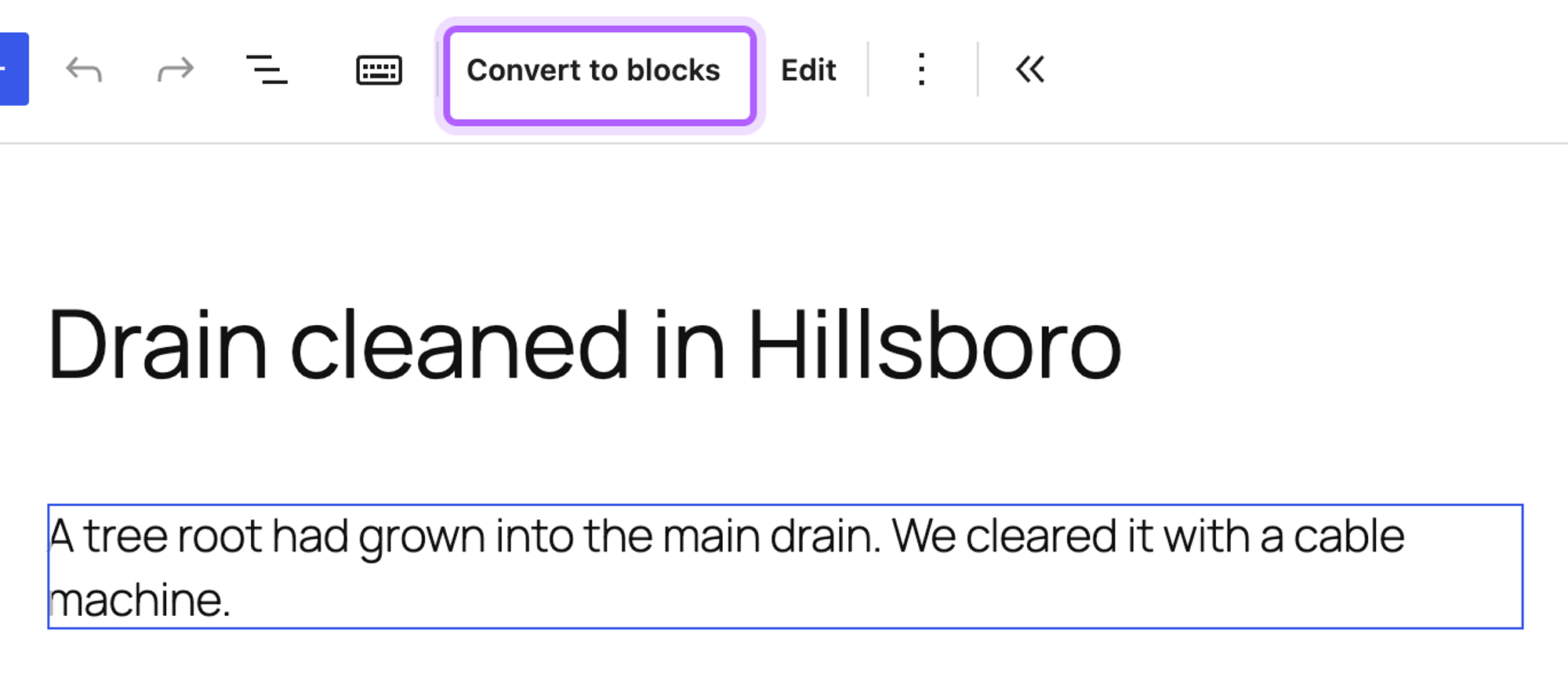
Click Convert to blocks to turn it into normal blocks. For future posts, wrap each paragraph in block comments, as the examples above do: <!-- wp:paragraph --><p>Text</p><!-- /wp:paragraph -->.
The post has no author
Without post_author, WordPress uses the current user, and a script run with WP-CLI has none unless you pass --user. In our test, such a post had author 0, and Twenty Twenty-Five showed "Written by" followed by nothing. Set post_author in the array, or run the script with --user=admin.
The category is missing or the post is in Uncategorized
post_category only takes IDs. In our test, array( 'Projects' ) left the post without any category. A category name that doesn't exist makes get_cat_ID() return 0, and that post ended up in Uncategorized. Create the category first, or look up the ID with get_cat_ID() as in the examples.
wp_insert_post returns 0 or "Content, title, and excerpt are empty."
WordPress refuses a post without a title, content and excerpt. With true as the second argument, you get this message as an error object; without it, the function returns 0. Check that the values you pass aren't empty, for example a CSV column with a different header than the script expects.
I've worked in SEO for more than ten years and helped over 100 businesses rank higher, mostly local businesses, e-commerce stores and SaaS companies. As co-founder of LPagery I work on local SEO, programmatic SEO and AI search visibility, and I test the strategies in these articles on our own sites and with our customers.