7 Best WordPress Plugins for Real Estate + MLS/IDX (Tested)

Updated
Part of the guide: WordPress SEO guides and plugin comparisons
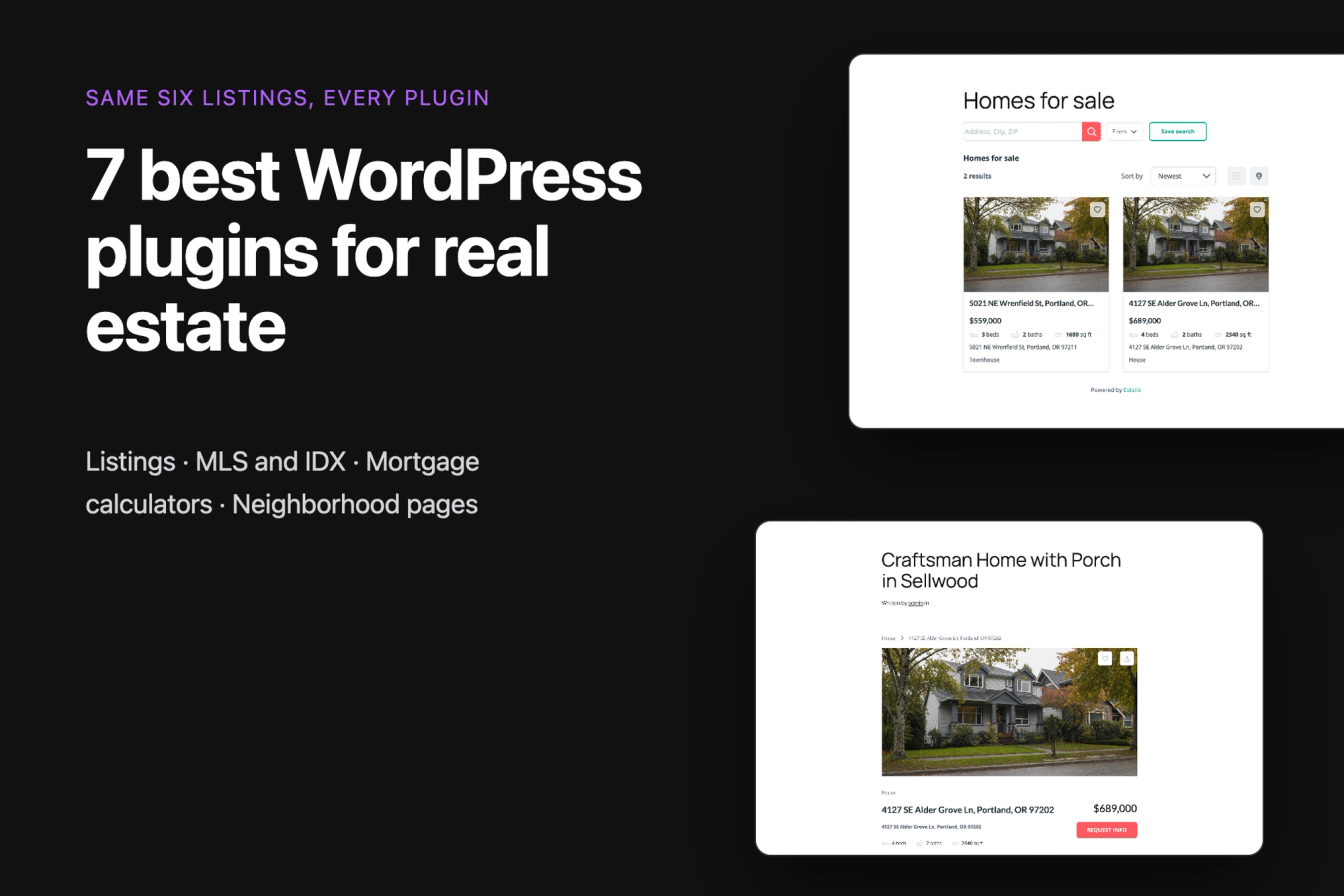
The best WordPress plugins for real estate depend on where your listings come from. If you enter your own listings, a listing plugin stores them in WordPress and gives visitors a search. If you want every home on your MLS, you need an IDX or MLS plugin, and that needs a paid feed plus your MLS's approval. We installed 23 free plugins from wordpress.org on the same test site, entered the same six Portland listings into each listing plugin, and took every IDX plugin as far as it goes without an MLS account.
Our picks, one per job: LPagery to get found in every neighborhood you sell in, with a page per area built from one template and a spreadsheet. Estatik for listings you enter yourself (its search returned exactly the right homes, and it prints House schema). SimplyRETS if you want to see an IDX search on your site before paying, because it ships a free demo feed. Simple Mortgage Calculator for a payment calculator (correct to the cent, adds 106 KB).
The list is ordered by the jobs a real estate site has to do, starting with getting found in each neighborhood, then showing your own listings, showing MLS listings and helping buyers with the payment. It is not ranked by a single score; within each job the best result in our test comes first.
Last tested 13 and 14 October 2026 on WordPress 7.1.3. We make LPagery, which is one of the plugins on this list. We are not affiliated with any other plugin here, and nobody paid to be included.
Plugin | Best for | Main catch in our test | Measured | Active installs |
|---|---|---|---|---|
LPagery | Neighborhood pages | 3 spreadsheet columns | 6 pages in 24 s, right listings on 6 of 6 | 3k+ |
Estatik | Your own listings with a working search | Map needs a Google API key | Search right; adds 1.3 MB | 10k+ |
Easy Property Listings | Block editor users | Map needs a Google API key | Search right; adds 187 KB | 5k+ |
Essential Real Estate | Most free features | Search defaults need changes | Adds 3.1 MB | 7k+ |
WPCasa | Lightest pages | No price filter in free search | Adds 138 KB | 1k+ |
SimplyRETS | Trying IDX before paying | Live data is paid | Demo search worked | 200+ |
Simple Mortgage Calculator | Payment calculator | None hit | $2,654.69 correct; adds 106 KB | 1k+ |
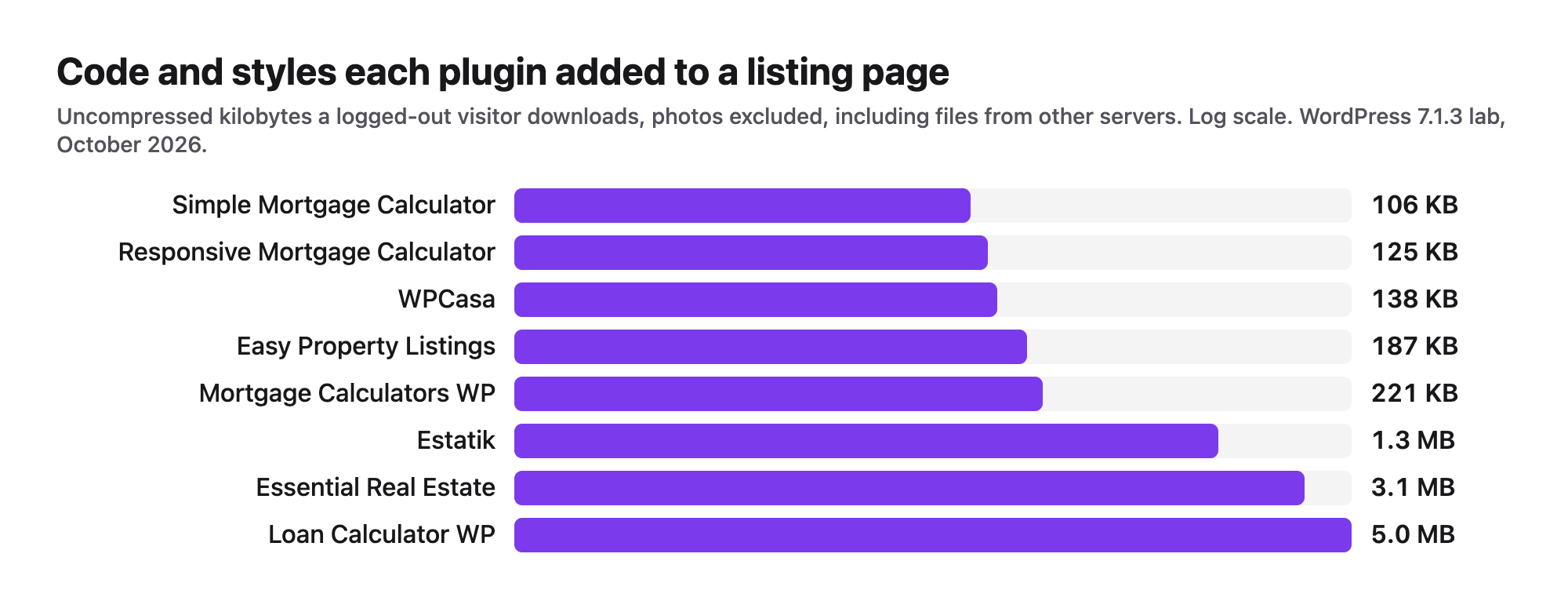
Weight added is what the plugin added to a logged-out visitor's single listing page in our lab, in uncompressed kilobytes, including files from other servers. Use it to compare plugins with each other; your host serves compressed files.
WordPress MLS and IDX plugins: what you need before you install one
An MLS plugin for WordPress is a front end. The listings come from a data feed that your MLS licenses to you, usually through an IDX vendor that charges a monthly fee. No free plugin on wordpress.org includes MLS data: every one we installed asked for an API key, an account or a registration key before it showed live listings, and only SimplyRETS showed demo data without one.
IDX, RETS and RESO Web API in plain words
- IDX (Internet Data Exchange) is the permission. Under the National Association of REALTORS policy, an MLS participant (a broker) may show other brokers' listings on a website they control, under the MLS's rules (NAR Handbook on Multiple Listing Policy 2025, IDX policy 7.58).
- RETS (Real Estate Transaction Standard) is the old way the data was delivered. RESO, the standards body, calls it deprecated and no longer supported (RESO Web API).
- RESO Web API is the current way: a web API that sends listings in the field names of the RESO Data Dictionary, so a plugin can read any certified MLS the same way (RESO Data Dictionary).
- A plugin then shows the data one of two ways: inside a frame or on a vendor subdomain (the listing pages live on the vendor's server), or as pages on your own domain ("organic" IDX), which search engines can crawl as part of your site.
What a broker has to request from the MLS
Only an MLS participant can get an IDX feed, so an agent works through their broker. The NAR policy that REALTOR-affiliated MLSs follow says:
- The participant must notify the MLS that they intend to display IDX listings and give the MLS access to check the display.
- The MLS must act on a feed request within five business days.
- The display must refresh at least every 12 hours, show the participant's own brokerage name, and name the listing firm with its email or phone number.
- Listings whose sellers or brokers opted out must not appear, and IDX data may be used only for IDX display. Indexing by search engines is allowed.
In practice the MLS adds its own paperwork. North Carolina's NCRMLS asks for a Participant Data Access Agreement with the broker and the broker's association and says there is "typically a setup and annual fee" (NCRMLS). Stellar MLS in Florida uses a three-party agreement between broker, vendor and MLS and delivers data through MLS Grid or Bridge (Stellar MLS). So the order is: pick an IDX vendor whose plugin you like, ask your broker to sign the MLS data agreement naming that vendor, then enter the vendor's key in the plugin.
Canada: CREA DDF instead of IDX
In Canada the feed is REALTOR.ca DDF (Data Distribution Facility) from the Canadian Real Estate Association. CREA describes it as a managed service for REALTORS and broker owners, with a National Shared Pool (other brokerages' listings you may display) and a Member Website Feed (your own and your office's listings) (CREA DDF). Its current API uses the RESO Web API standard (DDF Web API docs), and feeds are registered by the member in the DDF dashboard.
On wordpress.org, a search for CREA DDF returns Estatik and SoldPress, and SoldPress was last updated in January 2015. Estatik's CREA DDF sync is part of its paid Premium package, according to its own changelog. RealtyPress Premium, a dedicated DDF plugin sold outside wordpress.org, costs $139.00 and requires an active CREA membership (RealtyPress). None of these could be tested without a CREA membership.
Every IDX plugin we installed, and what it asked for
Plugin | Active installs | What it asked for after activation | Weight on a normal page without an account | Price (read 14 October 2026) |
|---|---|---|---|---|
SimplyRETS | 200+ | API key and secret; demo keys are prefilled | 276 KB | Basic $49/month, plus a one-time $99 per feed connection |
IMPress for IDX Broker | 7k+ | IDX Broker account (API key) | 0.1 KB | Core $60, Engage $99, Elite $149 a month, plus a setup fee with no published amount |
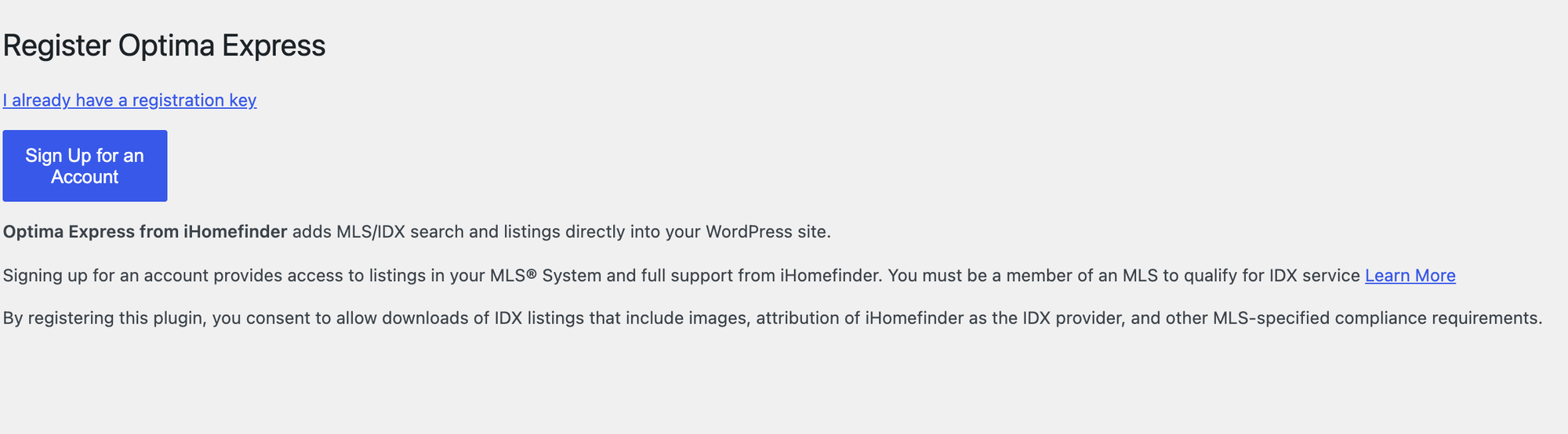
Optima Express (iHomefinder) | 10k+ | Registration key from a paid account | 99 KB | Plan prices given on a call only |
Showcase IDX | 2k+ | Sign in or start a free trial | 0.0 KB | Essentials $94.95, Premium $124.95 a month, MLS pass-through fee $0 to $33 a month |
MLSImport | 5k+ | MLSImport account and MLS credentials (setup wizard) | 256 KB | $49 a month for one MLS, 30-day free trial |
Flexmls IDX | 1k+ | Flexmls key and secret | 1.1 MB | $59 a month for agents, plus a setup fee; only for MLSs on Flexmls |
dsIDXpress (Diverse Solutions) | 1k+ | Activation key (trial or paid subscription) | 166 KB | Pricing page did not load for us (region block) |
Buying Buddy | 500+ | Consent to contact its servers, then an account | 2.2 MB | Agent $49, Team $77 a month, no setup fee |
Easy MLS Listings Import (Home ASAP) | 100+ | Agent's Real Estate Agent Directory account and MLS ID | 100 KB | No pricing page; listings shown in a frame |
Realtyna Organic IDX + WPL | 1k+ | Choice of trial (sample data) or full plan, both need registration | 948 KB | Prices behind a registration wall |
Rover IDX | 200+ | An MLS region; its settings screen could not reach Rover's server from our lab | not measured | From $65 a month, 30-day trial |
We did not test these hands-on: each needs an MLS feed and a paid account the lab does not have, so we cannot tell you how their search or lead capture works with live data. What we can tell you is what each asks for, what it costs on the vendor's own page today, and what it already loads on every page of your site before it is connected. Buying Buddy loaded 2.2 MB from three outside servers on a page without any listings, and Flexmls IDX 1.1 MB, before either was connected.
How we tested the plugins
Jonas Lindemann, who builds LPagery and writes our WordPress guides, ran every test in a local WordPress lab: WordPress 7.1.3, PHP 8.3 on Apache, the default Twenty Twenty-Five theme, and Chrome driven by a script. The example business is Riverbend Realty in Portland, Oregon. It is made up, its phone number (503) 555-0187 is in a range reserved for fiction, and the street names are invented so no real home appears.
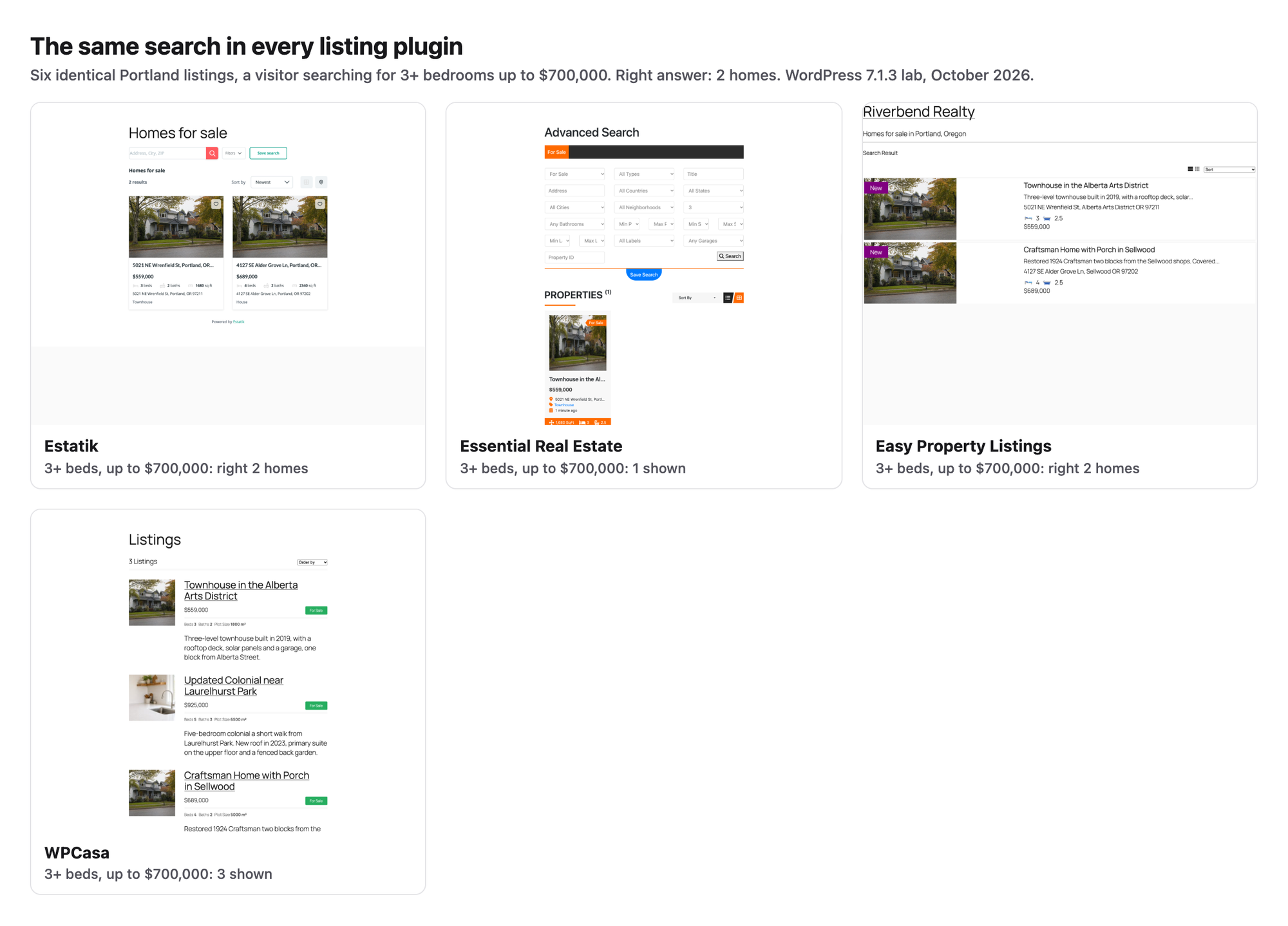
Each plugin ran alone on a freshly reset site. For the listing plugins the script added the same six listings through each plugin's own add-listing screen, as you would: a Sellwood craftsman ($689,000, 4 beds), a Laurelhurst colonial ($925,000, 5 beds), a St. Johns bungalow ($449,000, 2 beds), a Hawthorne condo ($389,000, 2 beds), a Pearl District loft ($615,000, 1 bed) and an Alberta townhouse ($559,000, 3 beds). Then a logged-out visitor searched for 3 or more bedrooms up to $700,000. The right answer is two homes, Sellwood and Alberta. For every plugin we recorded:
- Setup steps from Activate to a published search page, and the steps to add one listing (every screen, tab and group of fields).
- Whether the frontend search returned the right two homes.
- Whether the listing page shows a map, and whether that map needs a Google Maps API key.
- Structured data in the listing page source, read as a visitor.
- Weight added to the listing page against a plain page with the same text (median of 3 loads), and the layout at 390 pixels wide.
- What the free version blocked, and anything a reader would trip over.
Mortgage calculators got one job: a $525,000 home, 20% down, 6.5% interest, 30 years. The correct principal and interest is $2,654.69 a month. IDX plugins were installed and taken to the screen where they ask for a feed or account. Lead forms, showing requests, reviews, maps, business schema and click-to-call were measured once for all our niche lists in the same lab on 13 and 14 October 2026; we cite those numbers below. Prices were read on each vendor's pricing page on 14 October 2026. We installed 23 plugins: 6 listing plugins, 11 IDX plugins, 5 mortgage calculators and LPagery.
Job 1: get found in every neighborhood you sell in
Buyers search for an area before they search for a house: "homes for sale in Sellwood", "condos in the Pearl District". IDX pages are hard to rank for those searches, because the same MLS listings appear on every agent's site in the area. A page per neighborhood with your own local facts and your listings for that area gives Google something only you have. Our list of real estate keywords shows which of these searches have volume, and our guide to local SEO for real estate covers the rest of the setup.
Keep each page useful on its own. Google's spam policies name pages made for one city or region that funnel visitors to one place as doorway pages; our location pages tutorial quotes the policy and shows what makes a page worth keeping, and the landing page checklist for local services lists what each page needs.
1. LPagery
LPagery is the best plugin for agents who want a "Homes for sale in <neighborhood>" page for every area they serve, built from one template and a spreadsheet.
We built one template page with the title Homes for sale in {neighborhood}, a photo, an intro with the placeholder {area_facts}, and Essential Real Estate's listing shortcode filtered by {neighborhood_slug}. The spreadsheet had three columns, neighborhood, neighborhood_slug and area_facts, which is the free plan's limit, and one row per neighborhood.
LPagery created the 6 pages in 24 seconds. Every page returned 200, every title and H1 was different, no placeholder was left over, and 6 of 6 pages showed exactly the listing from their own neighborhood and no other. So when you add a new Sellwood listing in the listing plugin, it appears on the Sellwood page by itself. Brokerages with several offices can use the same approach for office pages, as in our guide to local SEO for multiple locations.
In our earlier niche test the same free version built 20 town pages in 26 seconds with 20 unique titles, H1s and meta descriptions. The pages are ordinary WordPress pages and stayed online after LPagery was switched off (more ways to bulk create pages). Our guide to service area pages in WordPress walks through the create screen step by step.
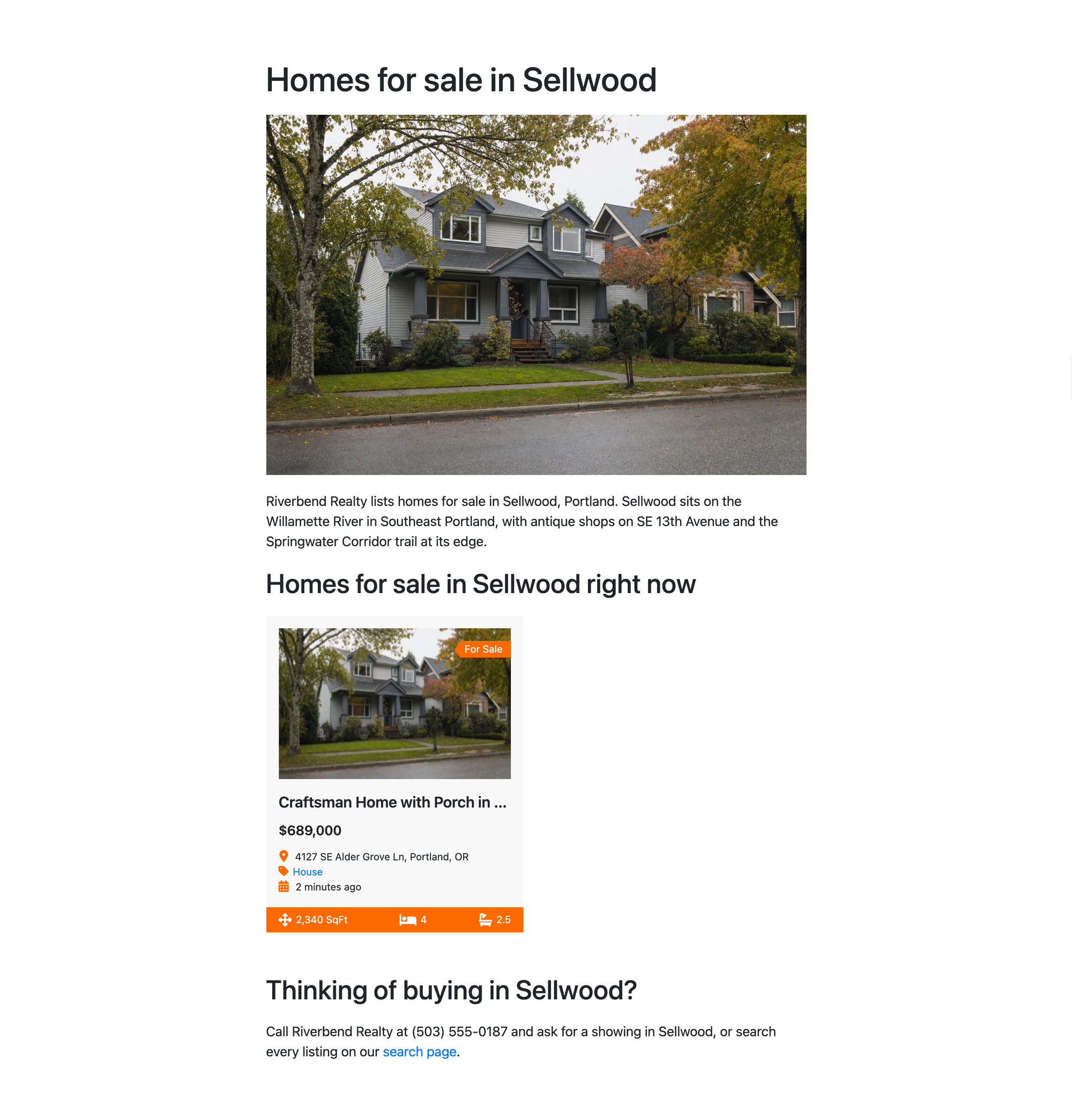
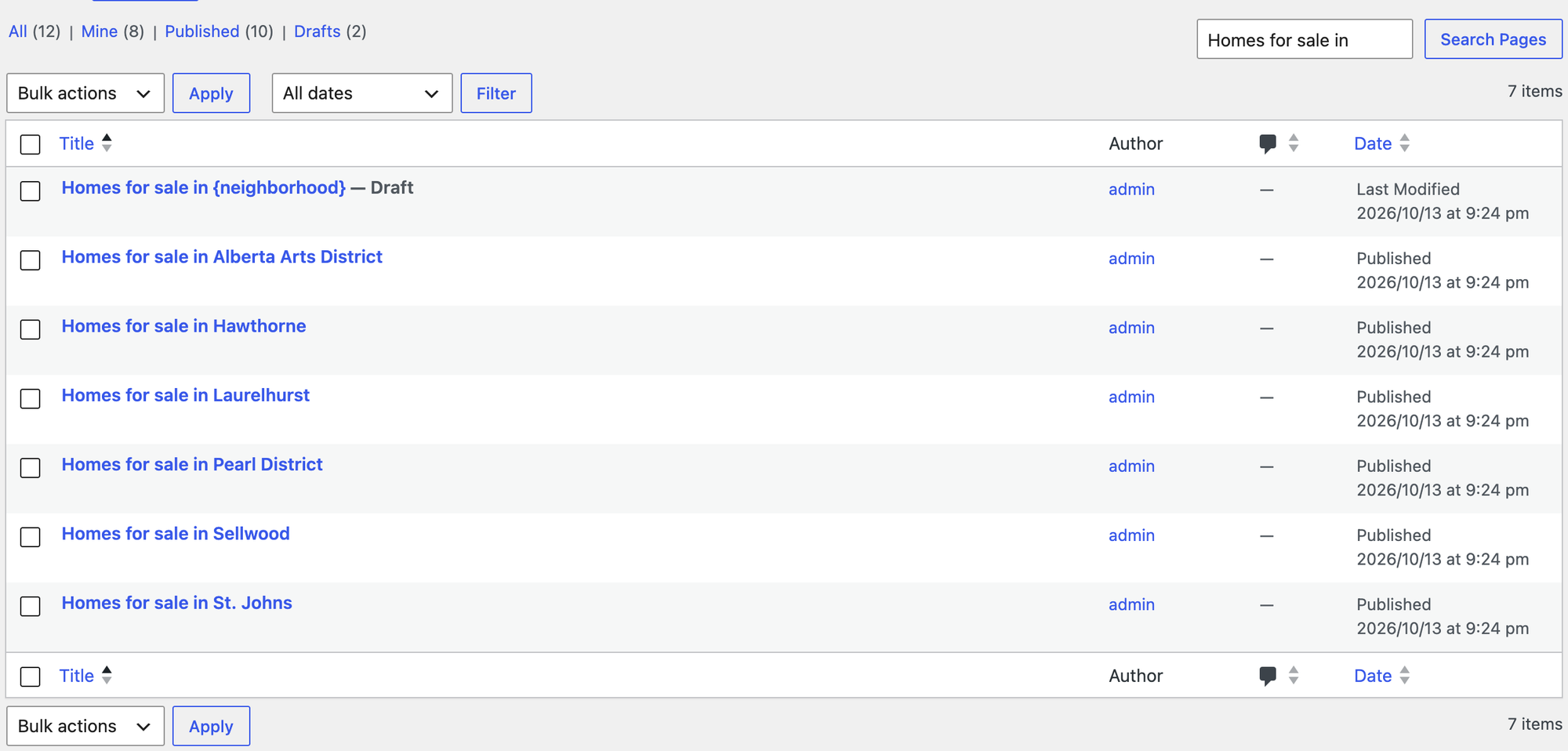
What we measured for LPagery 3.1.0:
- Steps: 8 from activation to created pages (the template page is built first, in the editor)
- Pages: 6 created, 6 return 200, 6 unique titles, 0 leftover placeholders
- Right listings on each page: 6 of 6
- Text similarity between pages: median 59%, so the area facts column has to carry real local detail
- LPagery's own files on the generated pages: none (0 KB)
- Free version limits: 3 placeholder columns and 100 pages per run
Pros
- Turns a sheet of neighborhood facts into pages in seconds.
- Works with the listing plugin you already use through its shortcode.
- Pages stay when the plugin is removed.
Cons
- Pages are only as good as the facts in your sheet; with one short column they are near copies.
- Three placeholder columns in the free version; more columns, Google Sheet Sync and bulk updates need a paid plan.
- No listing search of its own: you still need a listing or IDX plugin.
LPagery Standard costs $19 a month or $171 a year and lifts the column limit; Extended ($27 a month or $243 a year) adds Google Sheet Sync and interlinking (read on lpagery.io on 14 October 2026). See the bulk page generator page for what each plan adds. Links: LPagery on wordpress.org, vendor site.
Job 2: show the listings you enter yourself
These plugins store each listing as a WordPress post with price, bedrooms, address and photos, and add a search to your site. They suit agents who list their own homes, small brokerages, and markets where you have no IDX feed. They are also where your own listings can rank, because each one is a page on your domain with text you wrote.
2. Estatik
Estatik is the best free listing plugin in our test for agents who enter their own listings and want a search that works without setup; that verdict rests on one search task and the setup steps below.
Estatik's activation screen offers ADJUST PLUGIN TO YOUR NEEDS, a four-screen setup. It creates the pages a listing site needs (grid, list, map view, search results, sign-up and profile) and asks whether to add demo listings; we answered No, because the demo adds Miami listings to your site. Setup took 8 steps, and each listing took 9: title and description, then the Basics, Location and Photos & Media tabs, then the type, status and neighborhood tags.
The search worked first time. A visitor opened Filters, picked 3+ bedrooms and a maximum price of $700,000, and got Sellwood and Alberta, the two right homes, and nothing else. Each listing page printed House structured data (JSON-LD) on its own, the only listing plugin in our test that did. If your SEO plugin already prints schema, check that the two do not clash; our free SEO plugin test shows what each one outputs.
The map is the gap. The Location tab shows Set up your Google Maps API Key: the ZIP code and map position are filled by Google's address search, so without a key the listing has no map. A listing page added 1.3 MB of code and styles plus the photo, including a sharing script from static.addtoany.com.
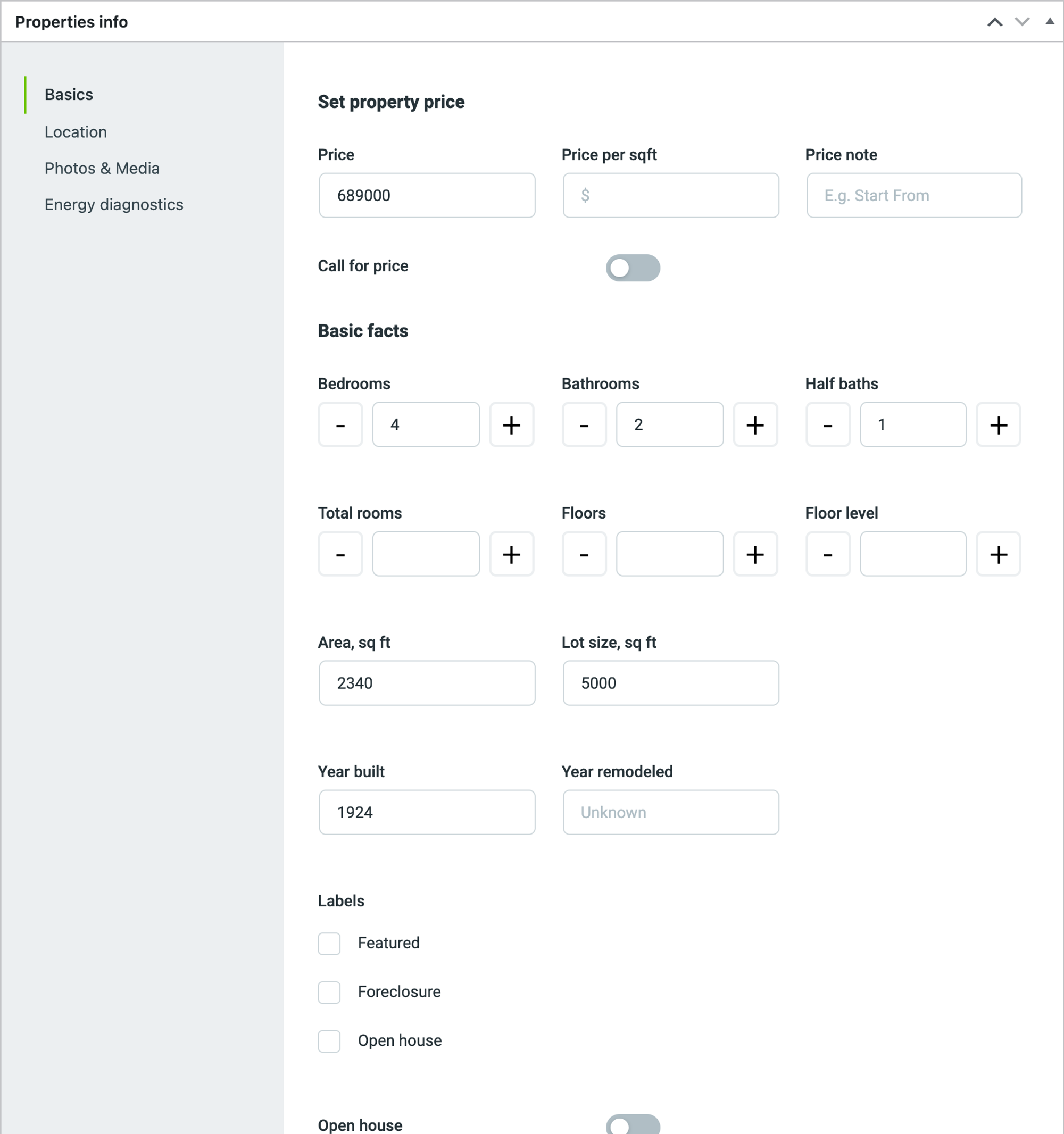
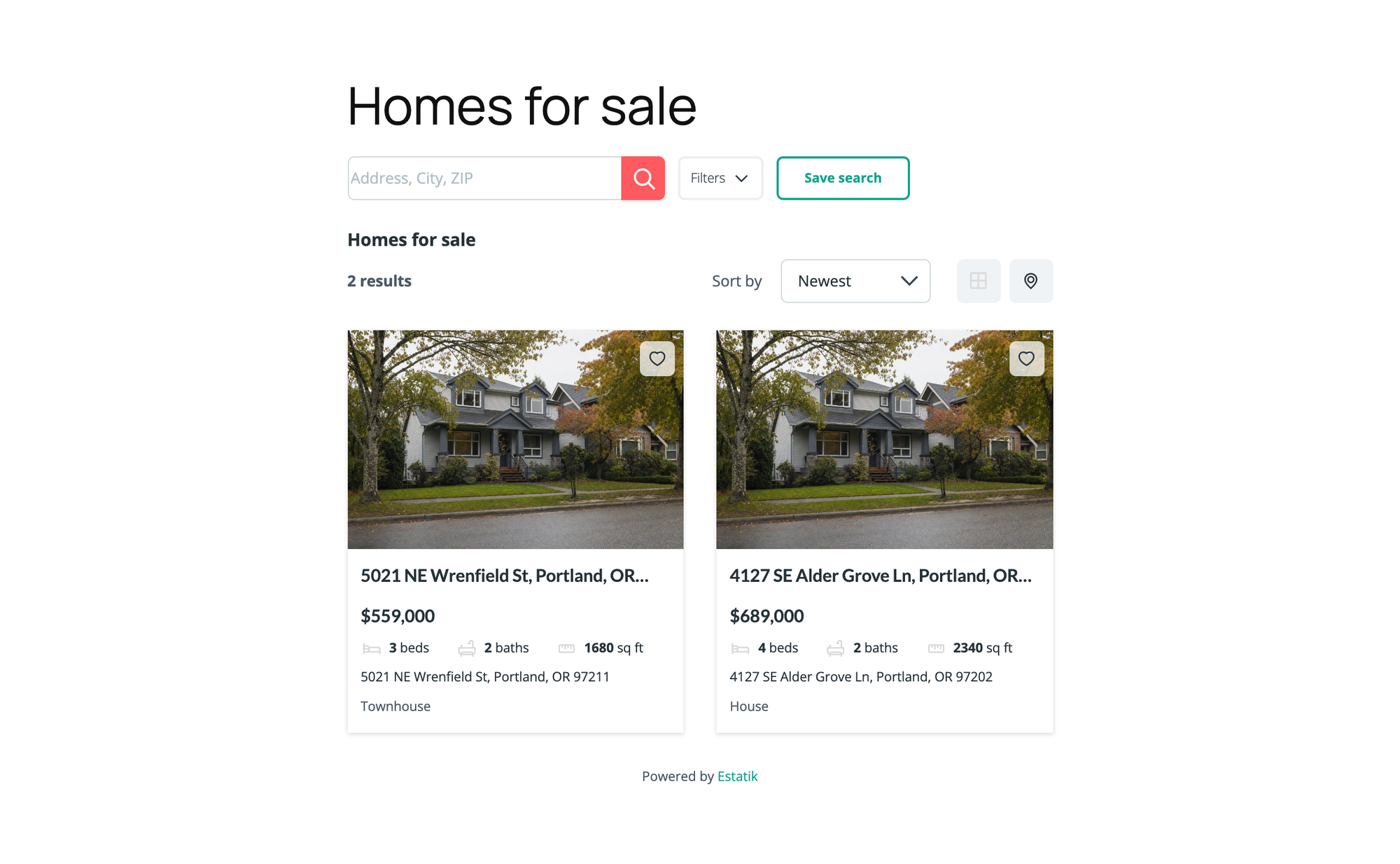
What we measured for Estatik 4.3.6:
- Setup steps: 8; steps per listing: 9
- Search for 3+ beds up to $700,000: right two homes
- Map on the listing page: no, needs a Google Maps API key
- Structured data on the listing page: JSON-LD House
- Weight added to a listing page: 1.3 MB plus the photo, 31 requests
- At 390 px: fits, no sideways scrolling
- Free version blocked: nothing in the task
Pros
- The search returned exactly the right homes.
- The only listing plugin that printed listing schema (House) as JSON-LD.
- Setup creates every page you need and lets you skip the demo data.
Cons
- No map without a Google Maps API key.
- Heavier than WPCasa: 1.3 MB of code against 138 KB.
- MLS import (RETS, RESO Web API and CREA DDF) is only in the Premium package, whose price is not published.
Estatik PRO costs $89. MLS import via RETS or RESO Web API needs Estatik Premium, and estatik.net shows no price for it (read on 14 October 2026). Links: Estatik on wordpress.org, vendor site.
3. Essential Real Estate
Essential Real Estate is the best free listing plugin for brokerages that want the most fields and pages without paying for add-ons.
Essential Real Estate opens a setup wizard that creates its pages: advanced search, compare, favorites, agent profiles, submission and payment pages for paid listings. Its address boxes are drop-downs of terms, so before the first listing we had to add the state, the city and all six neighborhoods on their own screens. That made setup the longest in the test, 11 steps, and each listing took 11, including a separate featured image because the listing cards show the featured image and the page shows the gallery.
The advanced search has every field you could want, but two defaults work against a buyer. The bedroom filter matches the exact number, so 3 bedrooms returned only the Alberta townhouse and hid the 4-bedroom Sellwood house. And the price drop-downs stop at $2,000 until you change them under Real Estate Options, so a buyer cannot pick $700,000 at all. We read both in the plugin's code to confirm them.
It loaded Google Maps scripts on every listing page (1.3 MB from maps.googleapis.com) but showed no map without an API key, and the listing page scrolled sideways on a 390 px phone screen.
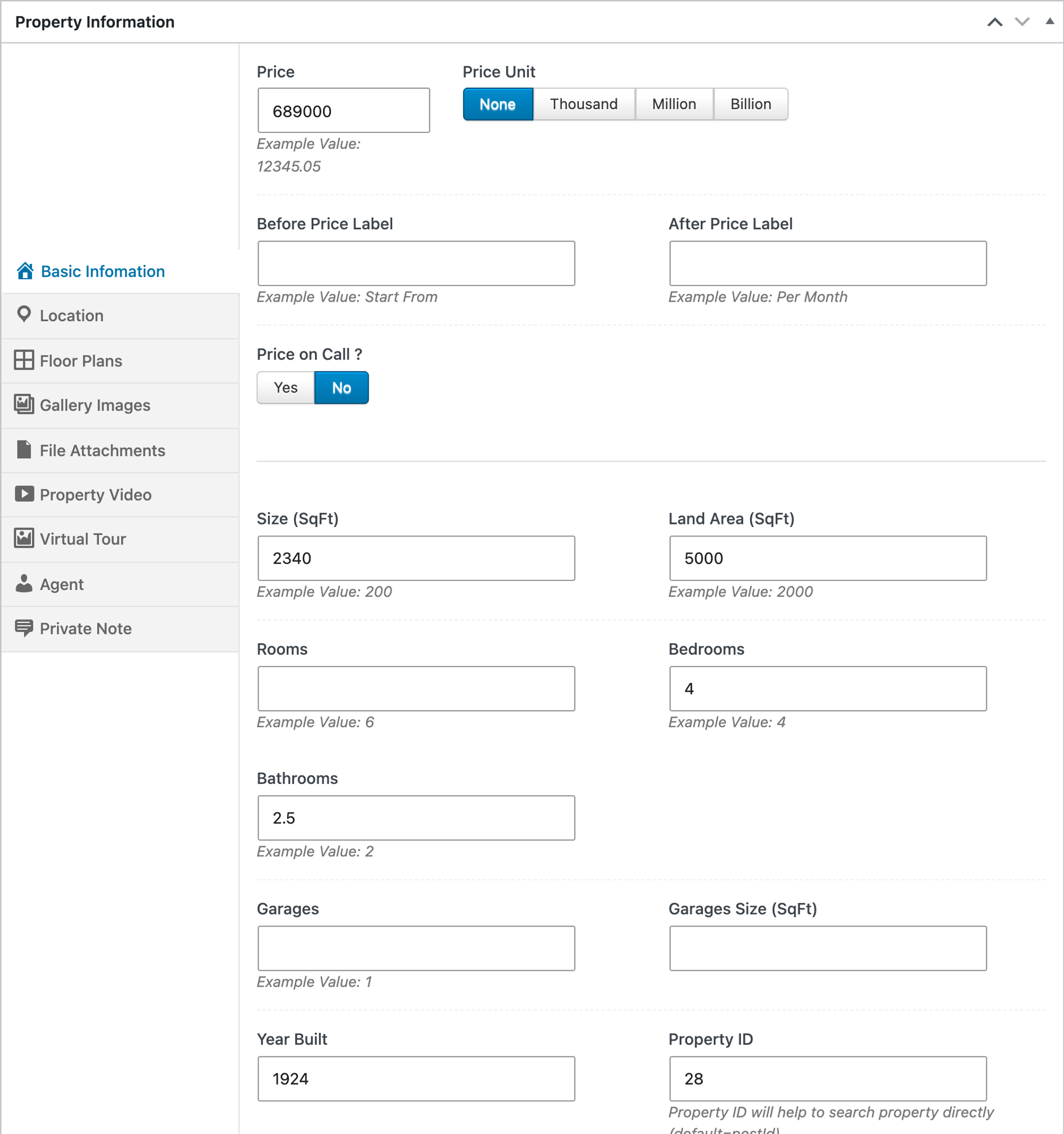
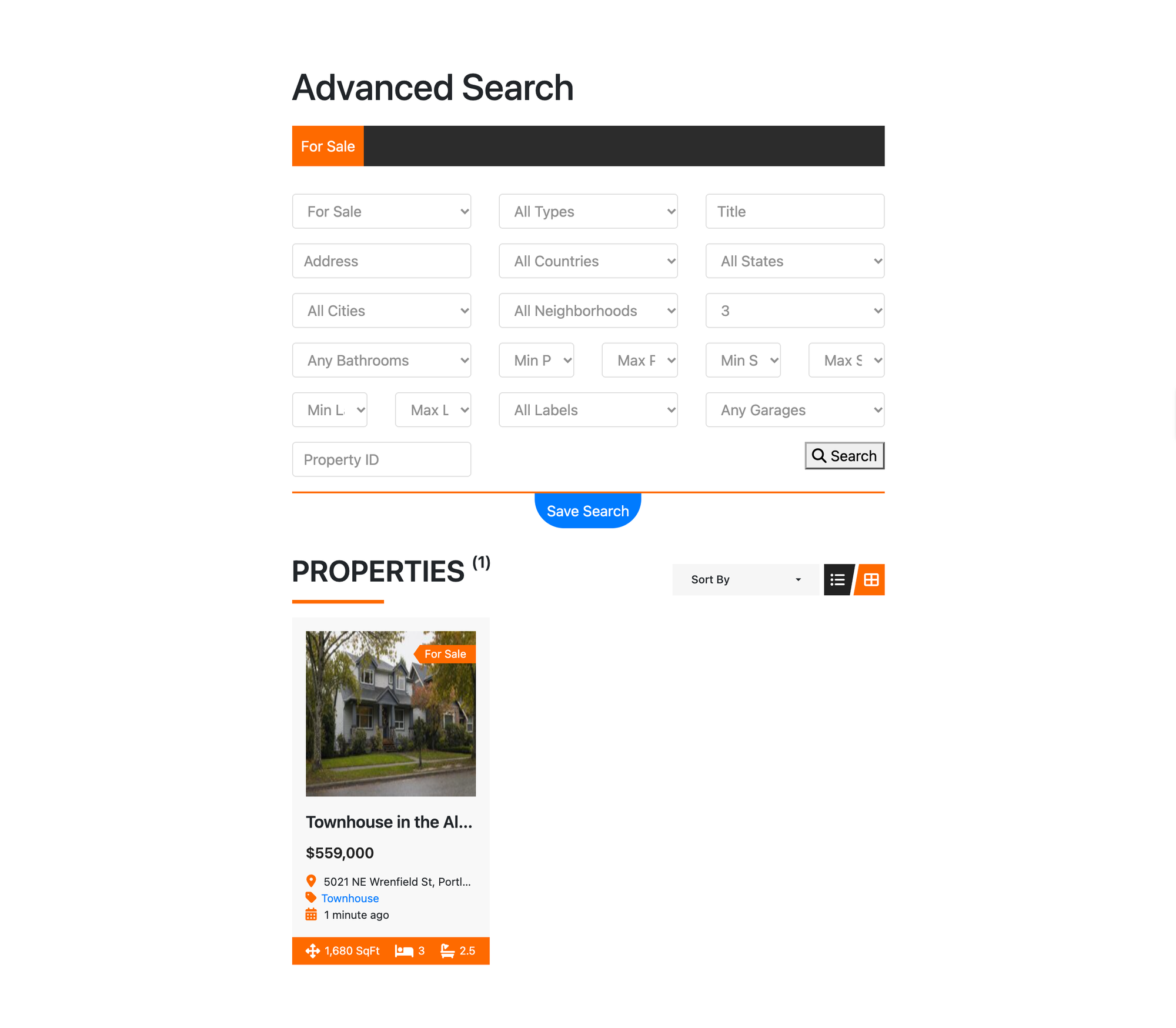
What we measured for Essential Real Estate 5.3.3:
- Setup steps: 11; steps per listing: 11
- Search for 3+ beds up to $700,000: not possible with the defaults (bedrooms match exactly, prices stop at $2,000)
- Map on the listing page: no, needs a Google Maps API key
- Structured data on the listing page: none
- Weight added to a listing page: 3.1 MB plus the photo, 46 requests, the heaviest in the test
- At 390 px: scrolls sideways (an element is 405 px wide on a 390 px screen)
- Free version blocked: nothing; the plugin's add-ons are free
Pros
- Most complete free feature set: compare, favorites, saved searches, agents, paid submissions.
- Neighborhood, city and state are real terms, which makes neighborhood pages easy (the LPagery test above uses that).
Cons
- Bedroom filter is exact and price lists stop at $2,000 until changed.
- Heaviest listing page in the test (3.1 MB of code).
- Sideways scrolling on phones in our theme.
Essential Real Estate has no paid version; its maker sells themes. Links: Essential Real Estate on wordpress.org.
4. WPCasa
WPCasa is the best free listing plugin for agents who want the lightest pages and plan to use a WPCasa theme.
WPCasa has no wizard. Its settings open on an account screen, and the Listings tab holds the one change a US agent needs: Measurement Unit is m2 by default, so we switched it to sq ft. Each detail field keeps its own unit, though: the plot size still read m² on the listing cards afterwards. Setup took 5 steps, and each listing 8 on one screen: price, For Sale, beds, baths, areas, map address, agent name and phone, then type, location and featured image.
WPCasa added only 138 KB of code to a listing page, the lightest in the test, and its markup carries schema.org microdata (Product, Offer, Place, GeoCoordinates and RealEstateAgent). The catch showed on the frontend: in the default Twenty Twenty-Five theme the listing page showed the title, photo and description but no visible price or details, and the full-width photo made the page scroll sideways on a phone. WPCasa sells its own themes for that layout.
The free search form offers offer type, location, type, beds and baths. Beds worked as a minimum (3 returned Alberta, Sellwood and Laurelhurst), but there is no price field, so the $925,000 Laurelhurst house stayed in the results. WPCasa lists an Advanced Search add-on as free on its site.
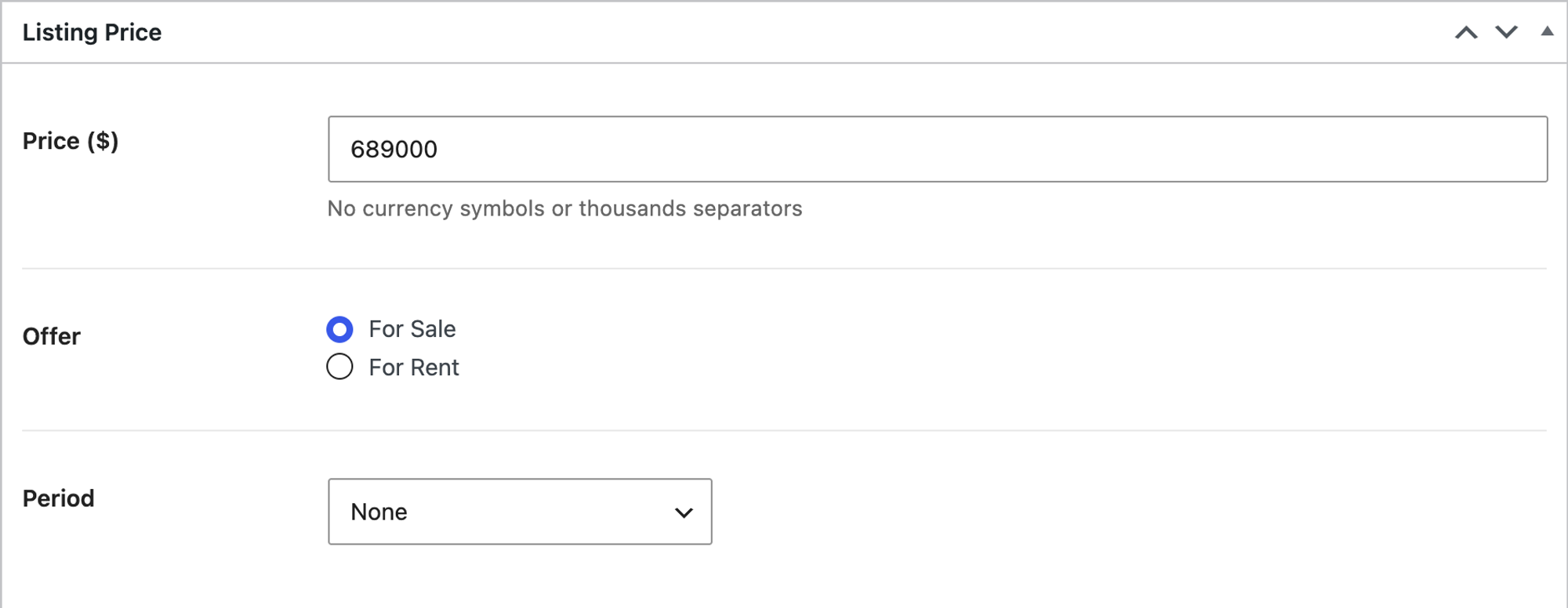
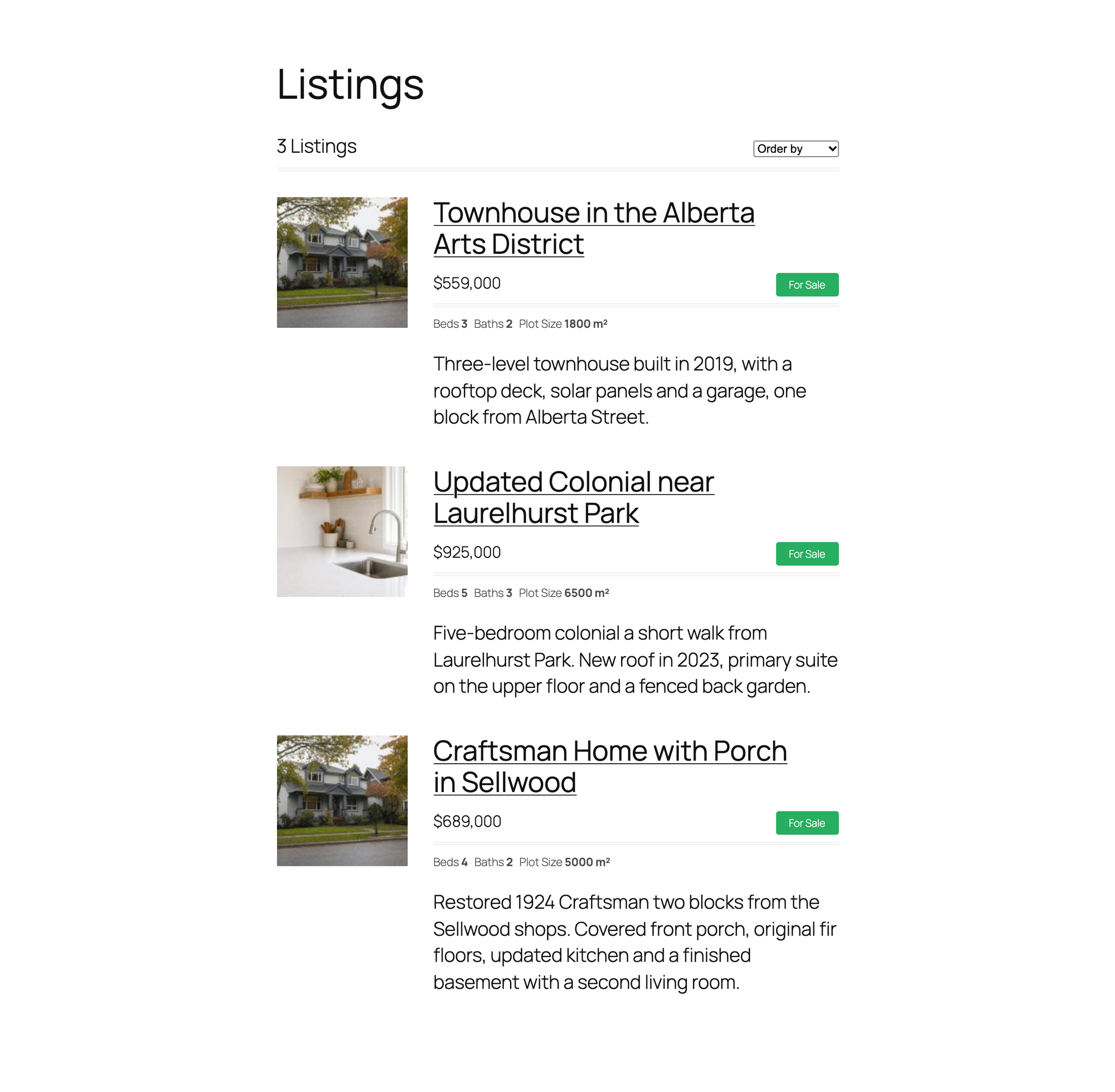
What we measured for WPCasa 1.5.5:
- Setup steps: 5; steps per listing: 8
- Search for 3+ beds up to $700,000: beds yes, no price filter in the free form (3 results, one over budget)
- Map on the listing page: no, needs a Google Maps API key
- Structured data on the listing page: microdata GeoCoordinates, Offer, Place, Product, RealEstateAgent
- Weight added to a listing page: 138 KB plus the photo, the lightest
- At 390 px: scrolls sideways (an element is 1024 px wide on a 390 px screen)
- Free version blocked: nothing in the task; mortgage calculator, PDF and featured listings are paid add-ons
Pros
- Lightest listing pages in the test.
- Fastest listing entry: everything on one screen.
- Schema.org microdata built in.
Cons
- Defaults to square meters.
- Price and details not visible in a block theme like Twenty Twenty-Five.
- No price filter in the free search form.
WPCasa's paid add-ons cost $29 to $129 each (read on wpcasa.com on 14 October 2026). Links: WPCasa on wordpress.org, vendor site.
5. Easy Property Listings
Easy Property Listings is the best free listing plugin for agents who use the block editor and want a correct search with the least setup.
Easy Property Listings needs no wizard: Property (residential) is switched on, and the listing screen is the normal block editor with its own boxes in the sidebar and in the Meta Boxes panel at the bottom, which starts collapsed. Setup took 2 steps and each listing 8 to 9. The address box splits street number and street name, and price and street address stay hidden on the page until you tick Display Price? and Display Street Address?.
Its search was correct: 3+ bedrooms up to $700,000 returned Sellwood and Alberta and nothing else. A listing page added 187 KB of code, with no structured data and no map; the map code uses Google Maps, so it needs an API key. In our block theme the search results opened in a plain fallback layout with the default widgets below them, so plan on some theme work. The plugin comes from an Australian developer, and it shows: house categories include Unit and Villa, and the paid extensions are billed in Australian dollars.
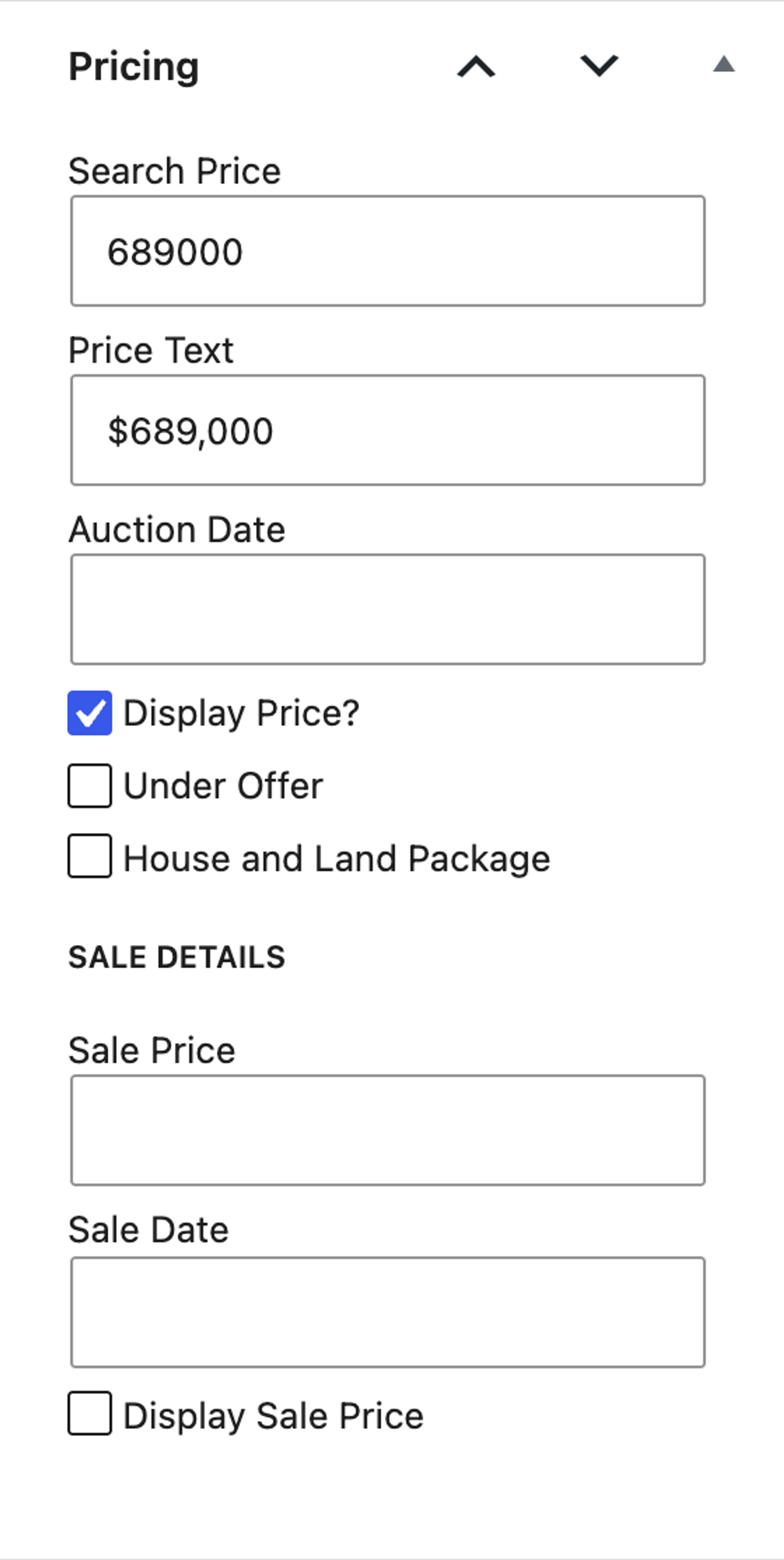
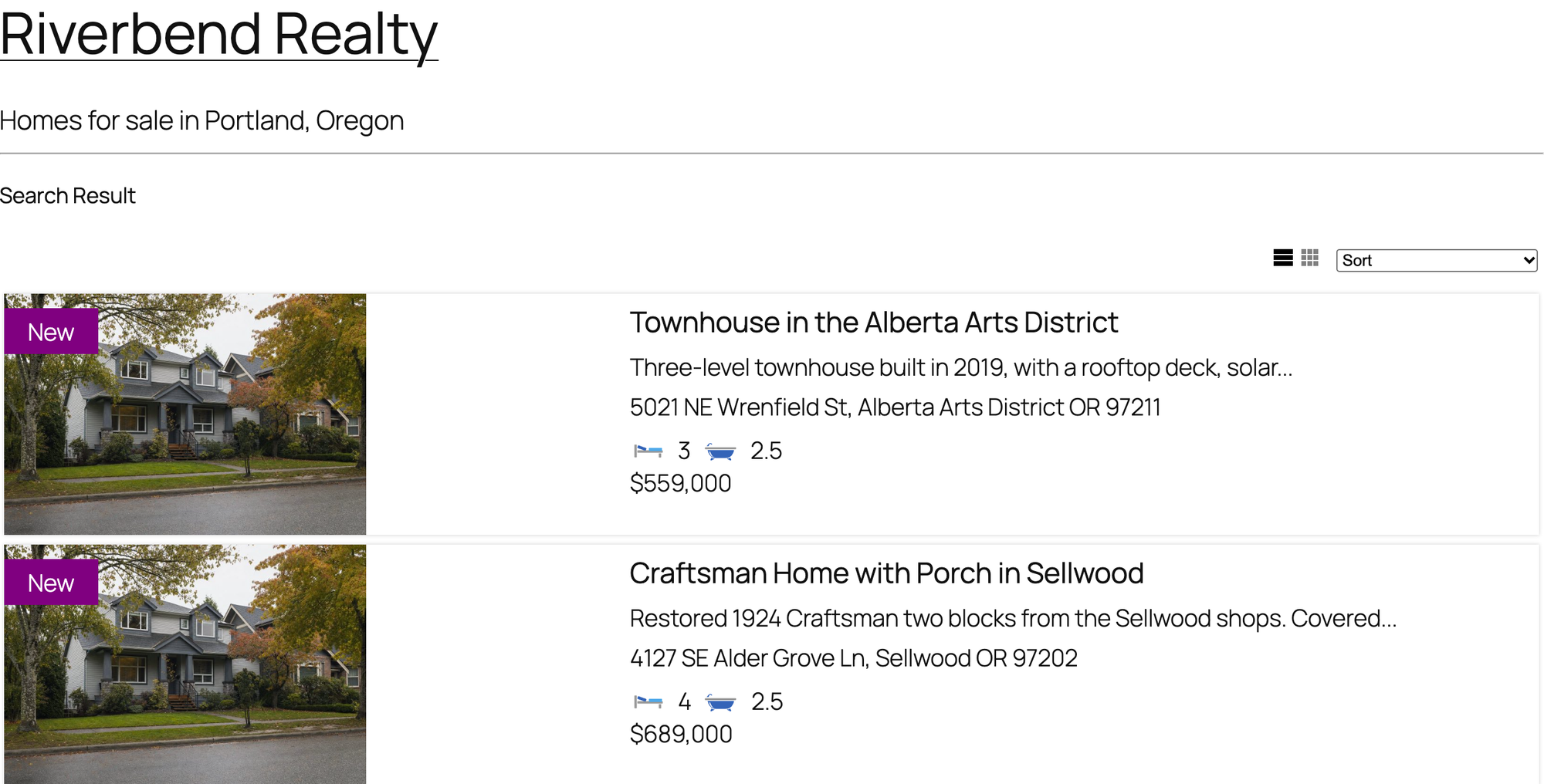
What we measured for Easy Property Listings 3.5.27:
- Setup steps: 2; steps per listing: 8 to 9
- Search for 3+ beds up to $700,000: right two homes
- Map on the listing page: no, needs a Google Maps API key
- Structured data on the listing page: none
- Weight added to a listing page: 187 KB plus the photo
- At 390 px: fits, no sideways scrolling
- Free version blocked: nothing in the task
Pros
- Correct search with no setup.
- Works in the block editor.
- Light listing pages.
Cons
- Price and address hidden until two boxes are ticked.
- Australian wording (Suburb, Unit) to work around.
- No schema, no map without a Google key.
The Core Extension Bundle costs AUD 297 a year for one site and includes about 30 extensions, a RESO extension among them (read on easypropertylistings.com.au on 14 October 2026). Links: Easy Property Listings on wordpress.org, vendor site.
Job 3: show MLS listings, with the IDX plugin you can try before paying
Every IDX plugin in our test needed an account before it showed a single listing, except one. SimplyRETS ships with demo keys, so you can see its search and listing pages on your own site first.
6. SimplyRETS
SimplyRETS is the best IDX plugin for agents and developers who want to see a working MLS search on their own site before they pay for a feed.
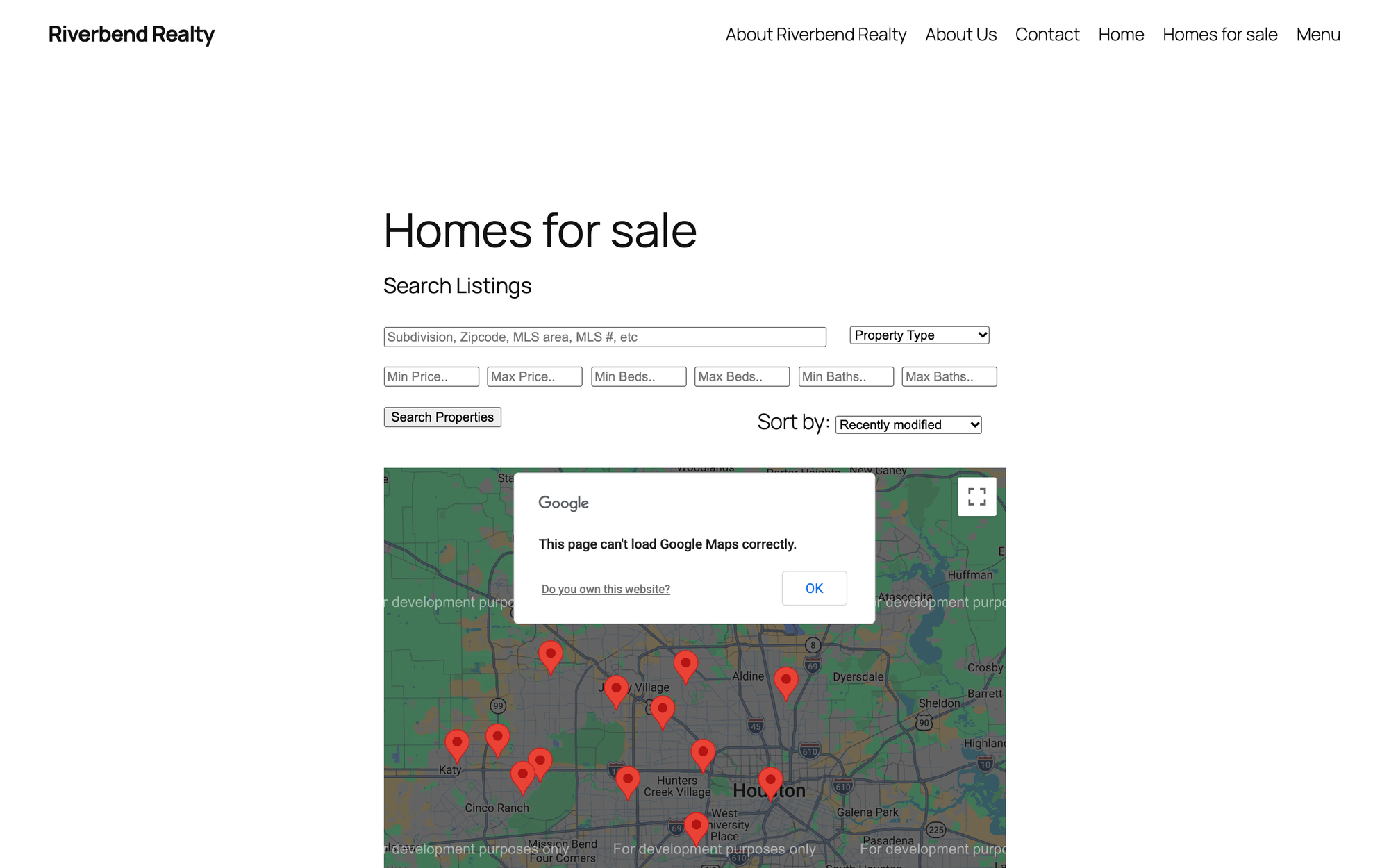
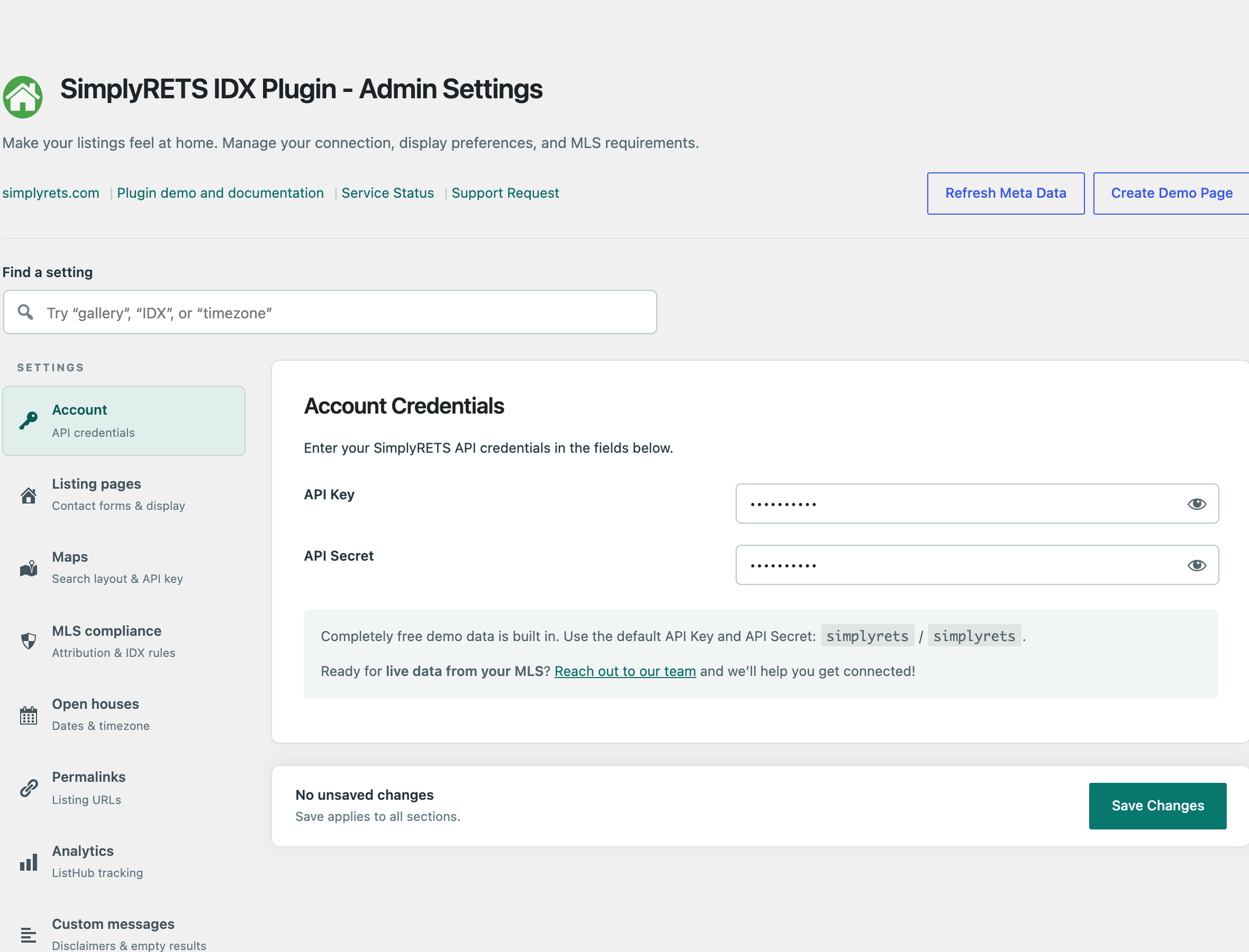
The plugin's settings already hold the demo API key and secret (simplyrets / simplyrets), and its page says the demo listings are not real properties but carry the same fields as a real MLS feed. We added its search form and listings shortcodes to a page: a visitor saw a list of demo homes in Texas with a map, filters for type, price, beds and baths, and one page per listing on our domain under /listings/.
The same search we ran on the listing plugins, 3+ beds up to $700,000, returned one demo home at $419,294, with every result inside the limits. Two things to plan for: the map needs your own Google Maps API key (ours showed Google's "can't load Google Maps correctly" notice), and the listing pages printed no structured data. Without any listings on the page, the plugin added 276 KB to every page of the site; a listing page weighed 1.6 MB in total, most of it photos and Google Maps.
What we measured for SimplyRETS 3.3.0:
- Steps to a working demo search: 3 (activate, check the prefilled demo keys, add the shortcodes to a page)
- Search for 3+ beds up to $700,000 on demo data: 1 result, within the limits
- Map: needs a Google Maps API key
- Structured data on the listing page: none
- Added to every page before you show listings: 276 KB
- At 390 px: fits
- Not tested: live MLS data, which needs a paid plan and your MLS's approval
Pros
- The only IDX plugin we could run without an account.
- Listing pages on your own domain, not in a frame.
Cons
- Live data costs $49 to $199 a month plus $99 per feed connection.
- No listing schema; the map needs your own Google key.
- Only 200+ active installs.
SimplyRETS costs $49 (Basic), $99 (Premium) or $199 (Enterprise) a month, plus a one-time $99 per RETS or RESO Web API connection (read on simplyrets.com on 14 October 2026). Links: SimplyRETS on wordpress.org, vendor site.
Job 4: help buyers with the payment (mortgage calculator plugins)
Each calculator went on a listing page as a shortcode, and a visitor entered a $525,000 price, $105,000 down (20%), 6.5% and 30 years. The right principal and interest is $2,654.69 a month.
These payments are principal and interest only, for illustration: they leave out property taxes, homeowners insurance, HOA fees and mortgage insurance (except the $2,792.50 figure, which adds Mortgage Calculators WP's default taxes, insurance and HOA). They are not financial advice or a loan offer.
Calculator | Active installs | Monthly payment shown | Weight added | Notes |
|---|---|---|---|---|
Simple Mortgage Calculator | 1k+ | $2,654.69 | 106 KB | Price, down payment, rate, term |
Responsive Mortgage Calculator | 7k+ | $2,654.69 | 125 KB | Down payment as an amount; optional amortization chart from mlcalc.com |
Mortgage Calculator | 4k+ | $2,654.69 | 135 KB | Also shows loan amount and total paid |
Mortgage Calculators WP | 3k+ | $2,655 (rounded), $2,792.50 with its default taxes, insurance and HOA | 221 KB | Interest is a slider; email the results |
Loan Calculator WP | 2k+ | Wrong for a mortgage: term capped at 7 years, 30% balloon by default | 5.0 MB | Embeds a YouTube video by default |
7. Simple Mortgage Calculator
Simple Mortgage Calculator is the best mortgage calculator plugin for listing pages that need the payment and nothing else.
After activation you add [mortgage_calc] to the page. Four fields, one button, and the visitor got $2,654.69, correct to the cent. It added 106 KB, the least of the five.

What we measured for Simple Mortgage Calculator 1.4.0:
- Steps: 2 (activate, add the shortcode)
- Payment correct: yes, $2,654.69
- Weight added: 106 KB
- At 390 px: fits
Pros
- Correct result, lightest of the five.
- No settings needed.
Cons
- Principal and interest only: no taxes, insurance or HOA.
- The boxes use placeholder text instead of labels, so once filled in they no longer say which is the price, rate, term or down payment.
Simple Mortgage Calculator has no paid version. Links: Simple Mortgage Calculator on wordpress.org.
Responsive Mortgage Calculator (also correct, 125 KB) is the pick if you want to pre-fill the price per page: its shortcode takes default values, for example a total amount of $525,000. Mortgage Calculators WP is the one that adds taxes, insurance and HOA, which buyers ask about; check its defaults (1% tax, $600 insurance, $50 HOA) before you publish. Its six-calculator Premium licence costs from $37 a year. Loan Calculator WP is built for car and equipment loans: it caps the term at 7 years and adds a 30% balloon payment by default, so it gave $5,048.23 a month for our home.
Lead forms, showings, schema and click-to-call
A listing site also needs a way to send a question, book a showing, and call. We tested these plugins once for all our niche lists on the same WordPress 7.1.3 lab (13 and 14 October 2026); the numbers carry over to a real estate site, and we did not re-run them. Our local SEO plugin test covers the SEO side in more depth.
- Contact and showing request forms: Forminator emailed every field and saved each entry in WordPress, with a free file upload (adds 724 KB). Fluent Forms saved entries too (216 KB). WPForms Lite emailed every field but keeps no entries in the free version.
- Booking a showing: Simply Schedule Appointments emailed both the office and the visitor right after setup, and the visitor booked in 4 steps; it is heavy at 3.0 MB. LatePoint did the same with 7 visitor steps and 1.2 MB.
- Business schema: Five Star Business Profile and Schema offers RealEstateAgent among 174 business types and prints the chosen type as JSON-LD on the page with its contact card (what local business schema is). Our guide to local business schema in WordPress compares the options.
- Click to call: Call Now Button added 5.7 KB and put a correct tel: link on phones, the lightest plugin in all our tests.
- Maps: Leaflet Map showed a map with no API key and no account, which matters here because none of the listing plugins above showed a map without a Google key. For a single office map, a plain Google Maps embed needs no plugin at all (how to embed Google Maps).
Test results side by side
Listing plugin | Setup steps | Steps per listing | Search: 3+ beds, max $700,000 | Map without a Google key | Structured data | Code added to a listing page | Fits 390 px |
|---|---|---|---|---|---|---|---|
Estatik | 8 | 9 | Right 2 homes | No | JSON-LD House | 1.3 MB | Yes |
Essential Real Estate | 11 | 11 | Not possible with defaults | No | none | 3.1 MB | No |
Easy Property Listings | 2 | 8 to 9 | Right 2 homes | No | none | 187 KB | Yes |
WPCasa | 5 | 8 | No price filter (3 shown) | No | microdata GeoCoordinates, Offer, Place, Product, RealEstateAgent | 138 KB | No |
Weight is a lab measurement in uncompressed kilobytes; your host compresses files, so compare the plugins with each other. A heavy plugin is worth it only if you use what it loads. Our caching plugin test shows how much a cache takes off a page like these.
Which real estate plugin should you choose?
- Choose LPagery when you want a page for every neighborhood you sell in, next to whichever listing or IDX plugin you use.
- Choose Estatik if you enter your own listings and want a search that works out of the box and House schema on every listing.
- Choose Easy Property Listings if you prefer the block editor and want a correct search with almost no setup.
- Choose Essential Real Estate if you need compare, favorites and paid listing submissions for free, and will adjust its search settings.
- Choose WPCasa if page weight matters most and you will use a WPCasa theme.
- Choose an IDX service (IDX Broker, Showcase IDX, MLSImport, SimplyRETS, iHomefinder) if you want every MLS listing on your site; start with your broker and your MLS's IDX page, then pick the vendor.
- Choose SimplyRETS to see an IDX search on your own site today, on demo data, before you commit.
- In Canada, ask your broker about a CREA DDF feed first, then pick a plugin that supports it (Estatik Premium or RealtyPress).
- Choose Simple Mortgage Calculator for a correct payment with the least weight, or Mortgage Calculators WP if buyers should see taxes, insurance and HOA.
Plugins we tested but left out
- RealPress (400+ active installs): under our 1,000-install bar, so we stopped after a two-listing trial run. It is the only listing plugin here whose code includes OpenStreetMap maps, which would avoid the Google key the others need.
- Property Hive: built for UK agents. Its setup wizard asks for a country and departments, the price field reads Price (£), the property types are UK terms (bungalow, detached, terraced), and several wizard screens offer a free 7-day trial of the paid version. We stopped after a trial run.
- Realtyna WPL (listing part): its Add Listing screen is its own interface outside the WordPress editor, and the default property types are Office, Apartment, Land and Villa, with no House. Its Organic IDX part is in the IDX table above.
- Rover IDX: activation showed "Please select an MLS region" and "Unable to communicate with server", and its settings screen did not finish loading in our lab, so we have no measurements.
- Houzez Property Feed: needs the paid Houzez theme, so it is not a plugin you can add to any site.
- Loan Calculator WP: a car and equipment loan calculator; it capped our 30-year mortgage at 7 years and added a 30% balloon payment, and it loads a YouTube video on the page (5.0 MB).
- WP Real Estate and SoldPress: last updated in January 2022 and January 2015.
- Real Estate Manager, which other lists recommend: no longer available on wordpress.org.
Questions about WordPress MLS and real estate plugins
What is the best WordPress plugin for MLS listings?
There is no best free one, because MLS data always comes through a paid service your MLS approves. Pick the vendor first: IDX Broker, Showcase IDX, MLSImport, iHomefinder (Optima Express), SimplyRETS and Flexmls all have free plugins on wordpress.org. On the pricing pages we read on 14 October 2026, entry plans cost from $49 a month (MLSImport, SimplyRETS) to $94.95 (Showcase IDX), top plans reach $199 a month (SimplyRETS Enterprise, MLSImport for 7 MLSs), setup or connection fees come on top at some vendors, and iHomefinder gives its prices only on a call. If listing pages on your own domain matter to you, ask the vendor whether its pages are "organic" or shown in a frame.
Is there a free IDX plugin for WordPress?
The plugins are free; the IDX feed is not. All 11 IDX plugins we installed asked for a key, account or registration before showing listings. SimplyRETS is the exception for testing: it ships free demo data, so you can try the search on your site, but live listings still need a paid plan and your MLS's approval.
How do I get MLS listings on my WordPress website?
- Ask your broker: only an MLS participant (the broker) can sign up for IDX.
- Pick an IDX vendor whose WordPress plugin you like and check that it serves your MLS.
- The broker signs the MLS's IDX or data access agreement naming that vendor; NAR rules give the MLS five business days to act on the request.
- Install the vendor's plugin and enter the key it gives you, then add its search and listing shortcodes to your pages.
Is there an API for MLS listings?
Yes. Most MLSs now deliver data through the RESO Web API, and RETS is deprecated. As an agent you usually do not call it yourself: an IDX vendor or a data platform such as MLS Grid, Bridge or Trestle holds the connection, and the WordPress plugin talks to the vendor. Developers can see what the data looks like with SimplyRETS's demo keys.
Which WordPress MLS plugin works in Canada?
Canadian listings come through CREA's DDF, not US-style IDX, and you need to be a REALTOR member to register a feed. On WordPress, Estatik Premium includes a DDF sync, and RealtyPress Premium ($139) is a dedicated DDF plugin sold outside wordpress.org. We found no CREA DDF statement on the pages of the US IDX vendors we read.
Do IDX listings help SEO?
Organic IDX pages can be crawled, and NAR's policy allows search engines to index them. But the same listings appear on every agent's site in your MLS, and Google says it picks one version of duplicate pages to show (Google Search Central). The pages that can rank for you are the ones with your own content: neighborhood pages, your own listings and local guides. Our guide to local landing pages explains what to put on them, and local SEO landing pages shows examples.
Do I need a mortgage calculator plugin?
It is optional, and cheap if you pick a light one: Simple Mortgage Calculator added 106 KB and gave the exact payment. Check the defaults of any calculator before you publish, because Loan Calculator WP gave $5,048.23 for a payment that is really $2,654.69.
I've worked in SEO for more than ten years and helped over 100 businesses rank higher, mostly local businesses, e-commerce stores and SaaS companies. As co-founder of LPagery I work on local SEO, programmatic SEO and AI search visibility, and I test the strategies in these articles on our own sites and with our customers.
I've worked in SEO for more than ten years and helped over 100 businesses rank higher, mostly local businesses, e-commerce stores and SaaS companies. As co-founder of LPagery I work on local SEO, programmatic SEO and AI search visibility, and I test the strategies in these articles on our own sites and with our customers.