Set a Category for the Generated Pages #
LPagery Pro lets you assign categories to your generated pages. Also it enables the opportunity to add categories for pages out of the box so you don’t need any other plugins for this to work.
Some of the functionalities presented in this article are not available in the free version
What are WordPress Categories? #
Categories make it easier for you to organize your pages. You even have the option to create parent and child categories, making hierarchical arrangements of your pages possible.
How to create WordPress Categories #
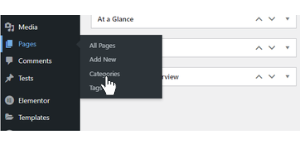
To create and edit your categories in WordPress, go to Pages > Categories.
Assign Categories in LPagery #
Once you created your category, you can use it in LPagery: Simply select your category in the dropdown in Step 4.

Now all pages that are generated, will be assigned to your chosen category.