
This tutorial builds a custom Elementor widget as a small plugin: a Sunrise & Sunset widget with its own controls that shows today's sunrise and sunset times for a location, fetched from a free API and cached. It covers registering the widget, the widget class, adding it to a page and the mistakes that stop a widget from showing up.
Everything was tested on WordPress 7.1.3 with Elementor 4.3.4 (the free version from wordpress.org) and the Twenty Twenty-Five theme.
What you need
You need Elementor, free or Pro, and access to your site's files over SFTP, your host's file manager or a local install. A custom widget is a normal WordPress plugin, so it keeps working when you switch themes, and you can install it on other sites as a zip file.
Create this folder structure in wp-content/plugins/:
sunrise-sunset-widget/
    sunrise-sunset-widget.php
    widgets/
        sunrise-sunset-widget.php
Step 1: Register the widget with Elementor
The main plugin file tells WordPress about the plugin and hands the widget to Elementor:
1<?php
2/**
3 * Plugin Name:      Sunrise & Sunset Widget for Elementor
4 * Description:      An Elementor widget that shows today's sunrise and sunset times for a location.
5 * Version:          1.0.0
6 * Requires Plugins: elementor
7 * Text Domain:      sunrise-sunset-widget
8 */
9
10if ( ! defined( 'ABSPATH' ) ) {
11    exit;
12}
13
14function sunrise_sunset_register_widget( $widgets_manager ) {
15    require_once __DIR__ . '/widgets/sunrise-sunset-widget.php';
16
17    $widgets_manager->register( new \Sunrise_Sunset_Widget() );
18}
19add_action( 'elementor/widgets/register', 'sunrise_sunset_register_widget' );
Elementor fires the elementor/widgets/register action when it builds its list of widgets, and passes its widgets manager to your function. $widgets_manager->register() adds an instance of your widget class. The class file is loaded inside that function, so it only runs when Elementor is active and \Elementor\Widget_Base exists.
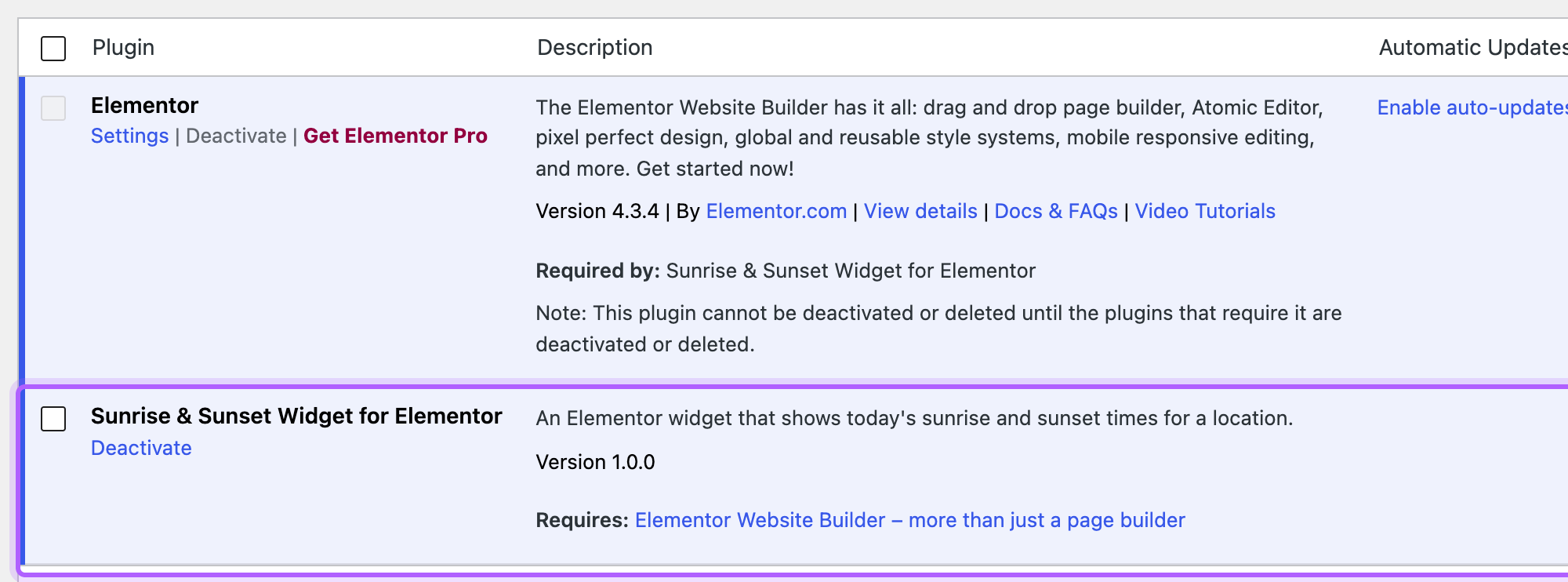
The Requires Plugins: elementor line uses WordPress's plugin dependencies: WordPress won't activate your plugin while Elementor is inactive, and Elementor can't be deactivated while your plugin is active. In the lab, activating the widget plugin with Elementor inactive failed with "Failed to activate plugin". Without that line the plugin activates anyway and the site keeps loading, because the hook never fires, so the widget simply doesn't exist.
Older tutorials use the elementor/widgets/widgets_registered hook and register_widget_type(). Both are deprecated since Elementor 3.5.0 (see includes/managers/widgets.php in Elementor 4.3.4), so use the hook and method above.
Step 2: Write the widget class
Every Elementor widget is a class that extends \Elementor\Widget_Base. This is the whole file:
1<?php
2if ( ! defined( 'ABSPATH' ) ) {
3    exit;
4}
5
6class Sunrise_Sunset_Widget extends \Elementor\Widget_Base {
7
8    public function get_name(): string {
9        return 'sunrise_sunset';
10    }
11
12    public function get_title(): string {
13        return esc_html__( 'Sunrise & Sunset', 'sunrise-sunset-widget' );
14    }
15
16    public function get_icon(): string {
17        return 'eicon-clock-o';
18    }
19
20    public function get_categories(): array {
21        return [ 'general' ];
22    }
23
24    public function get_keywords(): array {
25        return [ 'sunrise', 'sunset', 'sun', 'daylight' ];
26    }
27
28    // The times change every day, so Elementor's element cache must not store this widget's HTML.
29    protected function is_dynamic_content(): bool {
30        return true;
31    }
32
33    protected function register_controls(): void {
34        $this->start_controls_section(
35            'location_section',
36            [
37                'label' => esc_html__( 'Location', 'sunrise-sunset-widget' ),
38                'tab'   => \Elementor\Controls_Manager::TAB_CONTENT,
39            ]
40        );
41
42        $this->add_control(
43            'place',
44            [
45                'label'   => esc_html__( 'Place name', 'sunrise-sunset-widget' ),
46                'type'    => \Elementor\Controls_Manager::TEXT,
47                'default' => 'Portland, Oregon',
48            ]
49        );
50
51        $this->add_control(
52            'latitude',
53            [
54                'label'   => esc_html__( 'Latitude', 'sunrise-sunset-widget' ),
55                'type'    => \Elementor\Controls_Manager::TEXT,
56                'default' => '45.52',
57            ]
58        );
59
60        $this->add_control(
61            'longitude',
62            [
63                'label'   => esc_html__( 'Longitude', 'sunrise-sunset-widget' ),
64                'type'    => \Elementor\Controls_Manager::TEXT,
65                'default' => '-122.68',
66            ]
67        );
68
69        $this->end_controls_section();
70
71        $this->start_controls_section(
72            'style_section',
73            [
74                'label' => esc_html__( 'Times', 'sunrise-sunset-widget' ),
75                'tab'   => \Elementor\Controls_Manager::TAB_STYLE,
76            ]
77        );
78
79        $this->add_control(
80            'time_color',
81            [
82                'label'     => esc_html__( 'Time color', 'sunrise-sunset-widget' ),
83                'type'      => \Elementor\Controls_Manager::COLOR,
84                'selectors' => [
85                    '{{WRAPPER}} .sun-times__time' => 'color: {{VALUE}};',
86                ],
87            ]
88        );
89
90        $this->add_group_control(
91            \Elementor\Group_Control_Typography::get_type(),
92            [
93                'name'     => 'time_typography',
94                'selector' => '{{WRAPPER}} .sun-times__time',
95            ]
96        );
97
98        $this->end_controls_section();
99    }
100
101    protected function render(): void {
102        $settings = $this->get_settings_for_display();
103        $lat      = $settings['latitude'];
104        $lng      = $settings['longitude'];
105        $times    = false;
106
107        if ( is_numeric( $lat ) && is_numeric( $lng ) && abs( $lat ) <= 90 && abs( $lng ) <= 180 ) {
108            $times = $this->get_sun_times( (float) $lat, (float) $lng );
109        }
110
111        echo '<div class="sun-times">';
112
113        if ( '' !== $settings['place'] ) {
114            echo '<h3 class="sun-times__place">' . esc_html( $settings['place'] ) . '</h3>';
115        }
116
117        if ( ! $times ) {
118            echo '<p>' . esc_html__( 'Sunrise and sunset times are not available right now.', 'sunrise-sunset-widget' ) . '</p>';
119        } else {
120            $format = get_option( 'time_format' );
121            echo '<p>' . esc_html__( 'Sunrise', 'sunrise-sunset-widget' ) . ': <span class="sun-times__time">' . esc_html( wp_date( $format, $times['sunrise'] ) ) . '</span></p>';
122            echo '<p>' . esc_html__( 'Sunset', 'sunrise-sunset-widget' ) . ': <span class="sun-times__time">' . esc_html( wp_date( $format, $times['sunset'] ) ) . '</span></p>';
123        }
124
125        echo '</div>';
126    }
127
128    private function get_sun_times( float $lat, float $lng ) {
129        $date      = wp_date( 'Y-m-d' );
130        $cache_key = 'sun_times_' . md5( $lat . ',' . $lng . ',' . $date );
131        $times     = get_transient( $cache_key );
132
133        if ( false !== $times ) {
134            return $times;
135        }
136
137        $url = add_query_arg(
138            [
139                'lat'       => $lat,
140                'lng'       => $lng,
141                'date'      => $date,
142                'formatted' => 0,
143            ],
144            'https://api.sunrise-sunset.org/json'
145        );
146
147        $response = wp_remote_get( $url, [ 'timeout' => 10 ] );
148
149        if ( is_wp_error( $response ) || 200 !== wp_remote_retrieve_response_code( $response ) ) {
150            return false;
151        }
152
153        $data = json_decode( wp_remote_retrieve_body( $response ), true );
154
155        if ( empty( $data['results'] ) || 'OK' !== ( $data['status'] ?? '' ) ) {
156            return false;
157        }
158
159        $times = [
160            'sunrise' => strtotime( $data['results']['sunrise'] ),
161            'sunset'  => strtotime( $data['results']['sunset'] ),
162        ];
163
164        set_transient( $cache_key, $times, 12 * HOUR_IN_SECONDS );
165
166        return $times;
167    }
168}
The methods at the top describe the widget to the editor:
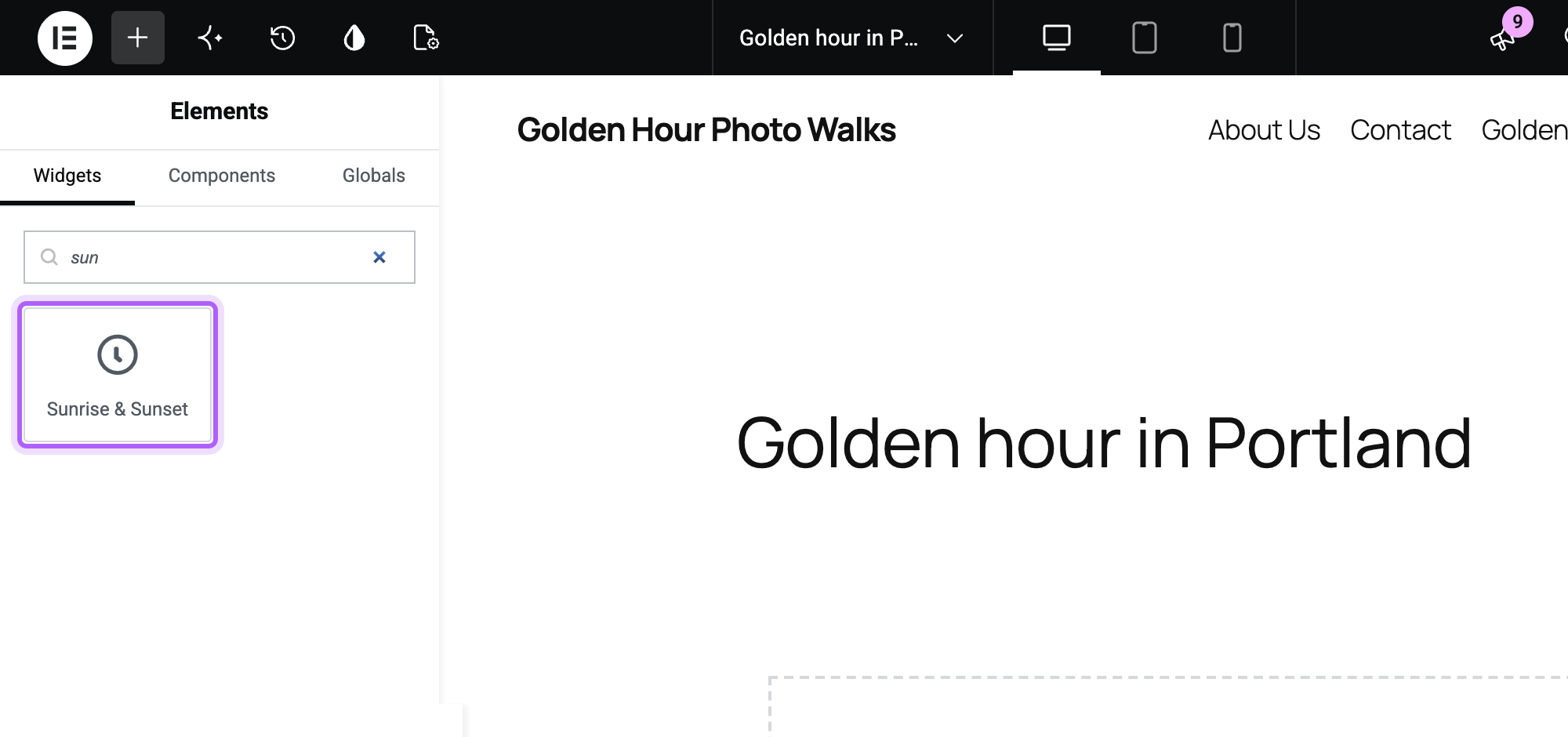
get_name()is the widget's internal ID. Elementor stores it with every page that uses the widget, so don't change it later.get_title()is the label in the widget panel.get_icon()is an Elementor icon class (eicon-clock-ohere) or any Font Awesome class.get_categories()decides which panel group the widget appears in.generalputs it in the General group.get_keywords()adds search terms, so the widget shows up when you search the panel for "sun" or "daylight".
Controls
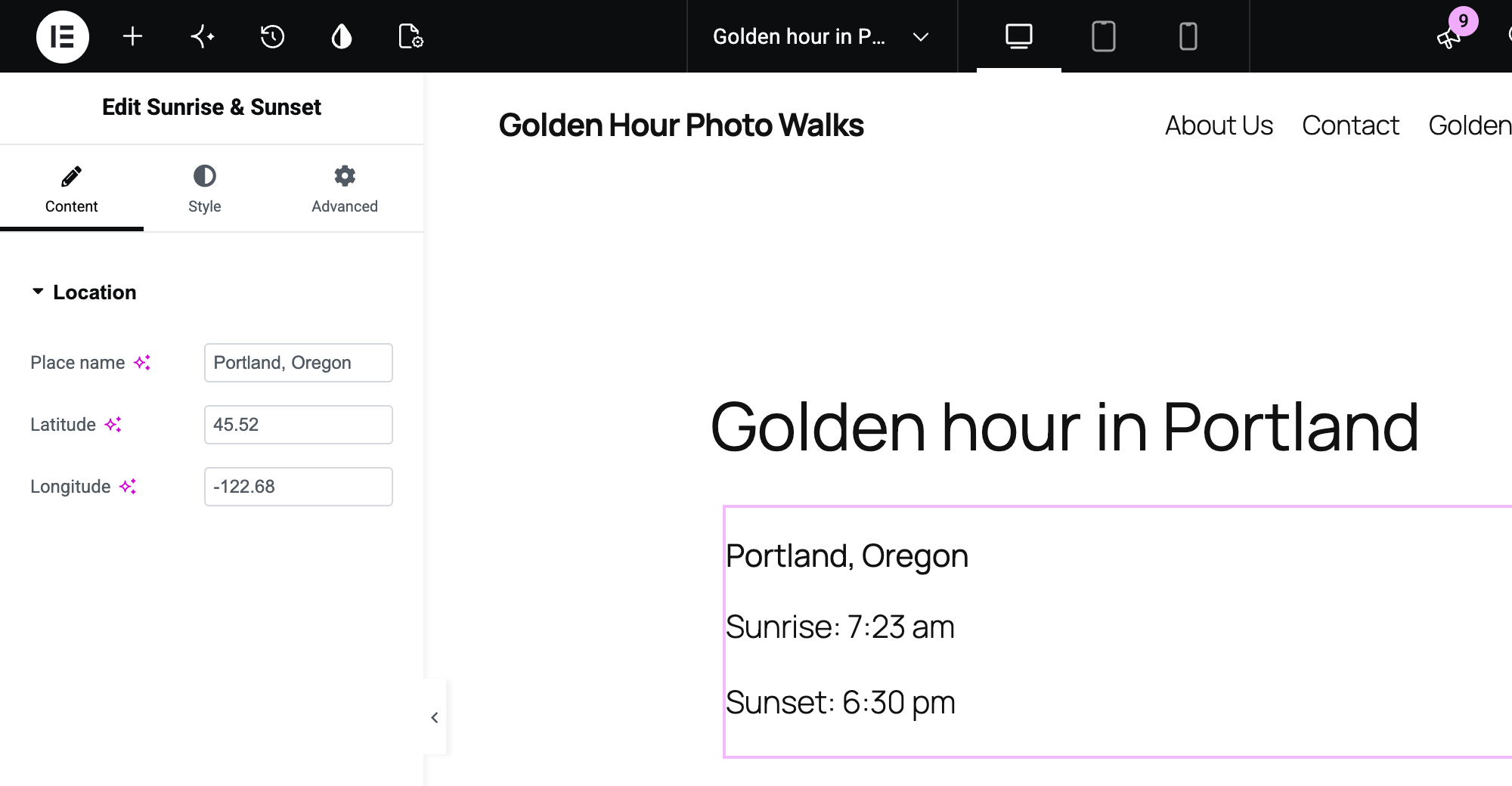
register_controls() adds the fields you see in the panel. Each group sits in a section created with start_controls_section(), and the tab argument puts it on the Content or the Style tab. The Location section has three text controls: a place name and the coordinates.
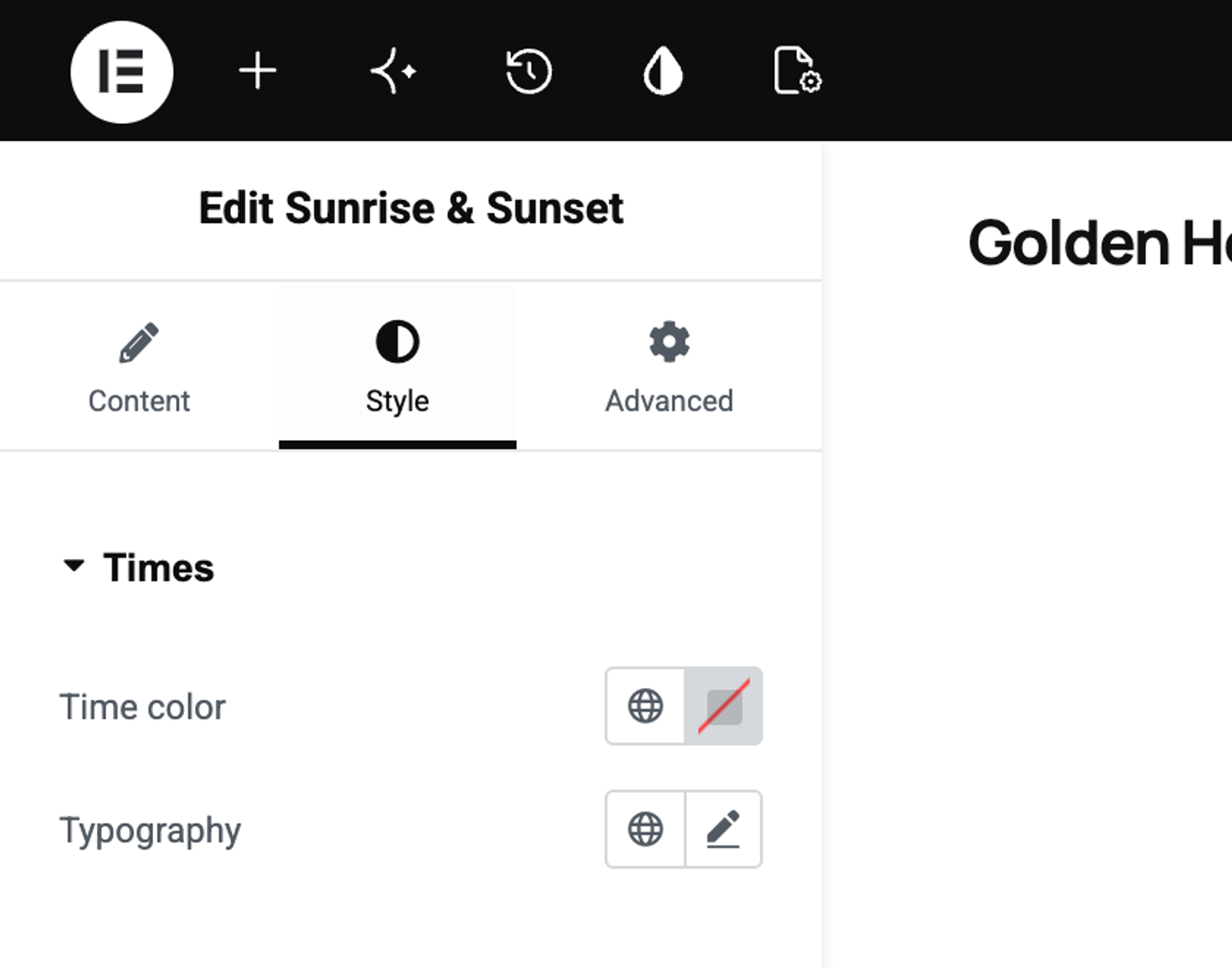
The Times section on the Style tab has a color control and a typography group control. Their selectors write CSS for you: {{WRAPPER}} becomes this widget's unique class, so the color only applies to this one widget on the page, and the editor updates the preview as you change it.
The coordinates are text controls on purpose. In the lab, a number control in a German-language browser showed 45,52 and cut the value off, and the range check in render() does what a number control's min and max would do.
Output
render() prints the widget's HTML on the page and in the editor preview. get_settings_for_display() returns the values from the controls. Everything a user can type goes through esc_html() before it is printed.
The times are printed with wp_date(), which formats a timestamp in the time zone under Settings > General, in the site's time format. date_i18n(), which many older examples use, prints a UTC timestamp in UTC: in the lab it turned a 7:23 am sunrise in Portland into 2:23 pm. So the widget suits a place in the same time zone as the site.
Fetching and caching the times
get_sun_times() asks the free sunrise-sunset.org API for today's times with wp_remote_get(). The API needs a latitude and longitude. It doesn't accept a city name: a request with address=New York returns INVALID_REQUEST, so a widget built that way only ever shows its error message.
The result is stored in a transient for 12 hours, keyed by the coordinates and the date. So the widget makes at most two API requests a day per location, and every other page view reads the stored times from the database. If the request fails or the coordinates are out of range, the widget shows a short message instead of breaking the page.
is_dynamic_content() is for Elementor's element cache, which is on by default and stores a widget's rendered HTML for a day (the Element Cache setting in Elementor's performance settings). Widgets that return false, such as Elementor's own Heading, are served from that cache. A widget that returns true, which is also the default when the method is missing, is rendered on every page view. This widget states it explicitly, because its output changes daily. In the lab, the page picked up new times right after the stored ones changed.
Step 3: Install and activate the plugin
Upload the sunrise-sunset-widget folder to wp-content/plugins/, or zip it and upload the zip with Upload Plugin on the screen for adding plugins. Then click Activate next to Sunrise & Sunset Widget for Elementor. The Plugins screen now shows the dependency in both directions:
Step 4: Add the widget to a page
Open a page with Edit with Elementor and type "sun" into the search field of the Elements panel. The widget appears with its title and icon:
Drag it onto the page. The panel switches to Edit Sunrise & Sunset with the Location controls, and the preview shows today's times, rendered by the PHP render() method:
The Style tab holds the Times section with Time color and Typography:
Enter your own place name and coordinates, then click Publish. You can look up the coordinates of a place by right-clicking it in Google Maps, which shows them at the top of the menu.
Step 5: Check the page as a visitor
Open the page in a private window, where you are logged out. The widget shows the place and today's times in the site's time zone:

In the lab, the times on the page matched a direct request to the API for the same coordinates and date.
Do you need content_template()?
content_template() is an optional method that writes the widget's markup as a JavaScript template. With it, the editor redraws the preview in the browser while you type, without asking the server. Without it, Elementor renders the preview with your PHP render() method, as the screenshot in Step 4 shows.
This widget leaves it out, because its output depends on data that only the server has. For a widget whose output comes only from its controls, such as a heading or a button, a content_template() that mirrors render() makes editing feel faster.
Why doesn't my widget show up in the Elementor panel?
Check that the plugin is active under Plugins and that Elementor is active too. If the plugin can't be activated, Elementor is inactive and the Requires Plugins line is blocking it. Then search the panel for the widget's title or one of its keywords.
If the plugin is active and the widget is still missing, compare the hook name with elementor/widgets/register and make sure the class name in new \Sunrise_Sunset_Widget() matches the class in the widget file.
Why does the widget say the times are not available?
The widget shows Sunrise and sunset times are not available right now. when the latitude or longitude is empty, out of range or isn't a number, or when the API request fails. Check the coordinates first: latitude goes from -90 to 90, longitude from -180 to 180, with a dot as the decimal separator.
A failed request is not cached, so the widget tries again on the next page view. If it keeps failing, your host may block outgoing requests; ask them whether api.sunrise-sunset.org is reachable from the server.
Why do the times not change from day to day?
Open the widget's Advanced tab and check Cache Settings. Set to Active, it makes Elementor cache the widget's HTML even though is_dynamic_content() returns true, and in the lab the page then kept showing the old times. Set it back to Default.
A page cache from a caching plugin or your host has the same effect for every visitor. Clear it, or set it to expire at least once a day. Our guide on how to clear the cache in WordPress covers the common plugins.
Where to go from here
Elementor's developer documentation lists every widget method and control type. If you also work with the block editor, the same idea as a block is in our tutorial on creating a custom WordPress block without plugins, and for output that works in any editor, see custom shortcodes. To use Elementor with your own content types, see how to create a custom post type and enable it for Elementor.
I've worked in SEO for more than ten years and helped over 100 businesses rank higher, mostly local businesses, e-commerce stores and SaaS companies. As co-founder of LPagery I work on local SEO, programmatic SEO and AI search visibility, and I test the strategies in these articles on our own sites and with our customers.