
Duplicating a page in WordPress is simple and can save you time, especially if you need to create similar pages. There are two main methods:
- Using a Plugin: For occasional duplication, plugins like Duplicate Page let you copy a page with one click while keeping the layout and formatting intact.
- Bulk Creation with LPagery: If you need to create multiple pages (e.g., for different locations or services), LPagery automates the process using spreadsheets, ensuring unique content for each page.
Quick Comparison
Method | Best For | Key Features | Limitations |
|---|---|---|---|
Duplicate Page Plugin | Single or occasional pages | Easy setup, retains formatting | Limited to one page at a time |
LPagery | Bulk page creation | Spreadsheet integration, SEO-friendly | Requires setup and monthly cost |
Choose the method that fits your needs: plugins for quick tasks or LPagery for bulk operations. Always update content and meta tags to avoid SEO issues.
Quick Page Duplication with Plugins
Using a WordPress duplication plugin is an easy way to copy pages and posts without the hassle of doing it manually. It’s a handy option for websites that sometimes need to duplicate pages while keeping the same layout and structure intact.
Setting Up the Duplicate Page Plugin
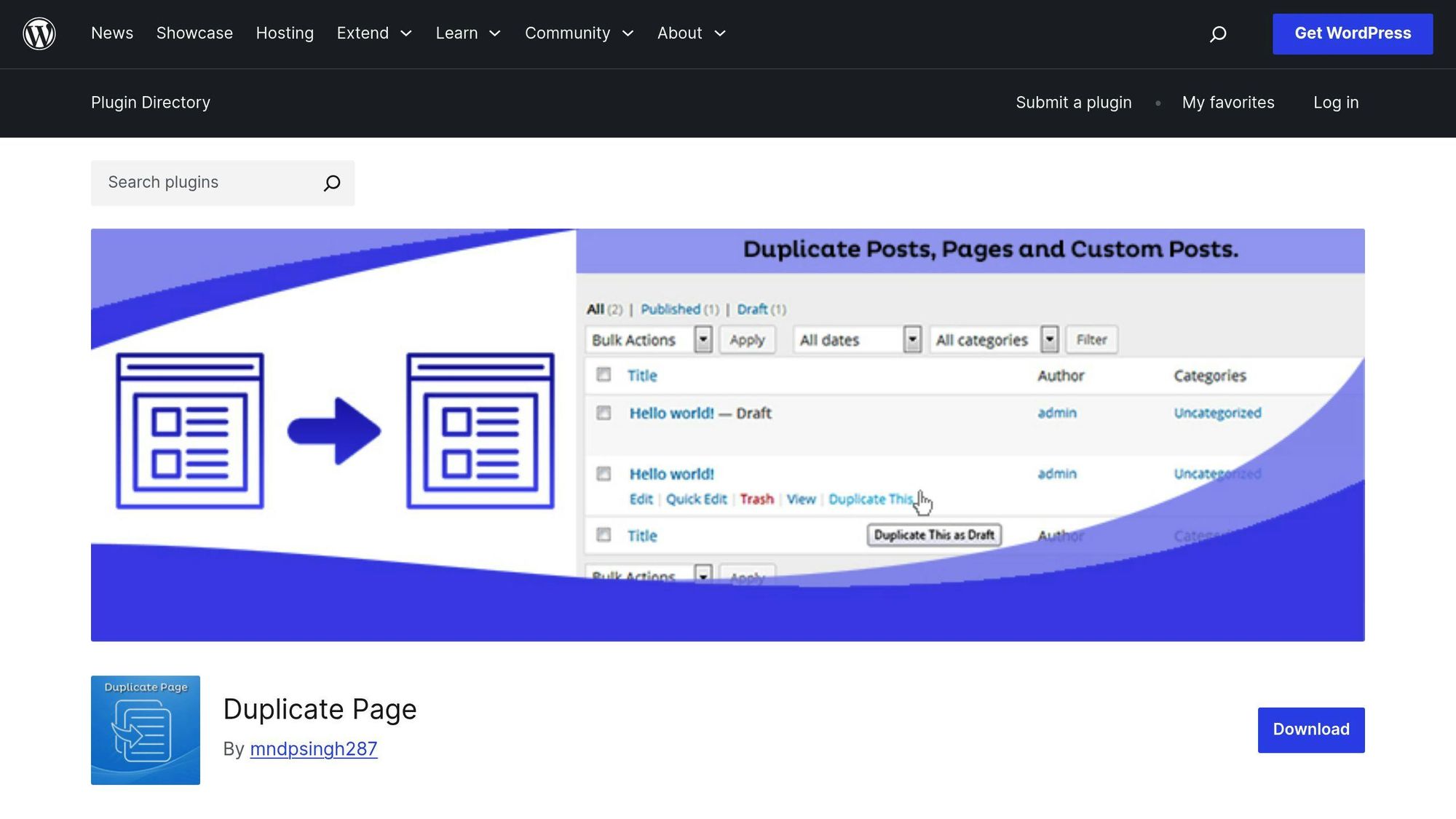
Here’s how to set it up:
- Go to your WordPress dashboard and click on "Plugins > Add New."
- Search for "Duplicate Page" in the plugin directory.
- Click "Install Now" and then "Activate."
- Once activated, head over to your Pages section. Hover over a page, and you’ll see a new "Clone" option.
After installation, the plugin adds a "Clone" button next to each page in your dashboard. With just one click, you can create an exact copy of any page [2].
Plugin Method: Strengths and Limitations
Here’s what you should know about using a basic duplication plugin:
Aspect | Benefits | Limitations |
|---|---|---|
Speed | Quick and easy duplication | Bulk operations are limited |
Features | Keeps formatting intact | Limited customization options |
SEO Impact | Retains SEO elements but needs care | Risk of duplicate content |
Flexibility | Works with all post types | No integration with spreadsheets |
The plugin also offers features like cloning comments and adding prefixes to differentiate content [3]. This is particularly useful for small businesses creating location-specific pages, where only minor tweaks are needed to make each page relevant to a specific area.
"When duplicating pages for local SEO, ensure each page is optimized with unique content, meta tags, and internal links for specific locations." [3][5]
To prevent SEO issues, be sure to update duplicated content, adjust meta tags, and modify internal links. Using canonical URLs can also help manage duplicate content effectively.
While this method works well for occasional page duplication, it’s not ideal for large-scale needs. For more advanced requirements, like bulk page creation with unique content, tools like LPagery might be a better fit.
Bulk Page Creation with LPagery
LPagery goes beyond basic duplication plugins, offering a scalable solution tailored for businesses focused on local SEO. This WordPress plugin specializes in creating multiple pages at once, while ensuring each page has its own unique content.
LPagery Features Overview
LPagery makes bulk page creation simple by using spreadsheets and templates:
Feature | What It Does |
|---|---|
Google Sheets Integration | Allows real-time updates to content |
Template System | Ensures consistent layouts while adding varied content |
SEO Plugin Compatibility | Rank Math |
Custom Post Type Support | Adapts to different types of content needs |
Local SEO Benefits
This plugin isn’t just about creating pages – it ensures those pages are optimized for local SEO. It tackles issues like duplicate content and helps businesses zero in on specific keywords. LPagery is especially useful for companies that need pages tailored to different locations or services.
"The main focus of LPagery is creating location and service-specific pages in bulk to target local SEO and long-tail keywords for every service in every location a business offers." [4]
How to Set Up and Use LPagery
Getting started with LPagery is straightforward, with just three main steps:
- Set Up a Base Template Begin by creating a template page in WordPress using your preferred page builder.
- Prepare a Spreadsheet Use a spreadsheet to input location-specific details, like service descriptions and URLs.
- Generate Pages Automatically LPagery takes care of the rest – custom URLs, meta tags, and internal links – creating SEO-friendly pages that stand out.
LPagery plans start at $19/month, making it an affordable choice for businesses and agencies managing multiple sites. While the plugin simplifies bulk page creation, remember that optimizing each page for SEO remains key to driving results.
sbb-itb-4893451
Page Duplication Tips
Choosing the right way to duplicate pages can impact your WordPress site’s performance and SEO rankings. Here’s how to do it effectively while keeping your search visibility intact.
Choosing Your Duplication Method
Your duplication method depends on what you need. Here’s a quick breakdown:
Requirement | Recommended Method | Best For |
|---|---|---|
Single Pages | Basic Duplicate Plugin | Blog posts, simple pages |
Bulk Pages | LPagery | Service businesses, franchises |
Custom Post Types | LPagery Extended Plan | Agencies, large websites |
Preventing SEO Problems
Duplicate content can confuse search engines and hurt your rankings. Follow these steps to avoid SEO issues:
Set Unique Meta Information
- Update page titles, meta descriptions, and featured images to make each page distinct.
- Use canonical URLs to point to the original content source.
Plugins like Yoast SEO or Rank Math can help by flagging duplicate content and optimization issues in real time [1]. Once you’ve tackled these SEO concerns, focus on making each duplicated page stand out with unique content.
Making Pages Unique
Turn duplicated pages into distinct resources by concentrating on these areas:
Location-Specific Elements
- Add local statistics and data.
- Tailor service descriptions to fit each area.
Content Differentiation
LPagery’s spreadsheet integration makes it easy to customize:
- Service descriptions, pricing, and testimonials for different locations.
- Local business hours and area-specific promotions.
This ensures your duplicated pages provide unique value while staying optimized for search engines.
Conclusion
Duplicating WordPress pages effectively starts with choosing the right tool for the job. If you only need to duplicate a single page, a straightforward plugin like Duplicate Page can handle it quickly and easily. For businesses managing multiple location-specific pages, tools like LPagery offer a spreadsheet-based system to streamline bulk duplication while ensuring each page has its own unique content.
As mentioned earlier, it’s crucial to include unique meta details and localized content to avoid SEO issues. This approach works well for service-based businesses and franchises that need location-specific pages.
Keep in mind, duplication isn’t just about copying content – it requires thoughtful planning and precision. Every duplicated page should add unique value and fit seamlessly into your broader SEO goals.
FAQs
Can you duplicate a page in WordPress without a plugin?
Yes, you can manually duplicate a WordPress page by copying its content and pasting it into a new page. Here’s how:
- Open the page editor for the page you want to duplicate and copy all its content.
- Create a new page and paste the copied content.
- Update the page title, meta descriptions, and any other settings.
This approach works, but it can take time since you’ll need to manually adjust settings like featured images and other page details.
What is the difference between duplicate and clone in WordPress?
In WordPress, "Duplicate" creates a fresh page with editable content, while "Clone" replicates the original page exactly, including all settings. For tasks like creating location-specific pages, duplication is often more practical because it allows for easier customization.
For example, if you’re using tools like LPagery for bulk page creation, the duplicate function is especially helpful. It lets you stick to a core template while tweaking specific elements for each location.
Whether you duplicate or clone, it’s important to ensure every page adds unique value to your site. This approach aligns with local SEO strategies. While manual duplication works fine for smaller tasks, automated tools are a better fit for businesses that need to generate multiple location-specific pages efficiently.

I’m an experienced SEO professional with over a decade of helping over 100 businesses rank higher online, especially local businesses, e-commerce stores and SaaS. As the co-founder of LPagery, I specialize in practical, proven strategies for regular SEO and Local SEO success.
This post may contain affiliate links which we earn a commission on when purchasing a given product.
I’m an experienced SEO professional with over a decade of helping over 100 businesses rank higher online, especially local businesses, e-commerce stores and SaaS. As the co-founder of LPagery, I specialize in practical, proven strategies for regular SEO and Local SEO success.