How to Create a Custom Shortcode in WordPress Without Plugins

Por Jonas Lindemann
Atualizado em
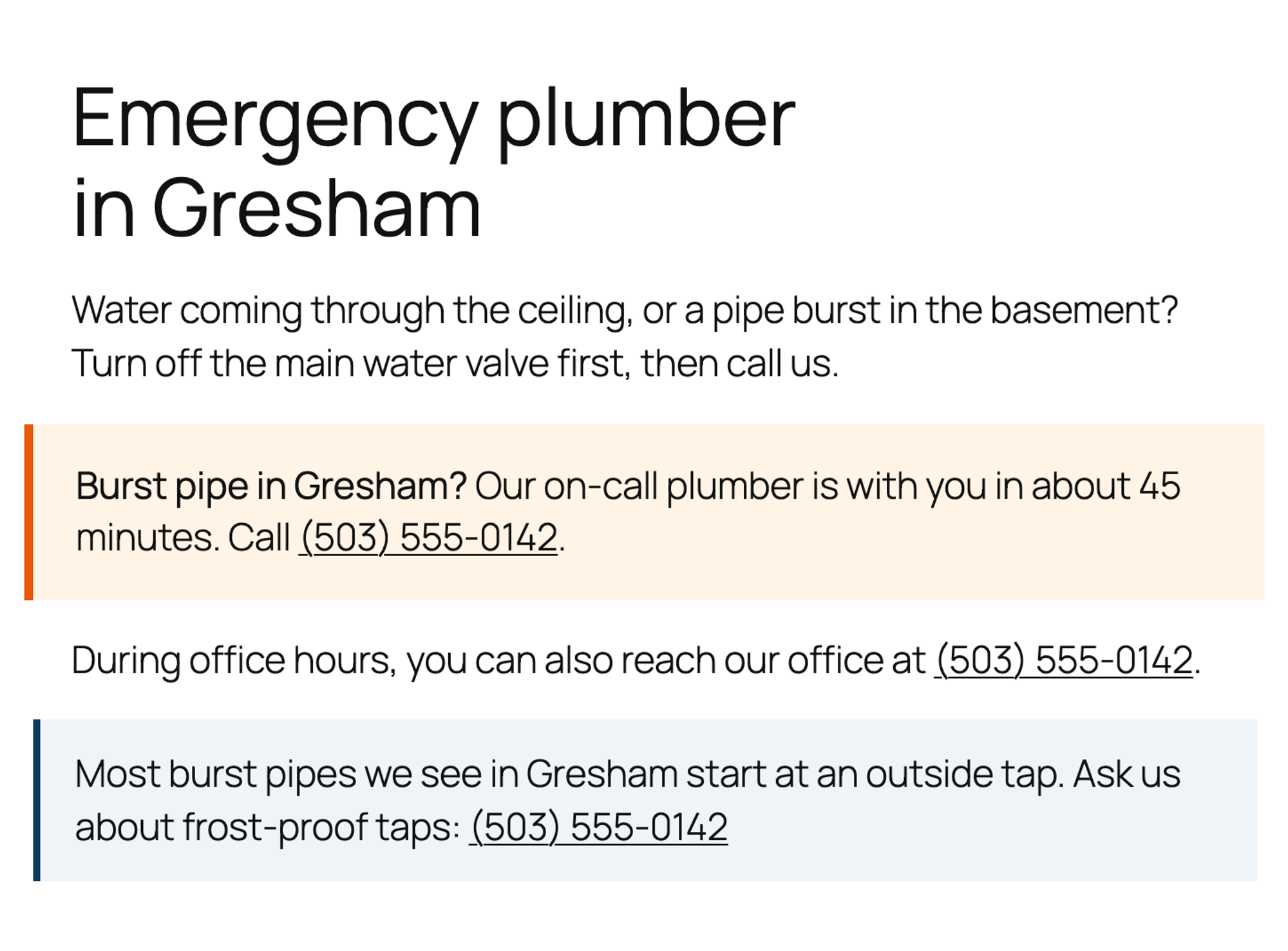
![The shortcode [emergency_banner town="Gresham" response="45 minutes"] next to the page it produces, with an emergency banner, a phone link in a sentence and a note box](https://cdn.sanity.io/images/mjl6isa5/production/7bb4ea30d61fa0b8c08c9a64db1bd0e3b8af209e-2016x1344.png?w=1344&h=896&auto=format)
This tutorial builds three shortcodes for a plumbing company's website: a phone link, a banner that takes attributes, and a box that wraps other content. It then shows where shortcodes work and how to fix the mistakes that break them.
All code was tested on WordPress 7.1.3 with the Twenty Twenty-Five theme, and the widget part with Twenty Twenty-One.
What is a shortcode?
A shortcode is a tag in square brackets, such as [business_phone], that WordPress replaces with the output of a PHP function when it shows a page. You write the function once and register the tag with add_shortcode(). Anyone who edits the site can then use the tag in posts and pages without touching code.
Where to put the code
Put your shortcodes in a file in wp-content/mu-plugins/. WordPress loads every PHP file directly in that folder on every request, and the shortcodes keep working when you switch themes. Code in a theme's functions.php stops running when you switch, and every page that uses the shortcode then shows the bare tag. Our tutorial on building a custom login page explains both places in more detail.
The snippets below go into one file, wp-content/mu-plugins/harbor-shortcodes.php. The complete file, with the <?php line it starts with, is at the end of this tutorial.
Step 1: Create a simple shortcode
This shortcode prints the company's phone number as a link that starts a call on phones:
function harbor_business_phone() {
    return '<a href="tel:+15035550142">(503) 555-0142</a>';
}
add_shortcode( 'business_phone', 'harbor_business_phone' );add_shortcode() takes the tag and the name of the function. The function has to return its HTML. With echo, the output lands at the top of the page instead of where the tag is (see "The shortcode output appears at the top of the page" below).
Use lowercase letters, numbers and underscores in tag names. Hyphens worked in our test too: [promo] and [promo-banner] each ran their own function.
Step 2: Add the shortcode to a page
In the block editor, you can use a shortcode in two ways:
- On its own line: add a Shortcode block (type
/shortcodein an empty line) and type the shortcode into it. - Inside a sentence: type it straight into a paragraph, like "reach our office at [business_phone]".
![The block editor with a page titled Emergency plumber in Gresham, a Shortcode block containing [emergency_banner town="Gresham" response="45 minutes"] highlighted, a paragraph with [business_phone] and a second Shortcode block with a [note] shortcode](https://cdn.sanity.io/images/mjl6isa5/production/361dc748454121375118e77406a265892e0e2f0f-1346x1168.png?w=2000&auto=format)
The editor shows the tags as text. Visitors see the output:
Shortcodes also ran in our test in a Custom HTML block, in a Shortcode block inside the footer template part, and in the classic Text widget with the Twenty Twenty-One theme. The Text widget needed no extra code, so the old add_filter( 'widget_text', 'do_shortcode' ) line isn't necessary. Page and post titles don't run shortcodes.
Step 3: Add attributes
Attributes let you change the output on each page. This banner takes the town and the response time, so [emergency_banner town="Gresham" response="45 minutes"] shows a banner for Gresham:
1function harbor_emergency_banner( $atts ) {
2    $atts = shortcode_atts(
3        array(
4            'town'     => 'Portland',
5            'response' => '60 minutes',
6        ),
7        $atts,
8        'emergency_banner'
9    );
10
11    return sprintf(
12        '<div class="emergency-banner" style="padding:1.25rem 1.5rem;border-left:5px solid #e8590c;background:#fff4e6">'
13        . '<strong>Burst pipe in %1$s?</strong> Our on-call plumber is with you in about %2$s. Call %3$s.</div>',
14        esc_html( $atts['town'] ),
15        esc_html( $atts['response'] ),
16        harbor_business_phone()
17    );
18}
19add_shortcode( 'emergency_banner', 'harbor_emergency_banner' );shortcode_atts() merges the attributes from the tag with your defaults, so [emergency_banner] on its own shows Portland and 60 minutes. Attributes that aren't in the defaults are dropped. The third argument, the tag name, lets other code change the attributes through the shortcode_atts_emergency_banner filter.
Every value goes through esc_html() before it's added to the HTML. In our test, town="<b>Gresham</b>" showed the tags as text, so an attribute can't add HTML or scripts to the page. The banner calls harbor_business_phone() from Step 1, so the number is stored in one place.
What we found about attribute values:
- Put values with spaces in quotes.
town=Lake Oswegoshowed only "Lake". - Straight double and single quotes both work.
- Curly quotes, which word processors add, become part of the value.
town=“Gresham”showed “Gresham” with the quotes. - Attribute names aren't case sensitive.
Town="Gresham"worked.
Step 4: Wrap content with an enclosing shortcode
An enclosing shortcode has an opening and a closing tag. WordPress passes the text between them to your function as $content:
1function harbor_note( $atts, $content = '' ) {
2    return '<div class="harbor-note" style="padding:1rem 1.25rem;border-left:4px solid #0b3d5c;background:#eef4f8">'
3        . do_shortcode( $content )
4        . '</div>';
5}
6add_shortcode( 'note', 'harbor_note' );
On the page, [note]Most burst pipes we see in Gresham start at an outside tap. Ask us about frost-proof taps: [business_phone][/note] shows the text in a box, as in the screenshot above. do_shortcode( $content ) runs the shortcodes inside the box. Without it, in our test, [business_phone] showed as plain text inside the note.
Step 5: Use a shortcode in PHP
In a classic theme's template files or in your own plugin, do_shortcode() returns a shortcode's output. shortcode_exists() checks first that the shortcode is registered:
if ( shortcode_exists( 'emergency_banner' ) ) {
    echo do_shortcode( '[emergency_banner town="Troutdale"]' );
}
Block themes like Twenty Twenty-Five build their templates from blocks. There, add a Shortcode block to the template or template part in the Site Editor instead.
Return longer HTML from a shortcode
For more than a line of HTML, you can write the HTML outside PHP and catch it with output buffering. ob_start() starts collecting everything that would be printed, and ob_get_clean() hands it back as a string to return:
1function harbor_opening_hours() {
2    ob_start();
3    ?>
4    <ul class="opening-hours">
5        <li>Monday to Friday: 7 am to 6 pm</li>
6        <li>Saturday: 8 am to 2 pm</li>
7    </ul>
8    <?php
9    return ob_get_clean();
10}
11add_shortcode( 'opening_hours', 'harbor_opening_hours' );
In our test, the list appeared inside the page content, right where the [opening_hours] tag was.
The complete file
Steps 1, 3 and 4 together, as one file:
1<?php
2/**
3 * Plugin Name: Harbor Plumbing shortcodes
4 * Description: [business_phone], [emergency_banner] and [note] for the Harbor Plumbing site.
5 */
6
7// [business_phone]: the phone number as a link that starts a call on phones
8function harbor_business_phone() {
9    return '<a href="tel:+15035550142">(503) 555-0142</a>';
10}
11add_shortcode( 'business_phone', 'harbor_business_phone' );
12
13// [emergency_banner town="Gresham" response="45 minutes"]
14function harbor_emergency_banner( $atts ) {
15    $atts = shortcode_atts(
16        array(
17            'town'     => 'Portland',
18            'response' => '60 minutes',
19        ),
20        $atts,
21        'emergency_banner'
22    );
23
24    return sprintf(
25        '<div class="emergency-banner" style="padding:1.25rem 1.5rem;border-left:5px solid #e8590c;background:#fff4e6">'
26        . '<strong>Burst pipe in %1$s?</strong> Our on-call plumber is with you in about %2$s. Call %3$s.</div>',
27        esc_html( $atts['town'] ),
28        esc_html( $atts['response'] ),
29        harbor_business_phone()
30    );
31}
32add_shortcode( 'emergency_banner', 'harbor_emergency_banner' );
33
34// [note]Any text, including other shortcodes[/note]
35function harbor_note( $atts, $content = '' ) {
36    return '<div class="harbor-note" style="padding:1rem 1.25rem;border-left:4px solid #0b3d5c;background:#eef4f8">'
37        . do_shortcode( $content )
38        . '</div>';
39}
40add_shortcode( 'note', 'harbor_note' );
Show a shortcode on a page without running it
Write it with double brackets. [[business_phone]] showed [business_phone] on the page in our test, which is useful when you explain a shortcode to readers. If you want a shortcode that adds a whole section with a visual preview in the editor, a custom block is the next step up.
The shortcode shows up as plain text
WordPress doesn't know the tag. In our test, a page with [business_phone] showed exactly that text until the file was in mu-plugins. Check that WordPress lists the file under Plugins > Must-Use, that the tag in add_shortcode() matches the one on the page letter for letter, and that you didn't put the shortcode in a page title.
The shortcode output appears at the top of the page
The function prints its HTML with echo instead of returning it. In Twenty Twenty-Five, the output then landed above the site header, even before <!DOCTYPE html>. That put the browser into quirks mode, and the page layout broke:
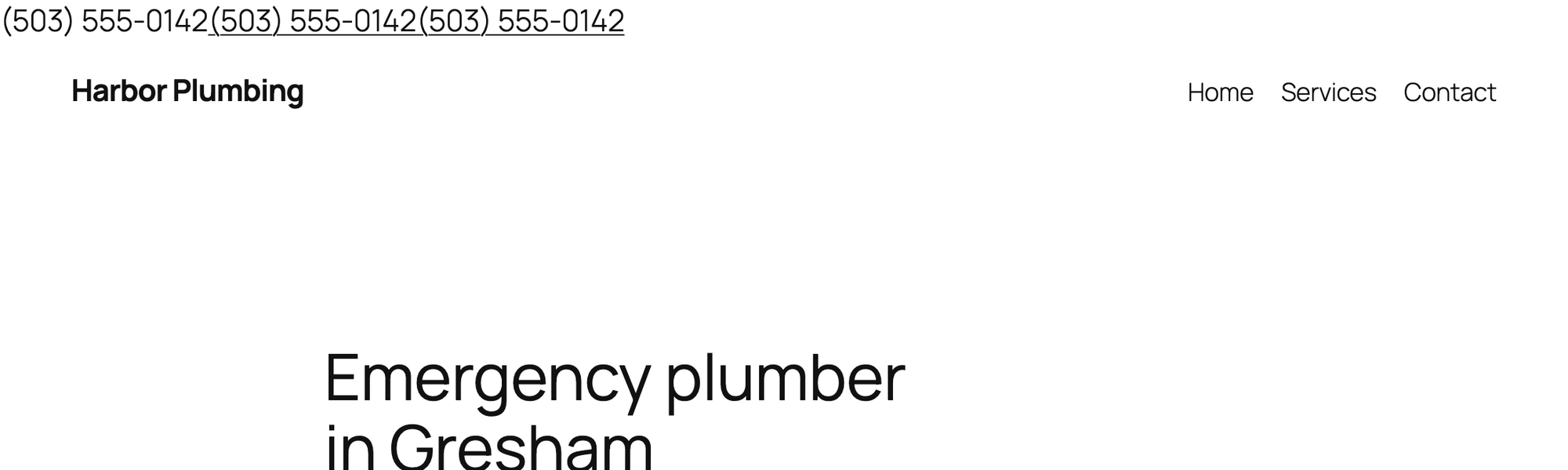
Change echo to return. If the function builds its HTML with several echo lines, use output buffering as in "Return longer HTML from a shortcode" above.
An attribute is ignored or cut off
Check the quotes first. A value with a space needs quotes, and curly quotes pasted from a word processor become part of the value. Then check that the attribute is in the defaults array of shortcode_atts(), because attributes that aren't listed there are dropped.
A shortcode inside another shortcode isn't replaced
The outer shortcode returns $content as it is. Return do_shortcode( $content ) instead, as the [note] shortcode in Step 4 does.
I've worked in SEO for more than ten years and helped over 100 businesses rank higher, mostly local businesses, e-commerce stores and SaaS companies. As co-founder of LPagery I work on local SEO, programmatic SEO and AI search visibility, and I test the strategies in these articles on our own sites and with our customers.